Rating 4.5 out of 5 stars with 69 reviews
4.5- Speed (19)
- Ease of use (15)
- Performance (10)
- Setup (3)
- Wired Connection (3)
- Signal Strength (3)
- Size (3)
Customer Images
The vast majority of our reviews come from verified purchases. Reviews from customers may include My Best Buy members, employees, and Tech Insider Network members (as tagged). Select reviewers may receive discounted products, promotional considerations or entries into drawings for honest, helpful reviews.
- Rated 5 out of 5 stars
Works perfectly
Excellent product! Works like a charm. More than doubled the internet speed to my LG OLED CX tv, compared to my WiFi signal. Installing it is also very easy. Just follow the simple directions that come with it, you can’t go wrong; at least in my case. A warning: don’t buy it through Amazon. It will cost you more than twice as much ($221) as compared to Best Buy ($89.99).
Posted by MikeJ
- Rated 5 out of 5 stars
Extremely Useful Product
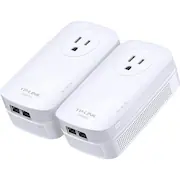
Powerline adapters are great for extending your network into locations of your home or office to where a wired connection is needed, but running a long Ethernet cable isn't feasible. And setting them up is pretty simple to do. Setup 1. Connect one of the powerline adapters to your router with one of the two included Ethernet cables. 2. Now plug the powerline adapter into a three-prong wall outlet near the router. 3. Next you will plug the second powerline adapter into a wall outlet near the device needing the wired Internet connection. 4. Once plugged in and the powerline LED comes on, connect it to the device with the remaining Ethernet cable. Note: The TP-LINK AV2000 Powerline Adapter Kit has three prongs and should only be used with three-prong wall outlets since the grounding prong is used for transmission. It’s mentioned that the adapters are not to be plugged into a battery backup, power strip, extension cord, or surge protector, and must be plugged directly into your outlet. As for build quality, the adapters feel very well made. They are somewhat bulky and will obstruct one of the two sockets on your outlet, but thankfully there is a pass-through socket on each adapter for you to use. The adapters will stick out from your outlet, so try to place them in an outlet located out of the way, if possible. Performance My current Internet plan is 90+ down / 12+ up, and while testing the adapter connected to my desktop, I was quite impressed with the results. I was getting around 80+ Mbps down / 11+ Mbps up on the test results, and those are some great numbers right there! I do live in a smallish 4 bedroom home, so I didn't have to place the powerline adapters too far apart from one another, which kept my signal strong between them. From what I've read, the further apart the adapters are from one another, the signal could degrade, especially if the electrical wiring in your building is old, or deteriorated. Overall, I am happy with the performance of these adapters. As with any other technology, what may work well for some, may not for others. So of course, your mileage may vary. TP-LINK has great 24/7 no cost customer support to help you, no matter when you purchased the adapters. And with the 2-year warranty on this product, you should be in good hands. Best of luck with getting your network up and running smoothly. Submitted as part of a free sample program
Posted by TechOnDeck
- Rated 1 out of 5 stars
Does not perform as expected
The speeds are nowhere near the advertised speed. It is 1/10th the speed of my current unreliable mesh network I am trying to replace. Yes, my wifi network is 10x faster than this setup. I have tried multiple plugs in the house and have the same speed with each Also, while it does have a passthrough outlet, it blocks the second outlet when you plug it in to a standard US receptacle.
Posted by OkayBuyer
- Rated 4 out of 5 stars
Great for a wired connection to my PS5/XBOX
This is a great piece of equipment especially when you want to obtain more wired connections to your devices. The onlh flaw in my opinion and the reason I gave it 4 stars is because it blocks the other outlet on the electrical outlet. For both of my consoles on wireless I would get 50Mbps on a good day (which is good enough to play but I wanted more) and wired I get over 210Mbps consistently. The higher speeds are good for remote play! I would love to see what the speed looks like on a gigabit network. Now all i need to do is add a network gigabit switch to cover my devices like the TV/Soundbar (to use the dedicated phone remote app) and AppleTV.
Posted by Wayne
- Rated 5 out of 5 stars
Big upgrade from older powerline adapters
I upgraded from a first gen powerline 500 kit and these new adapters are so much faster. Prior to the upgrade, my powerline network was about half the speed of my wifi. Now, I'm able to download a much more reasonable speeds. While I didn't expect to hit the advertised speed, it is certainly over twice as fast. For real world numbers, I was getting at best 27Mbps with the old adapter and now I'm seeing speeds over 60Mbps in Windows 10 to my home file server. In terms of pairing, I still have one old adapter and simply had to hit the pair button, and everything just worked. Very easy to do. In the past, I had trouble with other brands overheating but these have worked pretty well. The pass through works ok and it is a bit tight on the top, but I can still get smaller plugs in the top part of the outlet.
Posted by laffer1