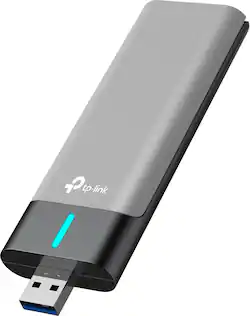
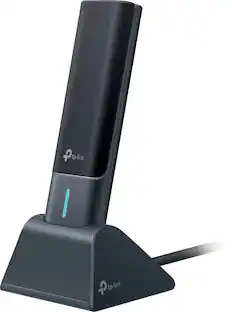
TP-Link - Archer TX20UH AX1800 Dual-Band Wi-Fi 6 USB 3.0 Adapter - Space Gray
- Key Specs
- Wi-Fi Speed: 1800 megabits per second (The maximum rate at which data is transferred between a network device and wireless router.)
- Wireless Standard: AX, AC (The wireless networking protocol used by the device. Each iteration of the protocol is based on the 802.11 standard developed by the Institute of Electrical and Electronics Engineers (IEEE) Standards Association. Denoted by letters following 802.11 (802.11a, 802.11ac, etc.), each version, published in alphabetical order, encompasses all previous versions.)
- Adapter Type: Wireless
- Antenna Type: Internal
- Frequency: 5.0 GHz, 2.4GHz Analog (A measurement of the electromagnetic radio waves a device emits.)
- USB Generation: USB 3.0 (The specification (generation) of the USB standard. Generations are backwards compatible with previous specifications (provided that those devices have the necessary adapter to accommodate the connection type).)
- Wireless Networking Standard: Wi-Fi 6 (The wireless networking standard used by the device. Each iteration of the standard developed by the Wi-Fi Alliance corresponds to an existing IEEE 802.11 protocol; for example, standard 802.11ac (or AC) is termed Wi-Fi 5. Refers specifically to the standard the device is designed to use, but ultimately determines product interoperability and backward compatibility including previous versions.)
- General
- Brand: TP-Link
- Model Number: Archer TX20UH
- Product Name: Archer TX20UH AX1800 Dual-Band Wi-Fi 6 USB 3.0 Adapter
- Color: Space Gray
- Security
- Encryption Type: WPA3 (The security protocols or certification programs that protect the Wi-Fi network.)
- Network
- Compatible Wireless Standard(s): Wireless-AX, Wireless-AC, Wireless-B, Wireless-G, Wireless-N (The wireless networking standard(s) the device is backwards compatible with. This includes networking protocols based on the IEEE 802.11 standard (alphabetically ascending) and the Wi-Fi Alliance standard (numerically ascending), both of which provide high-throughput wireless local area networks (WLANs). Devices designed to work with specific standard(s) will be backwards compatible with previous versions but may not run at optimal performance when using earlier iterations.)
- Wireless Networking Standard: Wi-Fi 6 (The wireless networking standard used by the device. Each iteration of the standard developed by the Wi-Fi Alliance corresponds to an existing IEEE 802.11 protocol; for example, standard 802.11ac (or AC) is termed Wi-Fi 5. Refers specifically to the standard the device is designed to use, but ultimately determines product interoperability and backward compatibility including previous versions.)
- Compatibility
- System Requirements: Windows or MAC OS (The software that a product must have for it to be able to integrate with another product.)
- Dimensions
- Product Height: 4.9 inches (The out of box height of the item. Height is measured as the vertical distance from the bottom of the item to the top as it would be primarily used or placed.)
- Product Length: 0.58 inches (The out of box length of the item. Length is measured as the longest dimension of the item.)
- Product Width: 1.19 inches (The out of box width of the item. Width is measured as the horizontal distance from one side of the item to the other as it would be primarily used or placed.)
- Product Weight: 0.06 pounds (The out of box weight of the item.)
- Warranty
- Warranty - Parts: 2-Years Limited
- Warranty - Labor: 2-Years Limited
- Other
- UPC: 840030708237
The TP-Link AX1800 USB 3.0 Adapter with dual-band high-gain antennas provides up to 10x faster access than USB 2.0. Wirelessly connect your notebook or desktop computer to a Wi-Fi 6 speeds up to 1800 Mbps network for 8K/4K lag-free streaming, large downloads throughout your home.
- Ultra-Performance Wi-Fi 6: Flexible dual-band speeds up to 1800 Mbps (1201 Mbps on 5 GHz + 574 Mbps on 2.4 GHz). Perfect for 8k/4k streaming, intensive online gaming, large downloads and uploads.
- Super-Fast USB 3.0: Up to 10× faster transfer speeds than USB 2.0.
- High-Gain internal antennas: Connect from further away with high-quality signals and transmissions.
- Low latency: Reduce your latency for impeccable conferencing and gameplay on crowded networks with OFDMA.
- Beamforming technology: Delivers a more targeted and highly efficient wireless connections.
- Refined security: Protect your personal data with the latest WPA3 encryption.
- Versatile & flexible: Plug into your PC or use an extension base to place on your desktop.
Whats Included
- 1 x Archer TX20UH
- 1 x Quick Installation Guide
- 1 x Extension base with 1m RF Cable
A: 1. Yes, though speeds on a USB 2.0 or lower port might be diminished a bit. Also the computer will need to be running a compatible OS. 2. The flap is the the Antenna so yes is should be up when being operated 3. Encryption is determined by the router or access point you connect to, not the adapter.
Q: can I use this devise on trips
A: Hi! This device is designed to provide a PC with the ability to detect and connect to nearby Wi-Fi networks. If that is your intended use, then yes, you can use it to connect to Wi-Fi networks within range. However, laptops typically have built-in Wi-Fi adapters already. Please note that this is not a cellular/MiFi dongle. It does not produce its own Internet connection.
A: Yes. Your router will determine the encryption protocol that is used. The Archer T2UH supports the following encryption protocols: WEP, WPA/WPA2/WPA3, WPA-PSK/WPA2-PSK.
A: As long as your router is capable of providing adequate download speed over Wi-Fi, this adapter should be a significant upgrade from your PC's existing one. Simply install this adapter, then disable the existing adapter in your PC via either the Device Manager or Control Panel. Then, use the Archer TX20UH to connect to your Wi-Fi network as the primary Wi-Fi adapter for your PC. If you have any questions, feel free to contact our TP-Link Support Team directly here: https://www.tp-link.com/us/support/contact-technical-support/#LiveChat-Support
Q: Does this require any drivers, and does it work with windows 11?
A: Hi! The TX20UH comes with its driver pre-loaded. Just plug in and install. Yes, it supports Windows 11.
Q: Can I use this as Apple/Android Car play adpater in my car?
A: No. This Wi-Fi adapter is designed for installation on PCs only.
Q: Can i use this in my car? I am needing a mobile hotspot.
A: Hi! This Wi-Fi adapter is not a mobile hotspot; it is designed for installation and use in personal computers and requires a nearby Wi-Fi network for connectivity.
Q: Can you suggest your lowest price but good WiFi Booster that will increase my download speed
A: Hi! Your download speed is determined primarily by your Internet service provider and the plan you're subscribed to. Your network equipment can certainly play a role, depending on how your devices are connected. For example, if your router's capabilities are lacking, or your PC's Wi-Fi adapter does not provide enough bandwidth or stable connectivity, installing a more capable Wi-Fi adapter, like the Archer TX20UH, may yield some improvement. We recommend ensuring your PC is not too far outside your router's Wi-Fi signal range, and you are connecting via 5GHz instead of 2.4GHz for best results.
People also viewed
Today's top picks
 $12.99The price was $14.99