Appreciation EventEnds Sunday. Limited quantities. No rainchecks.Shop now

Skip to contentGo to Product Search
Main Content

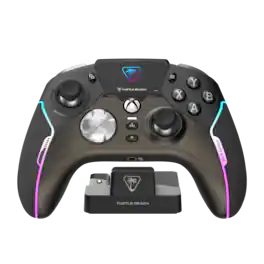
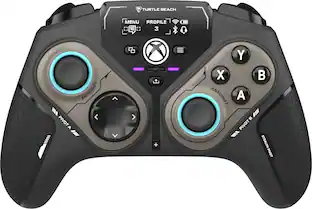
Turtle Beach - Stealth Ultra Wireless Controller with Charge Dock, 30-Hour Battery, Designed for Xbox Series X|S, Windows PC, Android - Black

Model: TBS-0710-05
SKU: 12331964
Sold & shipped by
Abe's Electronics Center

Customers are saying

Customers often highlight the excellent battery life and strong overall performance of the product. They also appreciate its lightweight design, responsive buttons, and extensive customization options, along with its comfortable feel. However, a significant concern for many users is inconsistent connectivity. While some users note issues with the software, triggers, and price, the product is generally praised for its absence of stick drift.

Generated by AI based on customer reviews.
Features
  • Lag-Free Wireless Technology

    Our proprietary, lag-free 2.4 GHz wireless connection and built-in Bluetooth technology gives you the freedom to play without a wired connection.

  • 30-Hour Battery & Rapid Charge Dock

    Our low-profile charge dock provides up to 30-hours of wireless usage, and fully recharges in just 2-hours using USB 3.0 high-speed charging.

  • Connected Command Display

    Our full-color Connected Command Display dashboard keeps you connected while you’re gaming with social media notifications, and settings adjustments available right on the dashboard.

  • Patented, On-Board Social Notifications

    Receive social notifications from your phone for all your favorite social media platforms on the Command Display dashboard to keep you in the loop while gaming.

  • AntiDrift Thumbsticks

    Contactless, hall effect thumbsticks use internal magnets instead of full contact analog-style sticks to provide high-resolution, smooth control without drift. Plus, two sets of additional Thumbcaps are included for tactile preference.

  • Precise, Microswitch Buttons

    Short travel tactile microswitches, rated at 5 million clicks are used for the D-Pad, ABXY cluster, mappable buttons and bumper buttons for faster, more reliable response and longer life.

  • Adjustable Trigger Stops

    Modify the throw distance of the triggers on-the-fly to suit the games you play. Shorter hair trigger locks provide a faster return profile for FPS games or set to full travel for precise throttle and brake control when racing.

  • Four Mappable Quick-Action Buttons

    Four mappable microswitch buttons on the back of the controller allow you to set up the Stealth Ultra to your exact preferences depending on the types of games you play.

  • Pro-Aim Focus Mode

    Selectable as one of the preset profiles for any of the four mappable buttons, Pro-Aim tunes thumbstick sensitivity for enhanced long-range accuracy.

  • Customization with Control Center 2 Companion App

    Open the Control Center 2 app on your Xbox console, PC, iOS, or Android smartphone to adjust controller settings and make product updates.

  • Advanced Audio Tuning

    Enhance any 3.5mm connected headset with exclusive audio features from Turtle Beach including EQ presets & Superhuman Hearing, game & chat volume mix, and more.

  • Intelligent RGB Lighting

    The intelligent RGB LED lighting system allows you to personalize your controller with 16.8 million distinct colors for aesthetics, notification alerts and low battery warnings.

  • Immersive Vibration Feedback

    Dual rumble motors in the handles and triggers provide immersive vibration feedback and are fully adjustable via the Command Display dashboard.

  • Premium Materials

    Designed for longevity and comfort, the Stealth Ultra has soft touch finishes, long-lasting microswitches, and comfortable, ergonomic grips.

  • Charge-Through Case

    Stow away your controller, charge dock, cables and two sets of additional thumbcaps in the hardshell travel case, plus a built-in slot lets you charge your Stealth Ultra while in its case.

See all features
Specifications
  • Wireless
    Yes
    Battery Size
    CR2032
    Compatible Platform(s)
    XBOX Series X, XBOX Series S, XBOX One, Windows, Android
Sponsored

Reviews

Customers are sayingCustomers often highlight the excellent battery life and strong overall performance of the product. They also appreciate its lightweight design, responsive buttons, and extensive customization options, along with its comfortable feel. However, a significant concern for many users is inconsistent connectivity. While some users note issues with the software, triggers, and price, the product is generally praised for its absence of stick drift.
This summary was generated by AI based on customer reviews.
  • Battery Life (121)
  • Overall Performance (103)
  • Weight (48)
  • Buttons (45)
  • Customization (40)
  • Connectivity (89)
  • Stick Drift (34)
  • Software (18)
  • Price (8)
  • Triggers (8)

Customer Images

The vast majority of our reviews come from verified purchases. Reviews from customers may include My Best Buy members, employees, and Tech Insider Network members (as tagged). Select reviewers may receive discounted products, promotional considerations or entries into drawings for honest, helpful reviews.

  • Rated 3 out of 5 stars

    Very good, but at a cost

    (Used this controller only on PC) I really liked this controller, it has a very good feel on it, it’s quite big so I find it very good for my hands and it’s also a little heavy which I like. The button clicks are good, I honestly prefer mouse-click-like buttons like in the Thrustmaster Eswap X controller, but it’s not bad. I think that most of the price is in the luxury feel to it and the screen features I guess, I honestly never used it, I wouldn’t be able to keep looking at the screen just to see my notifications when I have the phone next to me, and I also use my apple watch so it just vibrates on my wrist, also never needed to switch profiles for buttons mapping, I don’t play that many games, the only thing I would use it is for changing the lighting on it, but barely did that. The battery is not bad at all, I don’t use the controller for that long, but I always keep it charging when not using it, still would be happy for the hours used when not charging though. The first time I bought it, the A button lasted less than an year, I do play Rocket League, so I use it a lot, and I tend to click it harder than necessary, the button would need to pushed down farther to click and also sometimes would double click when I clicked once. Now I have a second one, I had the 2 year geeksquad, so I just swapped it which was pretty nice, I also put the 2 year on it, and for some reason it became twice the price, probably because of constant problems with it. Now almost 2 months with it the controller already have problems with the same buttons, they kind of click right, but sometimes it double registers the click. I‘ll use it until I get tired of it, then I’ll probably get the Gamesir g7 pro or Cyclone 2, since they’re half the price and have the instant trigger lock and TMR joysticks which I heard is better. I didn’t have any other problems with the controller, besides this fast button failure, so I don’t want to keep wasting that much money when I barely use most of the features of the controller, I would recommend it, but it would depend on your use of it, and with this price, it’s a little hard, so do your research and make sure you want all that.

    This review is from Turtle Beach - Stealth Ultra Wireless Controller with Charge Dock, 30-Hour Battery, Designed for Xbox Series X|S, Windows PC, Android - Black

    Posted by Luis

  • Rated 4 out of 5 stars

    Great Hardware, One Flaw for Big Thumbs

    ​I recently picked up the Turtle Beach Stealth Ultra wireless controller, and honestly, right now I’m liking it even better than my Xbox Elite Series 2. It’s a great, lightweight controller with a lot of cool features. The anti-drift thumbsticks are a huge plus, and I really like the neat little built-in screen that lets you easily adjust the colors and settings right on the fly. ​However, I do have one major gripe: the button layout. The screenshot button and the menu button for the LED screen are positioned way too close to the D-pad. If you have big thumbs like me, you're going to accidentally hit those buttons every time you try to press "right" on the D-pad. Hitting a menu or screenshot button mid-game is incredibly aggravating. Turtle Beach really should have positioned those buttons directly underneath the screen itself to keep them out of the action zone. ​The Verdict: Overall, I still really like the controller. If you can get past the cramped button placement around the D-pad, it's a fantastic piece of hardware.

    This review is from Turtle Beach - Stealth Ultra Wireless Controller with Charge Dock, 30-Hour Battery, Designed for Xbox Series X|S, Windows PC, Android - Black

    Posted by GARYK

  • Rated 5 out of 5 stars

    Great Controller, Lots of Ultra, not much stealth

    There is a lot to say about this controller. I go through controllers like bear goes through honey jars... I have had 4 of these controllers so far. None of them have had any stick drift after a year of use. The ones I have returned were due to some of the perceived lack of QA in the early batches that were shipped out. In all cases of returns it was the shoulder buttons that would start to have issues. My current one doesn't have any of these issues. Issues: I have read other reviews about the anti-friction rings on these controllers wearing grooves into the sticks, I have not seen this and as I said I have had one in constant use for over a year. The only negative I really have for this controller is the placement of the menu buttons. The Menu/Start/Select/Whatever you call them now, button on the left side of the controller is too close to the stick. You have to really concentrate to get your finger around the stick to hit the button. But that doesn't cause issues in any of the games I play, but it may for some people. Comfort: The controller itself is very comfortable in the hand. It has a slight texture to the grips that keep it comfortably in your palm. The buttons are all responsive, though if you are used to Scuf you may feel that they are a bit "squishy" compared to the faced buttons of the Scuf. I tend to use my Stealth Ultra for Shooters and even rocket league. I also have a couple of Scuf Instinct controllers, as well as the newer Scuf Valor Pro Wired Controller which I also love. The stealth ultra is a very comfortable controller. The placement of the back buttons works perfect for my hands. I'll post some images of how my hand sits on them for reference. Performance: I tend to use my controllers in a wired scenario, though I have used this particular controller wireless many times using the included dongle. I keep the dongle in the charging cradle that came with the controller. The only downside to using it wireless is that there is a delay when you want to start your Xbox from a shot down state. Sometimes the dongle doesn't connect for up to a minute meaning the Xbox just sits there until. the dongle finally connects and sends the startup signal. Like I said, I tend to use it wired so I don't run into that issue. I don't notice any lag above what I would expect from a wireless Xbox controller when in wireless mode. The sticks themselves have a great feel and the built-in response curves of the sticks just feel right to me. That is one of the reasons I prefer this over my Scuf controllers for games like Call of Duty. The aim just feels better. There are multiple curves you can choose from in the settings. I tend to stick to the Precision setting, and I set all my dead zones to 0%. It feels great and the aim is super responsive. The triggers are also very nice and the only thing I would change on them would be to make the trigger locks put the triggers into more of a mouse click feel instead of the current slightly squishier feel. There is not much travel, but compared to the mouse click, style trigger locks on my Scuf it just feels a bit soft. This doesn't affect my game play, but it is strictly a preference thing. The placement of the rear buttons is fine, I don't really have any pros or cons vs. other controllers. As with any controller the back buttons and their useability really hinges on how your hand lays on them and how easy they are for you to hit, without accidently hitting them. If they are awkward to you after a week of using it, you may want to try something else because if you can't feel comfortable with your back buttons, you will not get good muscle memory and will have to mentally stop to think about what you are doing when trying to hit them and that isn't good for any controller. So I highly recommend trying them out and also trying out some other controllers. Back buttons are not a deal breaker for some people, but if you do plan to use them, make sure you give it a good week of daily use to really see if they work for your hand size and shape and the way you hold your controller. Software: The software for the controller is fine for the most part, the issue I tend to have is that saving the settings back to the controller profile is not as simple as it should be. It can be confusing and is it feels like there were too many steps added. As you will see in the images, There are two menus that represent the memory profiles in the software and the onboard memory profiles. They do not always match up. And you would assume that you can just click the one you are adjusting in the software and then just match it up with the one you want to save it to on the controller, but you end up having to open another menu which makes it even more confusing. So the software could definitely use some more focus on UI/UX (I may be biased as I have been a software engineer and architect for over 25 years). The lighting is fairly straight forward though the colors do have some apparently duplication, and are rather limited. I would like the option to set custom colors for some of the effects but most of them have pre-set color choices. Not a deal breaker, but should be something that is easy to add more options too. Most of these settings can also be done directly on the screen built into the controller as well which is a nice bonus. I have not used any of the app control buttons to tie it in with phone or social media apps, I just don't need that on my controller. Summary: I am very happy with this controller, and like I said I have a lot of controllers and tend to go through them pretty fast. I currently have 1 Stealth Ultra that I use on my personal Xbox and PC in my office. I also have a Scuf Valor Pro in my office for when I just need a change. I have 3 Scuf Instinct Pro controllers, which I do enjoy, but the Stealth Ultra just feels better in game. I wish it had the trigger stops of the Scuf controllers, but that doesn't hold it back at all. I also have a few Xbox Elite controllers lying around, an old Razer Wolverine Pro, and have returned most other controllers (Nacon, Rig, Thrustmaster, etc...) My currently main daily drivers are the Stealth Ultra and the Various Scuf controllers depending on what I am playing and on which one of the Xboxes I happen to be playing on in a given day. We have a family of 4 who are all Xbox and PC, so when we play together as a family or have friends over we have plenty of options for controllers. I highly recommend this controller, especially if you play FPS games and need good aim. But like I said, test it out, see how it feels to you. I am a BestBuy Total Member, so I get an auto 24 month replacement plan on everything. So no harm in trying things out to find what works.

    This review is from Turtle Beach - Stealth Ultra Wireless Controller with Charge Dock, 30-Hour Battery, Designed for Xbox Series X|S, Windows PC, Android - Black

    Posted by BluePhaze

  • Rated 1 out of 5 stars

    So much hope, so little reward.

    As an avid gamer who is always trying new controllers, I had high hopes for this one. The clicky buttons and hall effect sticks were a major draw for me. I wish someone would create a basic controller with good sticks and clicky buttons. But after opening the box, I was greeted with beautiful hardware and a carrying case that had a soft, suede-like interior, unlike the elite controllers. The controller feels great in my hand, and most of the buttons are a joy to click. However, my initial excitement was short-lived, as I was extremely disappointed with the following issues: random power downs mid-use (every few minutes), random disconnections (which required me to repair every few minutes), inability to pair with the mobile app (preventing me from updating it, even after trying on multiple devices), right trigger with a strange click as if there was debris stuck inside not allowing a full click, and left stick not calibrated properly and, even after following the on-device recalibration, it would only input right and down (I have a video of this happening). Moreover, any changes made to settings such as color and rear buttons would only save until the controller turned off, after which it would factory reset itself. I couldn't recommend this controller to anyone. Thank you, Turtle Beach, for trying something new and pushing others to compete, but unfortunately, the only way I'd keep this controller is if it was free. I have returned the device and will continue to search for a controller that actually works and impresses. Thanks for reading my review.

    This review is from Turtle Beach - Stealth Ultra Wireless Controller with Charge Dock, 30-Hour Battery, Designed for Xbox Series X|S, Windows PC, Android - Black

    Posted by Caleb

  • Rated 4 out of 5 stars

    Be sure to look up the instructions. IS good

    I own & use 4 xbox elite series 2 controllers. i like this for regular everyday use. looked up the instructions & had no connection issues. Base needs to be plugged in to xbox and controller links to that wirelessly, not the dongle. did the configuration for sticks, no drift... unlike elite 2. battery at 56% after 10 hours. requires a little more patience & set up but is worth it.

    This review is from Turtle Beach - Stealth Ultra Wireless Controller with Charge Dock, 30-Hour Battery, Designed for Xbox Series X|S, Windows PC, Android - Black

    Posted by KAMAKAZE

Compare similar products

Turtle Beach - Stealth Ultra Wireless Controller with Charge Dock, 30-Hour Battery, Designed for Xbox Series X|S, Windows PC, Android - Black

The New King of Control. The Turtle Beach Stealth Ultra high-performance wireless smart game controller with charge dock is built for gamers who demand the best. Lag-free wireless quickly connects to Xbox consoles, and Windows PCs, plus Bluetooth for Android devices & supported Smart TVs. Tactile microswitches throughout provide fast, reliable response and last up to 5X longer than standard buttons, while AntiDrift thumbsticks eliminate drift for precise, customizable control and adjustable triggers suit your game on the fly. The Connected Command Display lets you customize the RGB lighting, audio, thumbsticks, mappable buttons and more, plus patented technology receives social notifications from your phone. Best of all, adjustable power modes provide up to 30 hours of battery life on a single charge.
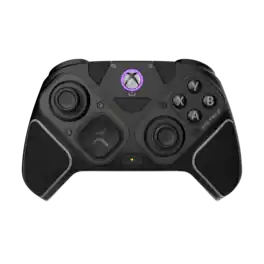
Turtle Beach - Stealth Pivot Wireless Smart PC Gaming Controller with Rotating Modules - Black
4.0(78)

Rank up to Revolutionary Control. The Turtle Beach Stealth Pivot wireless smart controller is designed for revolutionary gameplay on Windows PCs. Stealth Pivot features rotating button modules to quickly switch between core button layouts designed for FPS, action & racing titles, or revolved layouts for fighter & retro games. Play wirelessly on PC with the 2.4 GHz wireless transmitter, or via Bluetooth on Android devices & Smart TVs, and even play on XBOX consoles using the wired connection. A 20-hour battery life keeps you locked in without disruptions, plus the wired cable supports play-and-charge capability. The Connected Command Display screen offers extensive customization, and hall-effect thumbsticks, adjustable triggers and mappable buttons provide smooth, long-lasting, and adjustable control for multi-genre dominance.

Nacon - Revolution X Unlimited Wireless Controller for Xbox Series X|S, Xbox One & PC - Anniversary Edition
4.8(49)

The REVOLUTION X UNLIMITED wireless controller by NACON, officially licensed for Xbox, is compatible with Xbox One, Xbox Series S, Xbox Series X, Windows PC, and Android. Precise, high-performance, and customizable, it will allow you to stay in control of your game, whatever your playing style. Ergonomic and wireless, it frees your movements and offers you total gaming comfort. Eliminate your opponents thanks to increased responsiveness and formidable precision. Chain victories in your favorite battle royale or FPS/TPS shooter, thanks to an arsenal of fully customizable features and settings, even in the middle of the game, via the integrated control screen. Discover the ultra-high-performance PC mode with very low latency, with a gyroscopic aiming function to stay one step ahead. Designed by and for competitive players, and adapting to all your video games, the REVOLUTION X UNLIMITED will allow you to dominate the competition!

GameSir - G7 Pro Controller for Xbox Series X|S|One, PC, Android, TMR Sticks, Hall Effect Triggers, 1000Hz Polling Rate,Audio Jack - Shadow Ember

Pro by nature, performance reimagined. Level up from the celebrated G7 lineage - introducing the G7 Pro. Not only does it inherit the exceptional performance of the G7 series, the G7 Pro also brings exciting new upgrades: the first Xbox controller with TMR sticks, Hall Effect & clicky trigger stops, extra mappable mini bumpers, and enhanced low-latency input and output - all working together to deliver a smoother, more precise gaming experience, born for esports. Additionally, it goes beyond Xbox and PC with full Android support through tri-mode connectivity: wired for Xbox, 2.4G & wired for PC, and Bluetooth for Android. A true next-gen upgrade, crafted for gamers who demand more.

Pros for Turtle Beach - Stealth Ultra Wireless Controller with Charge Dock, 30-Hour Battery, Designed for Xbox Series X|S, Windows PC, Android - Black
Battery Life, Overall Performance, Weight, Customization, ButtonsBattery Life, Overall Performance, Weight, Comfort, DisplayCustomization, Battery Life, Weight, Build Quality, ConnectivityOverall Performance, Comfort, Button Quality, Stick Drift, Feel
Cons for Turtle Beach - Stealth Ultra Wireless Controller with Charge Dock, 30-Hour Battery, Designed for Xbox Series X|S, Windows PC, Android - Black
Connectivity, Stick Drift, Software, Price, TriggersConnectivity, Stick Drift, Size, Software, Button LayoutThere were no cons for this productConnectivity, Size

Specs

Questions & Answers
  • This doesn't support mapping R3 and L3 to the back buttons which is a deal breaker for me as those mappings are important to me. Will there be a firmware update enabling this function after launch?

    Thanks for your inquiry! We are currently in the process of preparing a firmware update for the Turtle Beach Stealth Ultra that will add L3 and R3 as mappable input selections. If you have any other questions please reach out directly to our dedicated Support Team so they can assist. They’re always happy to help and can be reached right from the support section of the Turtle Beach website. Thank you and have a great day!

    Answered by Turtle Beach Support
    Turtle Beach Support response
  • I'd like the short trigger stops to be as short as possible. How far does it travel when it's on the short stops in mm?

    Thanks for your inquiry! With the Turtle Beach Stealth Ultra hair trigger locks engaged, travel is 2mm, so about 2x the distance of a mouse click. If you have any other questions please reach out directly to our dedicated Support Team. They’re always happy to help and can be reached right from the support section of the Turtle Beach website. Thank you and have a great day!

    Answered by Turtle Beach Support
    Turtle Beach Support response
  • Can I use any type of wireless mic and controller at the same time or does the mic have to have a wire to plug in?

    Thanks for your inquiry, Dom! The Stealth Ultra Controller can be used alongside any type of wireless headset, however, the audio features on the Stealth Ultra will only be available for wired headsets connected directly to the controller itself. Best Regards!

    Answered by Turtle Beach Support
    Turtle Beach Support response
  • What kind of thumbsticks does the controller use?

    It uses contactless, hall effect thumbsticks with internal magnets for high-resolution, smooth control without drift.

    This question and answer was generated by AI based on customer and product data.
  • How long does it take to fully charge the controller?

    It takes just 2 hours to fully charge the controller using the USB 3.0 high-speed charging dock.

    This question and answer was generated by AI based on customer and product data.
Ask a question
No content

Customers often buy these together

Sponsored

Similar products from outside of Best Buy

sponsored
Ask BlueAI

Finance Options

My Best Buy® Credit Card
Choose a benefit:Or
Buy Now, Pay Later

Finance Options

My Best Buy® Credit Card
Choose a benefit:Or
Buy Now, Pay Later