DoorBOOsters are hereExclusions apply. Ends 11/2/25.Shop now

Main Content
product image

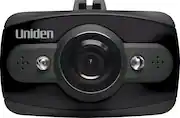
Uniden - DCAM Dash Camera - Black

Model: DCAM
SKU: 5366901
This item is no longer available in new condition. See similar items below
  • Key Specs
    • Field of View: 140 degrees
    • Automatic Incident Detection: true
    • G-Sensor: true
    • Compatibility: Universal
    • Camera Mounting Location: Dash
  • General
    • Brand: Uniden
    • Model Number: DCAM
    • Product Name: DCAM Dash Camera
    • Color: Black
  • Recording & Playback
    • Field of View: 140 degrees
    • Automatic Incident Detection: true
    • G-Sensor: true
    • Frame Rate: 25 frames per second (The frequency at which consecutive images can be captured. The higher the frame rate, the more detail that can be captured.)
    • Camera Power Source: Integrated battery
    • Expandable Memory Compatibility: microSD
  • Compatibility
    • Compatibility: Universal
  • Features
    • Integrated Microphone: true
  • Display
    • Screen Included: true
    • Screen Size: 1.5 inches (Size of the screen, measured diagonally from corner to corner.)
    • Screen Resolution: 1080 (Screens come in a range of resolutions (measured in pixels, horizontal x vertical). The higher the resolution, the greater the picture quality.)
    • On-Screen Display Languages: English (The available language options for displayed text.)
  • Mounting
    • Camera Mounting Location: Dash
    • Mount Included: true
    • Mount Type: Other
    • Screen Mounting Location: Other
  • Input
    • Number Of Auxiliary Inputs: 0
    • Number of USB Port(s): 1
  • Dimensions
    • Product Height: 3.44 inches (The out of box height of the item. Height is measured as the vertical distance from the bottom of the item to the top as it would be primarily used or placed.)
    • Product Width: 6.88 inches (The out of box width of the item. Width is measured as the horizontal distance from one side of the item to the other as it would be primarily used or placed.)
    • Product Depth: 5.44 inches (The out of box depth of the item. Depth is measured as the distance from the front of the item to the back as it would be primarily used or placed.)
    • Product Weight: 0.73 pounds (The out of box weight of the item.)
  • Warranty
    • Warranty - Parts: 1 year
    • Warranty - Labor: 1 year
  • Other
    • UPC: 050633361177

Document your road trip with this Uniden dash cam. It has 8GB of microSD storage, so it can record as much or as little of your drive as you want, and the 140-degree angle ensures a wider perspective. This Uniden dash cam has a G-sensor for collision detection and an unobtrusive 1.5-inch display.

  • 1080p Full HD recording: Allows to capture sharp footages at 25fps.
  • 1.5" LCD display: Provides clear view.
  • Built-in G-sensor: Supports collision detection feature when an accident happens.
  • 140-degree wide-angle lens: Provides expansive shooting coverage with minimal edge-to-edge distortion.
  • Built-in microphone: Captures clear audio.
  • Memory card slot: Allows you to store photos and videos on microSD cards (8GB card included).
  • USB interface: For simple connectivity.
  • Suction mount: Provides simple mounting.
  • 1080p Full HD recording: Allows to capture sharp footages at 25fps.
  • 1.5" LCD display: Provides clear view.
  • Built-in G-sensor: Supports collision detection feature when an accident happens.
  • 140-degree wide-angle lens: Provides expansive shooting coverage with minimal edge-to-edge distortion.
  • Built-in microphone: Captures clear audio.
  • Memory card slot: Allows you to store photos and videos on microSD cards (8GB card included).
  • USB interface: For simple connectivity.
  • Suction mount: Provides simple mounting.
Whats Included
  • 8GB MicroSD card
  • Suction Mount
  • Uniden DCAM Dash Camera
  • 8GB MicroSD card
  • Suction Mount
  • Uniden DCAM Dash Camera

Q: I have Uniden DC1...The screen goes dark in record mode, but I assume it is still recording. Does auto shutoff control the screen going blank? I would like the screen to stay on while driving. It is not a distraction for me if the screen stays on.

A: With power on and not recording, hit Menu twice (left middle button) to get the Setup menu. Use arrow keys to go down to Screensaver, OK to confirm, arrows to select Off (aka Disabled), OK to confirm. Menu again to exit. Screen should now be on all the time. PS: Owner's Manual, page 17. :)

Q: How long does the 8 GB, 16 GB, or 32 GB SD card allow the video to capture before looping?

A: I had the 8 GB and I think it only allowed for about 2 hours. I changed to a 32 GB and expect much more out of it. I suggest the 32 GB if you take long trips. The 8 GB is fine for in town such as going to work. And don't forget, if anything happens you can just push one button and that will be saved.

Q: Does the camera automatically start recording when you start the car engine?

A: Yes, if you have it plugged it. My lighters are on 24/7, so I have to plug it in.unplug it every time. If your cigarette lighter has no power to it when the key is off, then it will turn off automatically.

Q: DOES IT RECORD SOUND?

A: Yes and you have the option to turn audio recording on or off.

Q: My stop recording when my 32gb card is full. There is a blue screen pops out "Cardfull". It should be looping overwrite but it is not. Just recently happened. Anyway to fix it? or should I just manual delete every week? Thanks

A: If you read the manual it'll guide you to access an option for "loop recording". If this option is turned off, your dashcam will stop recording once the storage is full and you will need to manually delete. The loop recording option records in 3 minutes and re-records over the oldest file once storage is full. There's also something called a Gsensor option that will lock any files when impact is detected. Hope it helps!

Q: Does it come with a suction cup or some type of installation device or do you need to buy that separately?

A: Hi, It comes with a suction cup that works just fine. I mounted mine high on the windshield in front of the visor.

Q: How hard would it be to show the police what happened at the time of an accident ?

A: Not hard at all. Playback is a menu selection, and then locate the video you want to playback.

Q: can this dash camera be used in home

A: Yes, you can use in home.