Satechi - USB-C Monitor Stand Hub XL w/1 USB-C, 3 USB 3.0, SD/ MicroSD ports, and 3.5mm audio for iMac, MacBook, Windows laptops - Space Gray
Satechi - USB-C Monitor Stand Hub XL w/1 USB-C, 3 USB 3.0, SD/ MicroSD ports, and 3.5mm audio for iMac, MacBook, Windows laptops - Space Gray
FREE shipping to
Related Item

About This Item
- General
- Brand: Satechi
- Model Number: ST-UCSHXLM
- Product Name: USB-C Monitor Stand Hub XL w/1 USB-C, 3 USB 3.0, SD/ MicroSD ports, and 3.5mm audio for iMac, MacBook, Windows laptops
- Color: Space Gray
- Warranty
- Warranty - Parts: 1 year
- Warranty - Labor: 1 year
- Other
- UPC: 810086360338
Support your iMac, MacBook, MacBook Pro, Dell XPS, HP SPectre, and other laptops and devices with standard Type-C interfaces with elegant and functional Satechi - USB-C Monitor Stand Hub XL featuring built-in expansion ports including 1 Type-C Female Up to 5 Gbps, 2 USB 3.0 Up to 5 Gbps, SD/ MicroSD port, and 1 Jack Audio 3.5mm to maximize your space and enhance your experience. Note: SD and MicroSD cannot be read at the same time
- Five Essential Expansion Ports: The Satechi USB-C Monitor Stand Hub XL offers five essential expansion ports that allow you to be more productive and maximize your space in style with a premium and modern aluminum finish.
- Elegant Durable, and Functional: This USB-C Monitor Stand Hub XL not only looks great but it’s also practical, durable, and functional. It offers 1 Type-C Female Up to 5 Gbps, 2 USB 3.0 Up to 5 Gbps, SD/ MicroSD port (Support SD/SDHC/SDXC, UHS-1, up to 104MB/S), and 1 Audio Jack 3.5mm.
- Elevates Your Device: The Satechi USB-C Monitor Stand Hub XL also helps you reduce your neck strain and encourage better posture by elevating your device to a comfortable viewing angle with its seamless design.
- Compatibility: 2019/2018/2017/2016/2015 Macbook, 2019/2018/2017/2016 MacBook Pro, 2020 MacBook Pro M1, 2020 iMac Apple iMac, Huawei Matebook, HP Spectre, Chromebook, Dell XPS series, Millet notebook, and countless other devices with standard Type-C interface.
Whats Included
- USB-C Monitor Stand Hub XL
- User Manual
A: A USB-C to USB-A adapter should work. But you will have to test it to be sure.
Q: How much weight can it hold?
A: Hello there, Note that this product is no longer available for purchase, out of stock/discontinued. This device was designed to support Mac devices and other similar laptops with a type-C interface. For any additional questions or concerns you may email us at [email protected] or call us at +1(858)268-1800 (US). We look forward to hearing from you!
Q: Does this have a DC port to plug into the wall?
A: Hello Jason, Before proceeding, keep in mind that this specific product may no longer be available for purchase, out of stock/discontinued. That said, this adapter is a bus-powered device that connects via USB-C and does not need a separate power source to function. For any additional questions or concerns you may email us at [email protected] or call us at +1(858)268-1800 (US). We look forward to hearing from you!
Q: does this work with a ipad 10th gen?
A: It does indeed. My 10th Get iPad was only 57% charged and. immediately connected and able to read files from a Samsung USB-C (exfat) and USB 3.0 to Micro-B (Mac OS Extended (Journaled)) 1TB drives. Thanks for the question, I had never tried it, allows for a freestanding keyboard and mouse to be used. Hope you enjoy it!
Reviews
Customer Images
The vast majority of our reviews come from verified purchases. Reviews from customers may include My Best Buy members, employees, and Tech Insider Network members (as tagged). Select reviewers may receive discounted products, promotional considerations or entries into drawings for honest, helpful reviews.
Compare similar products
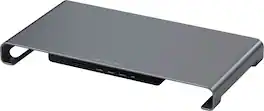
Support your iMac, MacBook, MacBook Pro, Dell XPS, HP SPectre, and other laptops and devices with standard Type-C interfaces with elegant and functional Satechi - USB-C Monitor Stand Hub XL featuring built-in expansion ports including 1 Type-C Female Up to 5 Gbps, 2 USB 3.0 Up to 5 Gbps, SD/ MicroSD port, and 1 Jack Audio 3.5mm to maximize your space and enhance your experience. Note: SD and MicroSD cannot be read at the same time

The JTSA101 is a gas spring monitor mount. The arm can hold max a 32” screen weighing up to 8kg/17.6 lbs. Easily adjust your screen to any height. The gas spring allows the screen to swivel 180°, tilt -45° to +90° and rotate 360°. Conveniently set your monitor at an optimal angle. This monitor mount gives you the ability to create a more efficient workspace, whether you need extra space or a standing desk setup.

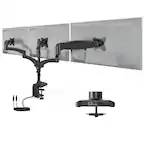
The JTSA102 is a gas spring dual monitor mount. The single arm can hold max two 32” screens weighing up to 8kg/17.6 lbs. Easily adjust your screens to any height. The gas spring allows the screen to swivel 180°, tilt -45°to +90°and rotate 360°. Conveniently set your monitor at an optimal angle. This monitor mount gives you the ability to create a more efficient workspace, whether you need extra space or a standing desk setup.

Improve your workspace with a mount that tilts (+/- 45°), swivels (+/- 90°), and raises your computer monitors. The Insignia Dual-Screen Desktop Mount for Monitors up to 32” Wide mounts to the edge of your desk with a cable management system that keeps your space cord-free. Upgrade your desktop setup with the ideal mount for your monitors.
| Pros for Satechi - USB-C Monitor Stand Hub XL w/1 USB-C, 3 USB 3.0, SD/ MicroSD ports, and 3.5mm audio for iMac, MacBook, Windows laptops - Space Gray | |||
|---|---|---|---|
| There were no pros for this product— | Ease of use, Adjustability, Overall Performance, Assembly, Price | Adjustability, Ease of use, Space Saving, Setup | Adjustability, Build Quality, Capacity |
| Cons for Satechi - USB-C Monitor Stand Hub XL w/1 USB-C, 3 USB 3.0, SD/ MicroSD ports, and 3.5mm audio for iMac, MacBook, Windows laptops - Space Gray | |||
| There were no cons for this product— | Cable Management | Cable Management, Weight Capacity, Compatibility, Price | There were no cons for this product— |