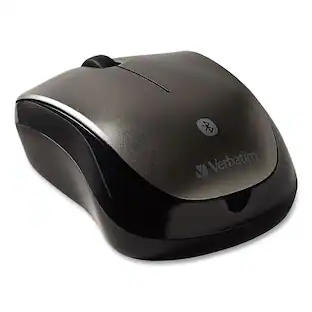
Verbatim - 99769 2.4 GHz Frequency/32.8 ft Wireless Range Left/Right Hand Use Silent Wireless Blue LED Mouse - Wireless - Graphite
Reviews coming soon
About this product
Say goodbye to noise and hello to silence with the Verbatim Silent Mouse. Using new Silent Technology, silent click switches, and rubber covers, this Verbatim mouse is truly silent. The 2.4 GHz wireless performance allows for lag-free cursor movement while the comfort-grip shape provides ease of use. Blue LED technology allows users to point and click on more surfaces than other mice—from a glass table to the granite kitchen counter! The mouse connects to the computer via a nano receiver, small enough to plug in and leave connected—great for computing on the go. Turn your noisy office into a place of tranquility and enjoy the sound of silence.
Features
Goodbye to noise
Truly silent mouse featuring Silent Technology, silent click switches, and rubber covers.
2.4 GHz wireless connection for lag-free performance.
Blue LED technology allows for use on virtually any surface with precision and control.
Ergonomic design and comfort grip for ease-of-use.
Plug-and-forget nano receiver connects mouse to computer.
Specifications
- Lighting TypeSingle colorNumber of Buttons (Total)3Connection TypeWireless
Reviews
This product doesn't have any reviews yet.

- SteelSeries - Rival 3 Gen 2 Wireless Optical Gaming Mouse with Ultra-fast clicks - Wireless - Black$44.99The price was $59.99




Compare similar products
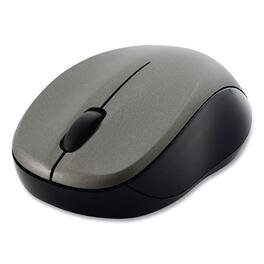
Say goodbye to noise and hello to silence with the Verbatim Silent Mouse. Using new Silent Technology, silent click switches, and rubber covers, this Verbatim mouse is truly silent. The 2.4 GHz wireless performance allows for lag-free cursor movement while the comfort-grip shape provides ease of use. Blue LED technology allows users to point and click on more surfaces than other mice—from a glass table to the granite kitchen counter! The mouse connects to the computer via a nano receiver, small enough to plug in and leave connected—great for computing on the go. Turn your noisy office into a place of tranquility and enjoy the sound of silence.
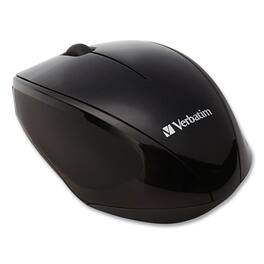
Navigate virtually anywhere with the Verbatim Wireless Multi-Trac Blue LED Optical Mouse. The comfort-grip shape provides ease of use while Blue LED technology allows users to point and click on more surfaces than other mice—from a glass table to the granite kitchen counter! The small nano receiver can be stored in the battery compartment, offering convenient storage and portability which makes this a great full-size go everywhere computer accessory.

Say goodbye to noise and hello to silence with the Verbatim Silent Mouse. Using new Silent Technology, silent click switches, and rubber covers, this Verbatim mouse is truly silent. The 2.4 GHz wireless performance allows for lag-free cursor movement while the comfort-grip shape provides ease of use. Blue LED technology allows users to point and click on more surfaces than other mice—from a glass table to the granite kitchen counter! The mouse connects to the computer via a nano receiver, small enough to plug in and leave connected—great for computing on the go. Turn your noisy office into a place of tranquility and enjoy the sound of silence.

Experience wireless freedom. The Verbatim Bluetooth® Wireless Multi-Trac Blue LED Tablet Mouse requires no receiver to connect wirelessly to your Android or Windows Bluetooth enabled tablet or Windows/Mac computer. With a range of up to 30 feet, it's the ultimate in hassle-free mobility. Thanks to Blue LED Technology, the Bluetooth Tablet Mouse allows you to navigate virtually anywhere—point and click on more surfaces than other mice—from a glass table to the granite kitchen counter! A 1600 DPI optical sensor provides smooth, precise tracking, ideal for detail work, and great for maximizing productivity by giving you more control. The Bluetooth Tablet Mouse is highly efficient with low power consumption, requiring only one AAA battery for use. The contoured shape of the Tablet Mouse will keep you navigating comfortably for hours.
Specs
Be the first to ask a question.
We’ll try to get your question answered within 24 hours by a Best Buy customer or brand representative.
Customers often buy these together
Computer Keyboards

![esc ~ ! 1 tab caps lock shift ctrl F2 Fl # 2 3 Q W A S Z start opt L F3 $ 4 E D X alt cmd3 ) FS F4 A % 5 6 R T F G V C logi 44 HI & F9 FID FB F7 F6 * ) - - & 0 8 9 7 O P U I Y K L H J > < N M 1 B PM + = { [ : I ; ? I alt cmd D 2 4 300 3 1 F12 . * page I insert home up clear backspace 8 9 + 7 page A pg up end down home } I delete ] / 6 4 5 4 enter 2 3 enter 1 dn Pg end shift = 0 del ins etrl fn opt](https://pisces.bbystatic.com/image2/BestBuy_US/images/products/6539/6539505_sd.jpg;maxHeight=232;maxWidth=233?format=webp)
![Esc F1 F2 F3 F4 F5 F6 F7 F8 F9 F10 F11 F12 Print Screen Scroll Lock Pause Break 1 2 3 4 5 6 7 8 9 0 - + = Backspace Insert Home H Page Up A Num Look 1 I Tab Q W E R T Y U I o P { [ } ] I I Delete End IN Page Down 7 Home 8 9 Pg Up Caps A Lock A S D F G H J K L ; : DE g Enter 4 5 6 Shift Z X C V N M < > ? I Shift 1 End 2 3 Pp Dn Enter Ctrl Alt Alt Ctrl 0 Ins Del](https://pisces.bbystatic.com/image2/BestBuy_US/images/products/a588d446-5678-40ae-86b8-1f15e0026e66.jpg;maxHeight=232;maxWidth=233?format=webp)












More to consider
 $42.99The price was $69.99
 Techtober Deal$59.99The price was $89.99



Explore tech essentials Sponsored
 $179.99The price was $249.99
 Techtober Deal$129.99The price was $159.99
 $179.99The price was $219.99



Keep exploring
 $139.95The price was $187.95
 $149.95The price was $215.95