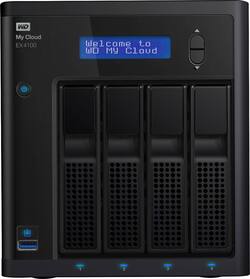
WD - My Cloud Expert EX4100 4-Bay 0TB External Network Attached Storage (NAS) - Black
- Key Specs
- Security Features: 256 AES volume encryption
- Storage Capacity: 0 gigabytes (Measured in megabytes (MB), gigabytes (GB) and terabytes (TB), this is the amount available for storing files, music, movies, photos and more. The total includes the capacity of the hard disk drive and solid state drive if both are included on the computer.)
- Number Of Drives Included: 0
- Number of Bays: 4 (Each bay, or enclosure, holds an individual drive.)
- Processor Model: ARM (Your computer's processor is like its brain. Working in combination with system memory, the power of the processor determines the complexity of software you can run, how many programs you can have open at the same time, and how fast those programs will run. Most computers feature an AMD, Intel or Snapdragon processor.)
- General
- Brand: WD
- Model Number: WDBWZE0000NBK-NESN
- Product Name: My Cloud Expert EX4100 4-Bay 0TB External Network Attached Storage (NAS)
- Color: Black
- Security
- Security Features: 256 AES volume encryption
- Features
- Storage Capacity: 0 gigabytes (Measured in megabytes (MB), gigabytes (GB) and terabytes (TB), this is the amount available for storing files, music, movies, photos and more. The total includes the capacity of the hard disk drive and solid state drive if both are included on the computer.)
- Number Of Drives Included: 0
- Number of Bays: 4 (Each bay, or enclosure, holds an individual drive.)
- Power Supply: 1
- Ports
- Number of RJ-45 Ports: 2 (An RJ-45 port, or jack, is an 8-pin connection between a device and a local area network (LAN), using an Ethernet, or RJ-45, cable.)
- Number of USB Ports (Total): 3
- Processor
- Processor Brand: ARM
- Processor Model: ARM (Your computer's processor is like its brain. Working in combination with system memory, the power of the processor determines the complexity of software you can run, how many programs you can have open at the same time, and how fast those programs will run. Most computers feature an AMD, Intel or Snapdragon processor.)
- Processor Model Number: Armada 388
- Processor Cores: 2-core (dual-core)
- Compatibility
- System Requirements: Windows 10, 8 or 7; macOS Mojave, High Sierra, Sierra; DLNA/UPnP devices for streaming; router with Internet connection; Internet Explorer 10 or up, Safari 6 or up, Firefox 30 or up, Google Chrome 31.0 or up on supported Windows and macOS platforms (The software that a product must have for it to be able to integrate with another product.)
- Drive Compatibility: 3.5" SATA HDD
- RAID Support: RAID 0, RAID 1, JBOD (A Redundant Array of Independent Disks (RAID) includes a collection of separate disks that your computer recognizes as one disk unit. Each configuration offers a different level of mirroring, striping and read/write speeds.)
- Ethernet Standard: 10/100/1000/2.5Gb (Each standard is a variation of the IEEE 802.3 set of computer networking technologies known as Ethernet. New versions evolved to include higher bandwidth, different physical media, and other new and improved features. Standards are often denoted by speeds (in Megabits per second). For example, a 10/100/1000 Ethernet port transmits at 10 Mbps, 100 Mbps, and 1000 Mbps (1 Gbps).)
- Memory
- System Memory (RAM): 2 gigabytes (Random-access memory (RAM) is a computing device's short-term data storage, which allows active information to be accessed quickly. The size and type of RAM determines how efficiently the device can handle large amounts of information at one time. For example, gaming or video editing requires more RAM for optimal performance.)
- Type of Memory (RAM): DDR3 (Each type of RAM delivers a different level of speed, bandwidth, energy efficiency and performance.)
- Performance
- Maximum Operating Temperature: 95 degrees fahrenheit (The highest recommended ambient (surrounding) temperature in which the product can ideally operate stated by the manufacturer. Generally long-term exposure of the product to temperatures more than the maximum can result in ineffective operation.)
- Dimensions
- Product Height: 7.56 inches (The out of box height of the item. Height is measured as the vertical distance from the bottom of the item to the top as it would be primarily used or placed.)
- Product Length: 9.13 inches (The out of box length of the item. Length is measured as the longest dimension of the item.)
- Product Width: 6.69 inches (The out of box width of the item. Width is measured as the horizontal distance from one side of the item to the other as it would be primarily used or placed.)
- Product Weight: 7.54 pounds (The out of box weight of the item.)
- Warranty
- Warranty - Parts: 2 years
- Warranty - Labor: 2 years
- Other
- UPC: 718037832944
Store and organize your files and data with this Western Digital My Cloud Expert Series 4-bay diskless NAS server. An intuitive dashboard makes it easy to set up, and the 256 AES volume encryption keeps your information secure. This Western Digital My Cloud Expert Series 4-bay diskless NAS server features multiple RAID options for effortless customization and Dual Gigabit Ethernet ports for seamless media streaming.
- High-performance hardware: A powerful Marvell ARMADA 388 1.6GHz dual-core processor and 2GB DDR3 memory delivers ultrafast transfer speeds of 115 MB/sec. upload and 107 MB/sec. download for high-performance media streaming and file transfers.
- Powered by WD My Cloud OS: This OS delivers a suite of tools and apps that empower you to take control of the media content that matters most.
- Easy to use and manage: The intuitive dashboard allows easy monitoring of storage, managing users, and customizing backup and third-party apps. Plus, you can set up mobile alerts to stay informed on the status of My Cloud device.
- Media streaming: Built-in Twonky DLNA-certified media server lets you stream HD content to media players, Smart TVs, gaming consoles, and other DLNA-certified devices.
- Auto backup: Keep your irreplaceable photos, videos, and files with multiple, automatic backup options for computers on your network.
- Multiple RAID options: Customize the system with the configuration that works best for you - RAID 0 for enhanced system performance, RAID 1 for mirrored data protection, RAID 5 for data protection and perfect capacity, RAID 10 for fast performance and ultimate data reliability, JBOD or spanning.
- RAID roaming: Keeps the RAID array intact when drives are moved from one My Cloud EX4100 device to another. RAID Migration lets you change the RAID configuration and expand storage without losing content.
- Advanced data security: 256 AES volume encryption provides additional protection for valuable photos, videos, music, and files.
- Recycle bin: With this optional feature, deleted files are not erased completely from the NAS, but moved to a special folder and can be retrieved, adding a second level of defense against accidental data deletion.
- Enhanced media streaming and network redundancy: Dual Gigabit Ethernet ports for link aggregation enhance network performance providing an excellent HD media streaming experience. They also provide network redundancy should one network connections fail.
- Power redundancy: Dual power ports offer the option of adding a second external power supply that will take over should the first power supply fail.
- One-touch USB 3.0 copy button: Plug in a camera or USB storage device to the built-in USB 3.0 port on the front of the system to automatically copy photos and videos with the touch of a button, making it easy to centralize media content.
- Remote and mobile access with simple sharing: The My Cloud app allows you to upload, access, and share photos, videos, music, and files from anywhere with computers, smartphones, or tablets.
- Energy-saving features: Include drive sleep mode, LCD and LED on/off, and power scheduling capabilities to save power and runtime energy.
Whats Included
- My Cloud Expert 4-Bay External Network Storage (NAS)
- Ethernet cable
- Power supply and cable
- Owner's manual
Product Manuals
Q: What is the total TB this will hold? I am thinking of using 4 8TB or 10TB drives.
A: Hello,Please know, my cloud PR4100 is a 4 bay device where you can use 4 drives at a time to make a storage capacity of your choice which can go up to 56 TB. There are multiple read modes which you can use. For more information please refer to the user manual of the device:https://products.wdc.com/nas0s5/nasum/en/.-Need Help? Please see our "'Contact Us" page for information.
Q: Hi IF I buy a WD Diskless EX4, can I fill it with 4 HDD of different capacities and manufacturers?
A: Hi Robinstates, Please be informed that with My Cloud EX4100 you can create a custom NAS with compatible hard drives. Moreover, in order to configure RAID on the NAS the capacities of HDD should be same, otherwise you may use different size HDD. To know more about the drive refer the below link: https://documents.westerndigital.com/content/dam/doc-library/en_us/assets/public/wd/product/nas/my_cloud/my_cloud_ex4100/data-sheet-my-cloud-expert-series-ex4100.pdf -Need Help? Please see our "'Contact Us" page for information.
A: Hello, Please be informed that you could store and organize your files and data with this Western Digital My Cloud Expert Series 4-bay diskless NAS server. An intuitive dashboard makes it easy to set up, and the 256 AES volume encryption keeps your information secure. This Western Digital My Cloud Expert Series 4-bay NAS server features multiple RAID options for effortless customization and Dual Gigabit Ethernet ports for seamless media streaming. To know more about the drive please refer to the below link: https://bit.ly/3RzP0XV -Need Help? Please see our "'Contact Us" page for informatio
Q: Can you use Solids State Drives (SSD).
A: Hello Don, We would like to inform you that you could not use SSD in my cloud devices, However WD Red, Red Plus and Red Pro are designed for My cloud. -Need Help? Please see our "'Contact Us" page for information.
A: Hello Vitatax, Based on your concern we would like to inform you that you could add multiple users from dashboard of the device https://support-en.wd.com/app/answers/detail/a_id/29448/kw/add%20user . Users could login to mycloud.com to access the device remotely. Please refer to the link to login :https://os5.mycloud.com/ -Need Help? Please see our "'Contact Us" page for information.
A: Nope, this is diskless...BYOD.
People also viewed
 $2,049.99The price was $2,144.24
Today's top picks
 $449.99The price was $829.99
 $2,449.99The price was $3,199.99
 $199.99The price was $249.99
 $999.98The price was $1,639.98










