Customer Ratings & Reviews
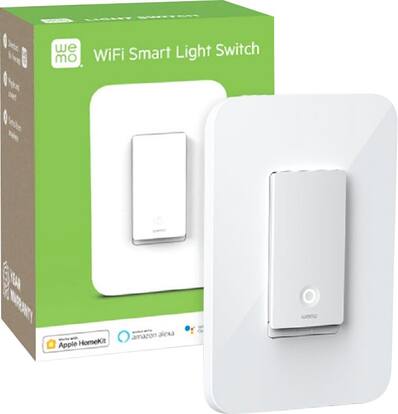 See more images
Customer reviews
Top Mentions
- Rated 4 out of 5 stars
Better Control for Lighting Made Easy
ecscatalyst Posted
I have multiple WeMo Light Switches, WeMo Dimmer Switches and WeMo Smart Plugs at the time of this writing and I think I have a pretty good perspective on these WeMo products. I'm glad that WeMo updated their mobile application to require their users to have an account to manage their products. Before, you just needed their products to connect to a Wi-Fi network. It is also convenient to have WeMo linked to Google Assistant. Before, updating the firmware to the WeMo switches and smart plugs was a hassle because it was not very intuitive. You attempt to update the firmware for the products, but there is no progress bar or any notification to identify how long the firmware update will take. And the firmware update would either fail midway or the app freezes. But, it seems the WeMo app has improved. Since a WeMo switch comes with only a one gang decorator/wallplate, I had to buy some 2 gang decorator/wallplate from Home Depot for two (2) WeMo switches that are together. You can name your WeMo products, create rules and schedules, and select which WeMo product(s) you would like to use and set a time when to them turn on and off. Specifically, my WeMo smart plugs tend to be occasionally unresponsive when using Google Assistant. It is inconsistent when it responds correctly, but I think it is because my WeMo Smart plugs are placed pretty far from the router. Be mindful on the distance to your router when it comes to the WeMo products. You may need to place them close to your router or add a Wi-Fi extender to your home. Sometimes, Google Assistant may turn on the incorrect WeMo light switch. To troubleshoot, I will either use the WeMo app instead or relink my WeMo account to Google Home. That way, it’ll refresh my WeMo products in Google Home. For WeMo Smart Plugs, I disconnect them from the outlet and reconnect them and wait a few moments until connection has been established. If there is a power outage or if I lose Internet connection, WeMo is pretty good at reconnecting in a few minutes. But if it does not reconnect, you will just have to hold a small button underneath the light switch with a small tool or maybe a pen to restart the WeMo light switch. If it does not reconnect, you would need to reassign or reactivate the light switch through the WeMo app. I did have one WeMo light switch that lost power randomly after 10 months of use. I thought it was bad wiring, but when I replaced it, I have not seen any issues. I will continue to monitor it, but so far so good. I would recommend buying WeMo and I will most likely buy another one in the near future.
I would recommend this to a friend - Rated 5 out of 5 stars
My home automation adventure begins
Homekit Posted
This has been the first product that I purchased for home automation. Great product. I was worried that I wouldn’t be able to hook this up, but it was no problem. Just made sure to connect it to the neutral wire which I guess all modern homes have. I love that you don’t need a hub just WiFi. I am able to use it with Siri via Apple HomeKit. It’s for my front light. All I have to say is “Hey Siri turn on front light” and voila it comes on. Great replacement for the 25 year old switch that broke. I’m excited to start my home automation adventure.
I would recommend this to a friend - Rated 5 out of 5 stars
Best light switch I’ve ever bought
MaxL Posted
I absolutely love this light switch. It looks so clean and modern and works incredibly good.
I would recommend this to a friend - Rated 5 out of 5 stars
Smart Switch working with Google & Apple Homekit
RealReview4U Posted
Everything is working fine with both Homekit and Google home. If you can change a light switch you can install this with no issue. Make sure you check the WEMO app for available updates get it working there and THEN add to Homekit or Google (or both). So far the product has been rock solid working in conjunction with multi brand eco system of smart devises 65+. I use it for the driveway and front door lights with automation (simple On and Off)...no need for dimmer capabilities. The cover plate is for a single gang box so I had to buy a different cover plate (see picture). I will buy more of these. Works as advertised.
I would recommend this to a friend - Rated 4 out of 5 stars
Siri, turn on the foyer chandelier
BeachBum Posted
The Wemo accessories are easy to install and a breeze to add to your WIFi system. Especially if you are an Apple HomeKit user. Scam the code on the back of the switch, and it walks you right through it.
I would recommend this to a friend - Rated 4 out of 5 stars
Use everywhere except bedrooms
Elizabeth Posted
I’ve had smart switches in the past and bought Wemo brand this time because I have the smart plugs and like the app. No complaints about the functionality really, but the switches have a light on the bottom, and I had to put stickers over the ones in my bedroom because they’re so bright. So I may end up putting these in a different room and getting another brand for my bedroom. Super easy to install and love absolutely everything else about them. Just don’t put them in the bedroom if you like it super dark.
I would recommend this to a friend - Rated 5 out of 5 stars
Great to use with timer function in app.
Pistol Posted
Recently bought another to add to my growing collection of wemo products. Have had one installed for about a yr so far. Directions are easy to install for wiring in the new switch. Once powered the device does what's its supposed to. Setup was easier on this second switch. Wemo has been updating their app to be more user friendly and is making connecting to their products a lot easier than what it used to be a yr ago.
I would recommend this to a friend - Rated 2 out of 5 stars
Looks great, but constantly stops working
Allabouttech Posted
We bought four of these. They were easy to install physically, and connecting through the app. They automatically paired with Alexa too, which is great. HOWEVER, every few days, Alexa loses connection with the Wemo app, which means that voice commands stops working every few days. It still works directly from the Wemo app mind you. To fix voice commands, you have to go back into the Alexa app and disable the skill and then reenable it. A large portion of the house is now automated, with various brands of lights. We never had an issue with any other brand in two years, and already we have had to reenable the skill 4 times in the last two weeks. This is unacceptable for such a product. Integration with Alexa should be flawless. It must work every time, or else it is pointless to have voice command capability. I am strongly considering pulling all four switches out of the walls and returning them to Best Buy, and going to the other brands that have worked flawlessly for us for two years.
No, I would not recommend this to a friend - Rated 4 out of 5 stars
Works well
cokey Posted
Installed easily. Had a hiccup getting the schedule to run correctly, but customer service was easy to reach and helped solve the problem!
I would recommend this to a friend - Rated 5 out of 5 stars
Great! Love having it work with Homekit
Glenn Posted
Bought 2 and got one already installed and works just great! I love having it in my studio. The best part is using it with Homekit!
I would recommend this to a friend - Rated 5 out of 5 stars
Great product
mychalk Posted
Great switch. In the process of outfitting my whole home with these and have no complaints thus far.
I would recommend this to a friend - Rated 5 out of 5 stars
Starting a New Smart Home
SmartHome Posted
It takes a little work to install and set it up. We set it up with Apple Home. Overall easy to use.
I would recommend this to a friend - Rated 1 out of 5 stars
Nightmare to set up! router incompatible RUKM!!!
Jpss73 Posted
Ive called WEMO twice, yesterday and today. If your WiFi signal is not extra strong this switch is worthless. I mean my RING doorbell and YALE deadbolt (right next to WEMO WEMO switch work perfect we WEMO give me an error message. Its super hard to circumvent HOMEKIT and even after all the attempts to do so, I was forced to connect it to HOMEKIT. after 2 hours over the phone with very nice WEMO customer support lady the error message appeared. THIS ACCESSORY IS NOT COMPATIBLE WITH YOUR WIFI ROUTER. NOW WHOS GOING TO PAY ME NACK FOR THE ELECTRICIAN THAT INSTALL IT??? Dontas buy this item.
No, I would not recommend this to a friendBrand response from BelkinStaff
Posted
Hi, Jpss73,
We understand that you already contacted our Support Team, however, we’d like to have our Escalation Engineers look into this further instead. Just email us your case number at WemoCares@belkin.com so we can pull up and review your records. Don’t forget to include a link to this post as our reference.
Regards,
Rosalyn
Wemo Support
- Rated 2 out of 5 stars
Buggy product
BryceH Posted
Always very buggy product. Made it a about a year and half and stopped working. You can not even use the reset function
No, I would not recommend this to a friend - Rated 5 out of 5 stars
Works great can be a tricky install
Flash Posted
I have been using Wink for a few years and did what I wanted. I don't do a lot of home automation, but want some things like my outside lights setup. When Wink switched to a subscription it just didn't make sense with my limited setup. Since I have Apple products started looking at HomeKit items. I got this switch for my outside house lights. Once setup it works great with HomeKit. I have an Apple TV as my hub which with you don't have to do anything on to setup. All the setup was done on my iPhone. The one thing that I fought was getting it connected to start with. All the instructions talk about making sure your iPhone and the switch are on the same network and it can't be the 5 GHz network. Well good luck getting your phone on the old 2.4 GHz network if you have something like the google wifi mesh system. I fought this. Read online about trying to get far enough away from a hub so your phone drops to 2.4 GHz. I was about to give up before I thought about other things you setup with your phone. Most once they are powered on and you are starting the setup process you go to the wifi settings on the iPhone and you will see the devices wifi and you connect to that. Same with this product. Don't try getting your iPhone on a 2.4 GHz network, just go to the network settings once you have the switch wired and power back on. You will see the switch as a wifi network. Connect to that then finish the switch setup in Apple's Home app. I did install the WeMo application which it will sync with the Apple Home app and pull in the switch. You do firmware updates in the WeMo app. That is all I am using that application for. I would prefer just a regular toggle switch and options on color switches, but this is fine. From my research this had better reviews then some of the other ones and the price was good. I have had it going for about a month and no issues. I do have it setup to automatically come up in the evening and off in the morning. I am not using it with Siri, but do have a plug that I am using that way that is working good.
I would recommend this to a friend - Rated 5 out of 5 stars
Smart Convenience All-The-Way!
DesiUncleSam Posted
Easy to install and network/connect. The indicator light is the perfect brightness that makes it easy to locate the switch in the dark, almost like a night-light, but not so bright as to disrupt sleep when installed in a bedroom. I’ve installed 60 WeMo Switches and 14 WeMo Smart Plugs throughout my home. Very reliable and easy to use system. Love the Apple HomeKit integration. Highly recommended.
I would recommend this to a friend - Rated 5 out of 5 stars
Excellent efficiency product
MOKI Posted
The WEMO products, outlets and switches have been great. My wife has a large plant collection. Many of them are under-grow lights. Prior to installing the WEMO products every am and pm she was making the rounds to flip switches. With the WEMO we have set individual programs and reduced the workload and wasted time spent making the rounds every am and pm. Times are consistent opposed to random manual on/off selection. Thank you, Tom P.S. Plants are ornamental ! But sure the WEMOS would operate alternative growing applications.
I would recommend this to a friend - Rated 5 out of 5 stars
Great smart home product
TimP Posted
This is my 5th WiFi enabled light switch. I have these installed to operate exterior house lights, such as porch lights and flood lights. I also use them for a dimmable light over the tub, which uses the Wemo dimmer WiFi switch, and the overhead light in my master bedroom. I chose these lights in particular because I can program the exterior lights to come on at sunset and off at sunrise. The app gets light data from the internet, so it adjusts daily as the year goes on. The inside lights that I selected are the only two that I feel are worth having control over via Siri. The one while in the tub for ambient light and the other is nice when laying in bed so we don’t have to get up and turn off the light. I figured that I would explain more of the use that I have found for these switches. The ease of instal and use is great. Even if you know very little about electrical I am sure you can install the product. Especially with all the videos on the internet these days. Just remember to turn off the appropriate breaker.
I would recommend this to a friend - Rated 5 out of 5 stars
Smart and simple.
DonM Posted
Just installed it yesterday. I like it a lot. I still need to install my second one. I wanted to set my outdoor lights to turn on at sunset and turn off at bedtime. Just a slight learning curve on my cell phone app but it seems to be working as intended. Another big issue in my household is that any tech that I put in must be easily usable manually. My smart thermostat can be set by turning a ring up or down and this light switch can be turned on/off with one button press. The whole thing is one big button. Press it and it turns on. Press it again and it turns off. Now I can come home to a front lighted house and my wife has full, unthinking access to it's use. It's the best of both worlds for us.
I would recommend this to a friend - Rated 5 out of 5 stars
Works great!
Shiba Posted
Super easy to install, just like a standard light switch. Wemo app is easy to use or integrate with HomeKit. Use of for auto schedule to turn outside lights on and off based on sunset/sunrise.
I would recommend this to a friend