Womier - L75 Wireless Mechanical Keyboard with Knob, 75% Hot Swappable Custom Gaming Keyboard - Blue
About this product
Gasket Structure with RGB Backlit, Pre-lubed Switches, Crystal Jelly PBT Keycaps, 2.4GHz/USB-C/BT5.0 Mode Keyboard
Color
BlueFeatures
75% Mechanical Keyboard & Multimedia Control Knob
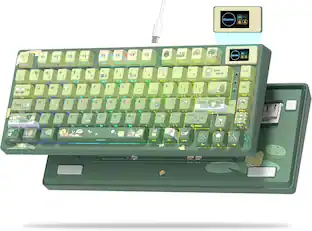
The L75 Keyboard is a compact 75% wireless keyboard with an 80-key layout and a multi-function knob, has number keys, function keys and arrow keys at the same time. The multi-function knob of the wireless gaming keyboard enables you to toggle Gaming/Office modes (long-press ~3s).
Gasket Mount Wireless Keyboard with Creamy Sound
The L75’s gasket mount design and five-layer sound dampening (sound-absorbing foam, switch pad, PET pad, switch foam and bottom silicone pad) produce a soft, creamy typing feel and a smooth thock. Pre-lubed stabilizers and plate foam further reduce noise for a quieter experience. Enjoy a satisfyingly silent yet responsive typing experience that’s a delight for prolonged use
South-facing LEDs RGB & Programable
The PC gaming keyboard has more than 16 built-in backlight modes, side light and south-facing LEDs. RGB effects and colors can be switched through the knob/software, or shortcut keys. With the L75 driver, all keys support macro customization, which allows you to record and edit macros to improve your work efficiency and speed up gameplay. Easily configure multiple profiles for different games or work settings
Hot-Swappable Creamy Keyboard with Pre-Lubed Switches
Customize your feel without soldering. The hot-swappable PCB supports both 3-pin and 5-pin mechanical switches, so you can easily experiment with different types (puller included). Each switch comes pre-lubed from the factory, and the stabilizers are precisely tuned. This delivers a smooth, wobble-free keystroke right out of the box, giving you a responsive foundation whether you're gaming or typing on this keyboard wireless.
Tri-Mode Wireless & Massive 4000mAh Battery
Connect this bluetooth keyboard to your workflow with seamless 2.4GHz, BT5.0, or wired USB-C options. The side-mounted switch lets you toggle between a PC, laptop, or tablet instantly. Worried about battery life on your wireless keyboard? A built-in 4000mAh battery and efficient power management deliver extended runtime for days of mixed-use gaming and typing, ensuring this computer keyboards stays ready when you are.
Specifications
- Lighting TypeRGBForm Factor75%Keyboard TechnologyMechanicalKey Switch BehaviorLinearConnection TypeWired, Wireless
Reviews
Rating 5 out of 5 stars with 3 reviews
The vast majority of our reviews come from verified purchases. Reviews from customers may include My Best Buy members, employees, and Tech Insider Network members (as tagged). Select reviewers may receive discounted products, promotional considerations or entries into drawings for honest, helpful reviews.





Compare similar products
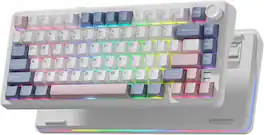
Gasket Structure with RGB Backlit, Pre-lubed Switches, Crystal Jelly PBT Keycaps, 2.4GHz/USB-C/BT5.0 Mode Keyboard
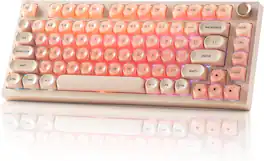
Hot Swappable, Pre-lubed Switches, Gasket Mount with MOA Profile Jelly Keycaps Gaming Keyboard
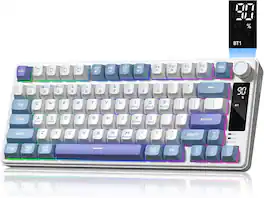
Tri-Mode 2.4GHz/USB-C/BT5.0, Anti-Ghosting No-Conflict Silent Membrane Keyboard for MAC Windows
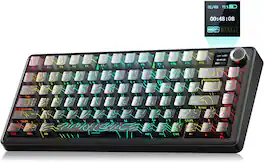
The AULA F75 Max is a compact 75% wireless computer keyboard built for both competitive gaming and everyday productivity. Pre-lubed mechanical switches on a gasket-mounted structure deliver a smooth, creamy typing feel and 1000Hz polling, tuned with layered sound dampening for a quiet, satisfying sound. Tri-mode connectivity pairs over Bluetooth 5.0, 2.4GHz wireless, or a wired USB-C to USB-A cable, switching across up to five devices, while plug-and-play USB keeps wired use simple. The space-saving compact 75% layout frees desk space for wide mouse movement, and full anti-ghosting keys with N-key rollover register every fast combo accurately. Vibrant RGB lighting with 16.8 million multicolor options illuminates the durable PBT keycaps for a fully customizable, illuminated setup. Built-in extras include a hot-swappable PCB for 3-pin and 5-pin switches, a multifunction control knob for volume, lighting, and modes, a TFT smart screen with a battery level indicator, a rechargeable 4000mAh battery for long wireless sessions, and an adjustable tilt kickstand. A driver lets you remap keys, record macros, assign programmable buttons, and use multimedia hot keys, so you can tailor the keyboard for gaming, work, or creative tasks. gift for teenage gamer, gift for gamer, gift for creator, gift for hard to buy for teen dad office gamer, gift for college student, gift for esports player, gift for streamer, birthday gift for gamer, WFH, satisfying work from home keyboard, style up your home office, home office vibes, battlestation upgrade, gaming setup aesthetic, desk setup upgrade, mechanical gaming keyboard, thocky keyboard, keyboard for Valorant, competitive FPS keyboard, hot-swappable keyboard, gasket mount keyboard, wireless gaming keyboard.
Specs
Customers often buy these together

Logitech - MK540 Full-size Advanced Wireless Membrane Keyboard and Mouse Combo for PC - Black
$48.22The price was $59.99![esc 1 ! 2 @ 3 # 4 $ 5 % 6 ^ 7 & 8 * 9 ( 0 ) - = | F1 F2 F3 F4 F5 F6 F7 F8 F9 F10 F11 F12 tab Q W E R T Y U I O P [ ] { } | caps A S D F G H J K L : : enter shift Z X C V B N M , < > ? shift ctrl alt fn ctrl](https://pisces.bbystatic.com/image2/BestBuy_US/images/products/bc5bce35-ca08-45da-bcc3-8d6fb215154b.jpg;maxHeight=232;maxWidth=233?format=webp)
Razer - Huntsman Mini 60% Wired Optical Clicky Switch Gaming Keyboard with Chroma RGB Backlighting - Black
$69.00The price was $119.99





![Sure, here is the corrected and grouped text from the image:
**Top Row:**
- ESC
- F1
- F2
- F3
- F4
- F5
- F6
- F7
- F8
- F9
- F10
- F11
- F12
- PRTSC
- DEL
**Number Row:**
- 1
- 2
- 3
- 4
- 5
- 6
- 7
- 8
- 9
- 0
- -
- =
- \
**Letter Row:**
- TAB
- Q
- W
- E
- R
- T
- Y
- U
- I
- O
- P
- [
- ]
- \
**Letter Row:**
- CAPS
- A
- S
- D
- F
- G
- H
- J
- K
- L
- ;
- '
**Letter Row:**
- SHIFT
- Z
- X
- C
- V
- B
- N
- M
- ,
- .
- /
**Function Row:**
-](https://pisces.bbystatic.com/image2/BestBuy_US/images/products/9be10b95-8e90-4a5d-b85f-cbc6a7d8e8df.png;maxHeight=232;maxWidth=233?format=webp)


![esc ~ ! 1 tab caps lock shift ctrl F2 Fl # 2 3 Q W A S Z start opt L F3 $ 4 E D X alt cmd3 ) FS F4 A % 5 6 R T F G V C logi 44 HI & F9 FID FB F7 F6 * ) - - & 0 8 9 7 O P U I Y K L H J > < N M 1 B PM + = { [ : I ; ? I alt cmd D 2 4 300 3 1 F12 . * page I insert home up clear backspace 8 9 + 7 page A pg up end down home } I delete ] / 6 4 5 4 enter 2 3 enter 1 dn Pg end shift = 0 del ins etrl fn opt](https://pisces.bbystatic.com/image2/BestBuy_US/images/products/6539/6539505_sd.jpg;maxHeight=232;maxWidth=233?format=webp)
![Esc F1 F2 F3 F4 F5 F6 F7 F8 F9 F10 F11 F12 Print Screen Scroll Lock Pause Break 1 2 3 4 5 6 7 8 9 0 - + = Backspace Insert Home H Page Up A Num Look 1 I Tab Q W E R T Y U I o P { [ } ] I I Delete End IN Page Down 7 Home 8 9 Pg Up Caps A Lock A S D F G H J K L ; : DE g Enter 4 5 6 Shift Z X C V N M < > ? I Shift 1 End 2 3 Pp Dn Enter Ctrl Alt Alt Ctrl 0 Ins Del](https://pisces.bbystatic.com/image2/BestBuy_US/images/products/a588d446-5678-40ae-86b8-1f15e0026e66.jpg;maxHeight=232;maxWidth=233?format=webp)

![Sure, here is the corrected and grouped text from the image:
---
**Top Row:**
- Esc
- F1 F2 F3 F4 F5 F6 F7 F8 F9 F10 F11 F12
**Second Row:**
- 1 ! 2 @ 3 # 4 $ 5 % 6 ^ 7 & 8 * 9 ( 0 ) - _ + =
**Third Row:**
- Tab Q W E R T Y U I O P [ { ] } \
**Fourth Row:**
- Caps Lock A S D F G H J K L ; ' Enter
**Fifth Row:**
- Shift Z X C V B N M , . / Shift
**Function Keys:**
- F1 F2 F3 F4 F5 F6 F7 F8 F9 F10 F11 F12
**Right Side:**
- Insert Home Page Up Delete End Page Down
**Bottom Row:**
- Ctrl Alt Spacebar Alt Ctrl
**Additional Keys:**
- Logi
- Scroll Lock
- Pause Break
---
This should match the layout of the keyboard in the image.](https://pisces.bbystatic.com/image2/BestBuy_US/images/products/0ce0f170-380c-41e4-8d6a-fa0aadbd534c.jpg;maxHeight=232;maxWidth=233?format=webp)
![Sure, here is the corrected and grouped text:
```
ESC F1 F2 F3 F4 F5 F6 F7 F8 F9 F10 F11 F12 1 2 3 logitech - - 1 2 # $ 4 % 5 6 & 7 8 9 0 - - back insert home page up num lock clear / . tab Q W E R T Y U I O P { [ } ] / delete end page down 7 home 8 A 9 P9 up + caps lock A S D F G H J K L : ; a enter 4 5 6 shift Z X C V B N M < > ? shift 1 end 2 3 pg dn enter ctrl fn start alt opt alt crnd x alt cmd x fn ctrl alt opt 0 ins del 1 logitech
```](https://pisces.bbystatic.com/image2/BestBuy_US/images/products/5761/5761911_sd.jpg;maxHeight=232;maxWidth=233?format=webp)
Customers ultimately bought
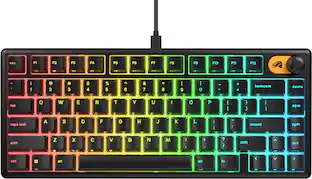 $47.99The price was $59.99

Explore tech essentials Sponsored
 $139.99The price was $199.99
 $179.99The price was $219.99
 $175.99The price was $219.99
 $143.99The price was $219.99
 $175.99The price was $249.99
Keep exploring
 $259.95The price was $359.95
 $199.95The price was $259.95