
Kenwood - DRV-A610WDP Dual camera system- Compact 4K HD dash camera w/ 2" display, Wi-Fi, and GPS) rear-view cam and SD Card - Black
Kenwood - DRV-A610WDP Dual camera system- Compact 4K HD dash camera w/ 2" display, Wi-Fi, and GPS) rear-view cam and SD Card - Black
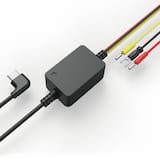
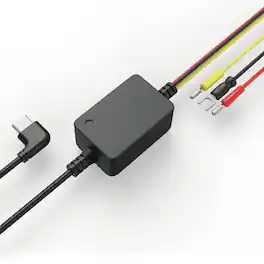
- Kenwood - Dashcam Hardwire Kit - Black$39.99
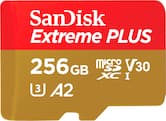
More Buying Options
Specifications
- Field of View136 degreesAutomatic Incident DetectionYesG-SensorYesRecording Resolution3840 x 2160 (4K)Forward Collision WarningNoCompatibilityFALSE
- Key Specs
- Field of View: 136 degrees
- Automatic Incident Detection: true
- G-Sensor: true
- Recording Resolution: 3840 x 2160 (4K) (Refers to the number of pixels, both horizontally and vertically, used to capture video. The higher the resolution the finer the video detail that can be seen.)
- Forward Collision Warning: false
- Compatibility: FALSE
- Wi-Fi Built-in: true (Able to connect directly to a wireless network without the use of an adapter.)
- Camera Mounting Location: Windshield, Rear window
- Vehicle Camera Type: Dashboard
- Professional Installation Recommended: false
- General
- Brand: Kenwood
- Model Number: DRV-A610WDP
- Product Name: DRV-A610WDP Dual camera system- Compact 4K HD dash camera w/ 2" display, Wi-Fi, and GPS) rear-view cam and SD Card
- Color: Black
- Vehicle Camera Type: Dashboard
- Professional Installation Recommended: false
- Recording & Playback
- Field of View: 136 degrees
- Automatic Incident Detection: true
- G-Sensor: true
- Recording Resolution: 3840 x 2160 (4K) (Refers to the number of pixels, both horizontally and vertically, used to capture video. The higher the resolution the finer the video detail that can be seen.)
- Frame Rate: 30 frames per second (The frequency at which consecutive images can be captured. The higher the frame rate, the more detail that can be captured.)
- Loop-Cycle Recording: Yes
- GPS Enabled: true
- Camera Power Source: Vehicle battery
- Expandable Memory Compatibility: microSD
- Recording Feature: true
- Alert
- Forward Collision Warning: false
- Go Alert: false
- Lane Departure Warning: false
- Traffic Camera Alert: false
- Compatibility
- Compatibility: FALSE
- App Compatible: true (The product can be connected to a program or software application on a mobile device, which then receives collected data from the product.)
- Wi-Fi Built-in: true (Able to connect directly to a wireless network without the use of an adapter.)
- Operating System Compatibility: Android, Apple iOS
- Features
- Lane Guidance: false
- Integrated Microphone: true
- Night Vision: false
- Remote Control Included: false
- Display
- Screen Included: true
- Screen Size: 2 inches (Size of the screen, measured diagonally from corner to corner.)
- Screen Resolution: 3840 x 2160 (Screens come in a range of resolutions (measured in pixels, horizontal x vertical). The higher the resolution, the greater the picture quality.)
- Mounting
- Camera Mounting Location: Windshield, Rear window
- Mount Included: true
- Mount Type: Adhesive
- Input
- Number Of Auxiliary Inputs: 0
- Number of USB Port(s): 1
- Dimensions
- Product Height: 1.68 inches (The out of box height of the item. Height is measured as the vertical distance from the bottom of the item to the top as it would be primarily used or placed.)
- Product Width: 0.96 inches (The out of box width of the item. Width is measured as the horizontal distance from one side of the item to the other as it would be primarily used or placed.)
- Product Depth: 2.3 inches (The out of box depth of the item. Depth is measured as the distance from the front of the item to the back as it would be primarily used or placed.)
- Product Weight: 1 pounds (The out of box weight of the item.)
- Warranty
- Warranty - Parts: 1 year
- Warranty - Labor: 1 year
- Other
- UPC: 019048239488
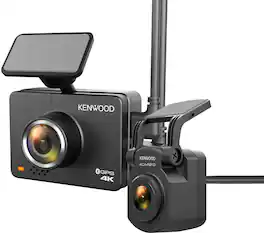
KENWOOD 4k Ultra HD Dashcam with Rear Camera
- GPS: Built-in GPS receiver tracks vehicle location and speed.
- 3-Axis G-Sensor: 3-axis G-sensor designed to detect a collision and GPS that records speed, latitude, and longitude.
- Super Capacitor: If power is lost, this prevents the recorded video file from being corrupted, as it provides enough power to allow the video file to close properly.
- Built-In Motion Sensor: Automatic recording when nearby person or object movement is detected.
- Smartphone App W/OTA Software Updates: Connect your smartphone to access and save video files as well as update receiver software with a Bluetooth and Wi-Fi connection.
- Rear Camera: IP67-rated interior or exterior rear camera for DRV-A610WDP with Wide Quad HD 2560x1440 resolution.
- Parking Mode: Capable of parking mode when paired with the CA-DR1130 hardwire kit.
- GPS: Built-in GPS receiver tracks vehicle location and speed.
- 3-Axis G-Sensor: 3-axis G-sensor designed to detect a collision and GPS that records speed, latitude, and longitude.
- Super Capacitor: If power is lost, this prevents the recorded video file from being corrupted, as it provides enough power to allow the video file to close properly.
- Built-In Motion Sensor: Automatic recording when nearby person or object movement is detected.
- Smartphone App W/OTA Software Updates: Connect your smartphone to access and save video files as well as update receiver software with a Bluetooth and Wi-Fi connection.
- Rear Camera: IP67-rated interior or exterior rear camera for DRV-A610WDP with Wide Quad HD 2560x1440 resolution.
- Parking Mode: Capable of parking mode when paired with the CA-DR1130 hardwire kit.
Whats Included
- Front Camera
- Rear Camera
- Power Cable
- Rear Camera Power Cable
- Windshield Mount
- Front Camera
- Rear Camera
- Power Cable
- Rear Camera Power Cable
- Windshield Mount
Q: Can I connect this dashcam to my phone?
A: Yes, you can connect your smartphone to the dashcam using Bluetooth and Wi-Fi to access and save video files, as well as update the software.
Q: Does this Kenwood dashcam come with a rear camera?
A: Yes, the Kenwood 4K Ultra HD Dashcam includes a rear camera.
Q: What is the recording resolution of this dashcam?
A: This dashcam records videos at a resolution of 3840 x 2160 (4K).
Q: How does the dashcam know when to start recording?
A: The dashcam has a built-in motion sensor that automatically starts recording when it detects movement nearby.
Q: Does the dashcam have a parking mode?
A: Yes, the dashcam is capable of parking mode, but it requires the CA-DR1130 hardwire kit.
Q: Does the camera have the ability to operate while car is turned off?
A: Yes, but you need to get the additional power kit.
A: Hello Valued Customer, thank you for sharing your question! You can review the content on the DRV-A610WDP dash camera in three different ways. First, you can watch on the device itself. Hit the Menu button and scroll to playback the clip you choose. Second, you can download the free Kenwood Dash Cam Manager APP from the Apple store or Google Play store. In this case you will have to enable your wi-fi & bluetooth on your phone, to see the individual clips. Finally, you can remove the SD card from the camera and select and play any of the files. If you have any additional questions you may reach out to 800-536-9663 or email us at [email protected]. Thank you for choosing KENWOOD!
Compare similar products
KENWOOD 4k Ultra HD Dashcam with Rear Camera

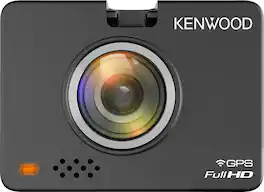
When it comes to capturing road incidents or helping you drive safely, the Q200 has you covered. Equipped with a high-resolution 2K QHD image sensor, the Q200 lets you capture every moment of your drive in crystal-clear detail, even in low-light conditions. The Q200 can also help you stay safe while you drive with alerts for lane departures and forward collisions. You can adjust settings or download files on the go thanks to its built-in Wi-Fi, and safeguard your parked vehicle with the Q200’s advanced Parking Surveillance mode.
| Pros for Kenwood - DRV-A610WDP Dual camera system- Compact 4K HD dash camera w/ 2" display, Wi-Fi, and GPS) rear-view cam and SD Card - Black | |||
|---|---|---|---|
| Video Quality, Overall Performance, Ease of use, Size | Video Quality, Overall Performance, Ease of use, GPS, Installation | Video Quality, Overall Performance, Size, Ease of Use | Overall Performance, Installation Ease |
| Cons for Kenwood - DRV-A610WDP Dual camera system- Compact 4K HD dash camera w/ 2" display, Wi-Fi, and GPS) rear-view cam and SD Card - Black | |||
| App Software | App Connectivity, Sensitivity, Rear Camera, Screen | Connectivity, SD Card | There were no cons for this product— |
Specs
Reviews
Customers are saying
Customers are pleased with the DRV-A610WDP dash camera's video quality, compact size, and ease of use. The inclusion of a rear camera is also a valued feature. However, some customers have expressed concerns regarding the app software.
Customer Images
The vast majority of our reviews come from verified purchases. Reviews from customers may include My Best Buy members, employees, and Tech Insider Network members (as tagged). Select reviewers may receive discounted products, promotional considerations or entries into drawings for honest, helpful reviews.
- Rated 4 out of 5 stars
Amazing quality videos. Hard do hide wires!
I installed this camera in my wife's car a few days ago, and so far, I'm impressed with the video quality. Packaging: The packaging is attractive and well-built. There are two boxes inside, one for each camera. The package is easy to open and includes all the necessary accessories. Installation: Attaching the camera to the windshield is easy, but running the wire along the edge of the windshield and hiding it under the car’s upholstery is not. The wire attachment stickers are too bulky and not well-designed for discreet placement. Once the wires are connected and the power is plugged in, the camera turns on right away. Navigating the camera menu: It takes some time to get used to the menu navigation and to figure out what each button does. A better design would be to switch the power and rear camera outlets to the right, and bring the buttons to the left, making them more visible to the driver. iOS App: I downloaded the app on my phone and was able to connect to the camera via Bluetooth. However, playing videos on my phone was slow, often resulting in a frozen single image instead of a smooth video. Overall: I bought this camera for protection and to have evidence in case of accidents or vandalism. So far, I haven’t needed to use it for that purpose, and I hope I never will. That said, I feel more secure having this dashcam. I would recommend it, especially for use in busy cities or for inexperienced drivers.
Charlottean Posted
- Rated 4 out of 5 stars
A dash camera that just works
I upgraded my dash cam to this Kenwood after my last one died. I wanted something with more reliable software and a rear camera, as well as a front camera. After getting into an accident where we disagreed on who was at fault, I installed cameras in all the cars. Like most other cameras, it struggles to pick up license plates. However, the recordings are clear, and it has worked every day, which is the vital thing. The menu and app are easy to understand, and no frills, exactly what you want in a menu and app like this. Easy to get into, do what you want, and get out. Overall, I recommend this camera, as it works reliably every day and doesn't require constant adjustments or reformatting, unlike some other models I've used. I recommend using a larger micro SD card with it, and be sure to buy a micro SD card designed for dash cams that can be written over many times, as the basic ones will fail after a while. Other than that, everything is in the box. The installation varies by car. I recommend a hardwire kit for a cleaner look, and if you're not comfortable doing the installation, Geek Squad will do a good job. Other than that, the installation consists of pushing cables up into the roof panel, it was the same as any other dash cam.
pwaltz Posted
- Rated 4 out of 5 stars
Super compact and great picture quality
The resolution and image quality during daylight is amazing. Havent had a chance to test out the low light performance. The main cam is 4k and rear is 1440. I haven’t got the rear cam mounted yet but is just a single cord and double face tape. It does come with a micro sd card but it is hard to remove and put back in, but should not need to when using the app!
Jheint Posted