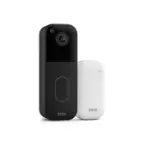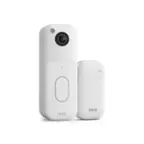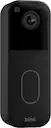
Blink - Video Doorbell - Head-to-toe HD view, two-year battery, simple setup, Required Sync Module Not included - Black
Blink - Video Doorbell - Head-to-toe HD view, two-year battery, simple setup, Required Sync Module Not included - Black
Color
BlackRelated Item

Highlights
- Key Specs
- Camera Resolution: 1440 x 1440 (Refers to the number of pixels, both horizontally and vertically, used to capture video/images. The higher the resolution the finer the detail that can be seen.)
- Storage Type: Cloud
- General
- Brand: Blink
- Model Number: B0DGQVYW2K
- Product Name: Blink Video Doorbell - Head-to-toe HD view, two-year battery, simple setup, Required Sync Module Not included
- Color: Black
- Camera
- Camera Resolution: 1440 x 1440 (Refers to the number of pixels, both horizontally and vertically, used to capture video/images. The higher the resolution the finer the detail that can be seen.)
- Power
- Power Source: Battery-powered
- Rechargeable Battery: false
- Compatibility
- App Compatible: true (The product can be connected to a program or software application on a mobile device, which then receives collected data from the product.)
- Connectivity
- Camera Connectivity: Wireless (Security system cameras can be set up in several ways. Wired cameras require cables for power and footage transmission, while wire-free cameras don't need cables for either. Wireless cameras still require cables for receiving power but are able to transmit footage via a wireless network.)
- Chime: Connects to existing
- Storage
- Storage Type: Cloud
- Dimensions
- Product Height: 1.4409 inches (The out of box height of the item. Height is measured as the vertical distance from the bottom of the item to the top as it would be primarily used or placed.)
- Product Width: 1.8504 inches (The out of box width of the item. Width is measured as the horizontal distance from one side of the item to the other as it would be primarily used or placed.)
- Product Depth: 5.1181 inches (The out of box depth of the item. Depth is measured as the distance from the front of the item to the back as it would be primarily used or placed.)
- Product Weight: 0.2594 pounds (The out of box weight of the item.)
- Warranty
- Warranty - Parts: 1 year limited
- Warranty - Labor: Not applicable
- Other
- UPC: 840414642478
Head-to-toe HD view, two-year battery, simple setup, Sync Module Core Not included – Add-On (Black)
- Second Generation: Video Doorbell is our second-generation smart security doorbell with up to two years of battery life, an expanded field of view, and improved security features for more peace of mind, no matter where you are.
- Last longer with two-year battery life: Experience up to two years of continuous security coverage with three AA Energizer lithium batteries and a Blink Sync Module (sold separately).
- See more at your door: Greet guests and watch packages get delivered, day and night, with head-to-toe HD view and infrared night vision. Use two-way talk to hear and speak through the Blink app.
- Set up in minutes: Easily install wire-free or connect Video Doorbell to existing doorbell wiring. When wired, Video Doorbell will sound through your home. Without wiring, you can use your Blink Mini 2 camera (sold separately) as an indoor plug-in chime. You'll also get alerts on your Blink app with each doorbell press.
- Always know who's there: As part of a Blink Subscription Plan (sold separately), get alerts whenever a person is detected and enjoy features like Blink Moments, which stitches together clips into a single video to save and share.
- Save and share clips: Securely store your footage in the cloud with a free 30-day trial of a Blink Subscription Plan (sold separately).
- Works with Alexa: Connect to an Alexa-enabled device to answer the front door, arm and disarm your smart home system, and more using your voice.
Whats Included
- Video Doorbell
- three AA Energizer lithium batteries
- USB-C cable
- indoor power adapter
- mounting kit (including screws and anchors)
- corner mount
Q: Can you use an sd card for local storage with the new blink video doorbell? -MH
A: Hi there! You can use local storage by plugging a USB drive into a Sync Module 2 or a micro SD card into a Sync Module XR, however this model doesn't come with either. This particular listing is for adding a doorbell to an existing Blink system that already features a Sync Module. If you'd like the Blink Video Doorbell you see here, I'd suggest picking up a separate Sync Module 2 to use the USB storage. If you run into any issues setting things up, you can always reach out via the app for some help. Personally I had to eject the USB drive in the app and re-insert it once or twice before things started working properly. I hope that helps, have a great rest of your day!
Q: Can you mount on the same mount as the 1st generation.
A: Hello, Suflae! The Blink Video Doorbell 2nd generation would not mount onto a 1st generation mount. However, the Blink Video Doorbell 2nd generation comes with a unique mount (along with mounting accessories such as screws) you would be able to install instead. Thanks for the question, have a great day!
A: I recently set up the Blink Video Doorbell and, yes, this new model requires a Sync Module to work properly. I already had one from my other Blink devices, and it connected easily. Without a Sync Module, you can still get motion alerts, but live view and full functionality won’t work. So make sure you have a module or get one separately.
A: Hello Monica and thank you for your question! The Blink Video Doorbell requires a stable Wi-Fi connection to work, you can use your home Wi-Fi for this connection. In addition to Wi-Fi the Blink Video Doorbell also requires a Sync Module. Unfortunately, this model does not include a Sync Module. This can be purchased separately or bundled with the Doorbell. Hope this helps! Have a great day!
Q: Can best buy install the doorbell
A: Yes, Best Buy/Geek Squad can install your Blink Video Doorbell if you purchase the installation service
Q: How do i hard wire the blink camera
A: To hard‑wire your Blink Video Doorbell, you connect it to your existing doorbell wiring so it can ring your indoor chime when someone presses the button. Here’s the basic process: Turn off power at your home’s breaker before you start — this is very important for safety. Remove your old doorbell button and the existing wiring. Use the wire extenders included with the Blink Video Doorbell to connect your home’s low‑voltage doorbell wires (typically 16–24 VAC) to the terminals on the back of the Blink doorbell. Mount the back plate and doorbell to your wall using the included screws and anchors. Restore power at the breaker, then finish setup in the Blink app. The app will help you confirm wiring and chime compatibility. Even when wired, the Blink doorbell still uses its internal batteries to operate.
A: Yes — the Blink Video Doorbell has two‑way audio, so you can hear and talk to visitors at your door through the Blink app on your phone or tablet. When someone presses the doorbell or motion is detected, you’ll get a notification, and you can open the app to see the video and speak with the person using your device’s microphone and speaker. This means you don’t need to be at home to talk to someone — you can do it remotely through the app.
Q: Where is the bell that rings
A: he Blink Video Doorbell doesn’t include a traditional chime inside the box. To make it ring, you can either: Use an existing doorbell chime — the doorbell wires can trigger your home’s current chime when pressed. Use the Blink app — you’ll get instant notifications on your phone or tablet whenever someone presses the doorbell or motion is detected. You can also hear and speak to visitors through the app. So, the “bell” is either your existing chime or your mobile device — the Blink Video Doorbell itself doesn’t have a built-in speaker that rings like a traditional bell.
Compare similar products

Head-to-toe HD view, two-year battery, simple setup, Sync Module Core Not included – Add-On (Black)

Smart security that is designed for every home. Set up in minutes, and receive notifications from the app whenever a visitor presses your Video Doorbell or motion is detected. You can also choose to wire it to sound your existing home chime. Blink Video Doorbell lets you answer your door no matter where you are. Receive customizable alerts right from the Blink Home Monitor app, and experience helpful features like HD day and night video and two-way audio. Best part – Blink’s long-battery life technology provides peace of mind for up to two years.

For exceptional front door and yard security, choose Tapo D205. Witness every detail in 2K resolution and ensure there are no blind spots with the expansive 160° head-to-toe field of view. Enjoy wire-free convenience for up to 6 months thanks to the long-lasting battery. Choose flexible storage options with a microSD card (sold separately) or cloud storage with a Tapo Care subscription. The free smart AI feature detects people visiting your door, keeping you informed without any hidden fees. Finally, the doorbell offers clear night vision for substantial security even in the darkest conditions.
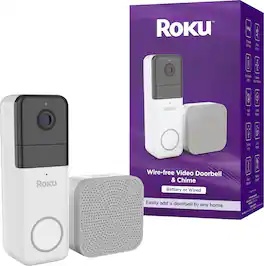
Keep an eye on the entrance to your house, apartment, or wherever you call home with Roku Wire-free Video Doorbell & Chime. Get detailed, day-or-night video of your front door streamed right to the Roku Smart Home mobile app or any Roku TV or Player. Customizable sound and motion alerts let you see who’s there and answer the door right away (or pretend you’re not home) with crisp two-way audio. Choose your own chime tone and set it anywhere in your home to get alerts when you don’t have your smartphone handy. The guided setup is surprisingly simple for any home, even if you don’t have an existing doorbell—no electrician’s license required.
| Pros for Blink - Video Doorbell - Head-to-toe HD view, two-year battery, simple setup, Required Sync Module Not included - Black | |||
|---|---|---|---|
| Image Quality, Ease of Use, Field of View, Safety | There were no pros for this product— | Picture Quality, Battery Life | There were no pros for this product— |
Specs




Reviews
Customers are saying
Customers are enthusiastic about the Video Doorbell's performance. Users report that the image quality is great when the doorbell button is pressed. Overall, the video doorbell seems to be working fine for users.
Customer Images
The vast majority of our reviews come from verified purchases. Reviews from customers may include My Best Buy members, employees, and Tech Insider Network members (as tagged). Select reviewers may receive discounted products, promotional considerations or entries into drawings for honest, helpful reviews.
- Rated 5 out of 5 stars
Doorbell Review
I absolutely love my Blink Doorbell! From setup to daily use, it has exceeded my expectations. Installation was super simple — the instructions were clear and took less than 10 minutes to complete. The video quality is crisp and clear, even at night, which gives me extra peace of mind knowing I can see who’s at the door at all times.
brandonmateus Posted
- Rated 5 out of 5 stars
best door bell camera
Easy installation and syncing with sync module, 2year battery life is great not to mention picture and video quality
MannyC Posted
- Rated 5 out of 5 stars
Love Blink!!!
I recently installed the Blink Video Doorbell and it works perfectly with my entire Blink system. The video is clear, day or night, and motion detection is very accurate. Notifications arrive instantly on my phone, and the two-way audio is clear and reliable. Setup was straightforward, and it seamlessly integrates with my other Blink cameras and devices. It’s a great addition to my home security system and makes monitoring my front door effortless. Highly recommended for anyone using Blink products!
This review is from Blink - Video Doorbell - Head-to-toe HD view, two-year battery, simple setup, Required Sync Module Not included - White
EdgarZ Posted