Alienware - AW3225QF 31.6" QD-OLED Curved 4K UHD 240Hz .03-ms G-SYNC Compatible Gaming Monitor with HDR (HDMI, USB-C) - Lunar Light
Alienware - AW3225QF 31.6" QD-OLED Curved 4K UHD 240Hz .03-ms G-SYNC Compatible Gaming Monitor with HDR (HDMI, USB-C) - Lunar Light
- Dell - DA305 6-in-1 USB-C Universal Multiport Adapter Docking Station - Gray$79.99

More Buying Options

Highlights
- Key Specs
- Refresh Rate: 240Hz (The number of frames per second the device can produce natively without enhancement. Higher rates help produce smooth, seamless pictures.)
- Maximum Resolution: 3840 x 2160 (Maximum resolution refers to the highest number of pixels that a screen can process and display. Higher resolution signals produce more detailed images.)
- Response Time: 0.03 milliseconds (The speed at which pixels can change colors is called response time. It is measured in milliseconds (ms).)
- Panel Type: Not Applicable (Technology that affects response time and image quality.)
- Synchronization Technology: G-SYNC Compatible (NVIDIA Adaptive Sync), VESA Adaptive-Sync (Generally, these technologies allow syncing between a computer/console game's frame rate and the device's refresh rate for a smoother display without tearing.)
- Screen Size: 31.6 inches (Size of the screen, measured diagonally from corner to corner.)
- OLED Technology: QD-OLED
- Display Connector(s): 1 x DisplayPort 1.4, 2 x HDMI 2.1 (The number and type of connectors used to connect to an external display.)
- General
- Brand: Alienware
- Model Number: AW3225QF
- Product Name: AW3225QF 31.6" QD-OLED Curved 4K UHD 240Hz .03-ms G-SYNC Compatible Gaming Monitor with HDR (HDMI, USB-C)
- Color: Lunar Light
- Operating System Compatibility: Windows, Chrome, Apple iOS, Linux
- Display
- Refresh Rate: 240Hz (The number of frames per second the device can produce natively without enhancement. Higher rates help produce smooth, seamless pictures.)
- Maximum Resolution: 3840 x 2160 (Maximum resolution refers to the highest number of pixels that a screen can process and display. Higher resolution signals produce more detailed images.)
- Contrast Ratio: 1,500,000:1 (Measured difference between a displayed image's brightest whites and darkest blacks. The larger the first number, the more detail and color that can be displayed.)
- Response Time: 0.03 milliseconds (The speed at which pixels can change colors is called response time. It is measured in milliseconds (ms).)
- Display Type: OLED
- Panel Type: Not Applicable (Technology that affects response time and image quality.)
- Synchronization Technology: G-SYNC Compatible (NVIDIA Adaptive Sync), VESA Adaptive-Sync (Generally, these technologies allow syncing between a computer/console game's frame rate and the device's refresh rate for a smoother display without tearing.)
- Aspect Ratio: 16:9 (The measurement of the width of a screen compared to the height of a screen, expressed as a ratio.)
- Curved Screen: true
- Pixel Density: 140 pixels per inch (The number of pixels present per inch on the device's display. Higher pixel density improves the clarity and sharpness of the displayed image.)
- Brightness: 1000 candela per square meter (A measure of the total light output.)
- Screen Size: 31.6 inches (Size of the screen, measured diagonally from corner to corner.)
- High Dynamic Range (HDR): true (An HDR-compatible 4K TV or other HDR-compatible product displays HDR video content when it's available from sources like 4K Ultra HD Blu-ray Discs and 4K streaming services.)
- High Dynamic Range Format: Dolby Vision, VESA Certified DisplayHDR 400 True Black (There are a few HDR formats that tell the TV or other HDR-compatible product how to best utilize its capabilities to display HDR content. HDR technology can support one or multiple formats, each with various benefits to picture quality.)
- Horizontal Viewing Angle: 178 degrees (The maximum angle at which the display can be viewed with acceptable visual performance from either side.)
- Vertical Viewing Angle: 178 degrees (The maximum angle at which the display can be viewed with acceptable visual performance from above or below.)
- Touch Screen: false (Touch-screen devices make navigating more intuitive. Using a touch-screen display, you can do things such as tap to select, hold and drag to move items, swipe to scroll, and pinch to zoom.)
- On-Screen Display Languages: English, French, Spanish, Portuguese (The available language options for displayed text.)
- Display Surface: Anti-reflective
- OLED Technology: QD-OLED
- Connectivity
- Number of DisplayPort Inputs (Total): 1
- Number of HDMI Inputs (Total): 2
- Number of VGA Ports: 0 (VGA (Video Graphics Adapter or Video Graphics Array) is a display standard that transmits via analog signals. This type of interface is typically used to connect a computer to a display device such as a monitor, projector, or TV.)
- Number of DVI Inputs: 0 (The number of digital cables carrying analog (VGA) video signals that can be connected to the product.)
- Number of Mini DisplayPort Inputs: 0
- Number of Thunderbolt Ports (Total): 0
- Display Connector(s): 1 x DisplayPort 1.4, 2 x HDMI 2.1 (The number and type of connectors used to connect to an external display.)
- Number of USB Ports (Total): 5
- USB Ports: 1 x USB-C 3.2, 3 x USB-A 3.2, 1 x USB-B (The number and type of USB ports the product has.)
- Number of USB-C Charging Ports: 1
- Number of USB-B Ports: 1
- Headphone Jack: false (The device features an interface that allows for the connection of headphones.)
- Compatibility
- Wall Mountable: true (The product is able to be secured to a wall. Some products are designed ready to mount, while others may require additional hardware/accessories for installation.)
- VESA Wall Mount Standard: 100mm x 100mm (VESA wall mount standards refer to the spacing of screw holes built into a TV in order to fit with standard TV wall mounts. These standards are implemented into most TVs and monitors.)
- Voice Assistant Built-in: Not Applicable (A digital assistant built into the device that uses voice commands to answer questions and control smart devices.)
- Features
- Tiltable: true
- Adjustable Stand Height: true
- Anti-Glare: false (Product has features, such as a matte finish, that reduce the likelihood for screen glare.)
- Eye Relief Features: Flicker free, Low blue light
- Built-In Webcam: false
- Integrated Speaker(s): false
- Dimensions
- Product Height With Stand: 22.94 inches
- Product Height Without Stand: 16.61 inches
- Product Width: 28.17 inches (The out of box width of the item. Width is measured as the horizontal distance from one side of the item to the other as it would be primarily used or placed.)
- Product Depth (With Stand): 12.04 inches
- Product Depth Without Stand: 4.19 inches
- Product Weight: 13.23 pounds (The out of box weight of the item.)
- Stand Included: true
- Stand Width: 16.96 inches (The horizontal measurement of the stand/base, or the distance from the outside of one leg to the outside of the opposite leg, as it is attached to the product.)
- Power
- Power Consumption: 42.5 watts
- Power Saving/Off Mode: 0.3 watts (This mode will turn the display and/or the device off, or into a standby mode, after a preset length of time with no activity to conserve power.)
- Certifications Listings & Approvals
- ENERGY STAR Certified: false (Devices carrying the ENERGY STAR service mark, such as computer products and peripherals, kitchen appliances, and other products, generally use 20% to 30% less energy than required by federal standards.)
- EPEAT Qualified: false (The Electronic Product Environmental Assessment Tool (EPEAT) was designed to provide an environmental assessment tool for purchasers. In order to qualify for EPEAT, a product must meet all 23 required criteria.)
- Warranty
- Warranty - Parts: 3-Year Advanced Exchange Service and Premium Panel Exchange
- Warranty - Labor: 3-Year Advanced Exchange Service and Premium Panel Exchange
- Other
- UPC: 884116467175
The world’s first 4K QD-OLED gaming monitor has arrived. The AW3225QF delivers ultimate visual fidelity with 4K resolution, Dolby Vision, a 240Hz refresh rate, and 0.03 ms minimum response time, plus superb color performance.
- OLED Display with Quantum Dot Display Technology: Quantum Dot Display Technology with OLED enables a slim panel design and delivers a superior color performance with a higher peak luminance and greater color gamut range.
- 3840 x 2160 4K resolution: 4K resolution (3840x2160) delivers incredible detail on advanced QD-OLED panel.
- Infinite contrast ratio: 1000000:1 contrast ratio ensures deep, inky blacks and stunning brights at peak luminance of 1000nits, all in the same scene
- DCI-P3 99% Color Coverage: DCI-P3 99% color coverage and Delta E < 2 accuracy for vivid, lifelike colors.
- 240Hz Refresh Rate: Up to 240Hz refresh rate enables excellent motion clarity.
- 0.03ms response time GtG (Gray to Gray): Near-instantaneous 0.03 ms gray-to-gray min. response time virtually eliminates blurring and ghosting.
- 1700R curved screen: 1700R curved screen for greater eye comfort and visual immersion.
- NVIDIA G-SYNC Compatible and VESA AdaptiveSync: NVIDIA G-SYNC Compatible and VESA AdaptiveSync for tear-free, stutter-free visuals.
- 3-zone AlienFX lighting: 3-zone AlienFX lighting evokes premium, customizable presence on desktop.
- 3-year Advanced Exchange Service: Three-year Advanced Exchange Service warranty that includes OLED burn-in coverage.
Whats Included
- AW3225QF Gaming Monitor
- Stand riser and base
- Power cable
- HDMI 2.1 FRL cable
- DisplayPort to DisplayPort 1.4 cable
- USB 3.2 Gen 1 (5 Gbps) upstream cable
- Microfiber cloth
- Quick setup guide
- Safety Information
Q: Does this Alienware monitor have speakers?
A: No, this monitor does not have built-in speakers.
Q: What kind of display technology does this monitor use?
A: This monitor uses OLED display technology with Quantum Dot technology.
Q: Does this monitor support HDR, and if so, what format?
A: Yes, this monitor supports HDR and uses the Dolby Vision format.
Q: What is the color coverage provided by this monitor?
A: This monitor provides DCI-P3 99% color coverage.
Q: Is this monitor compatible with NVIDIA G-SYNC?
A: Yes, it is compatible with NVIDIA G-SYNC and VESA AdaptiveSync.
Q: What is the response time of this monitor?
A: This monitor boasts a near-instantaneous 0.03 ms gray-to-gray minimum response time.
Q: Does it support a vesa mount?
A: This monitor comes with VESA mounting holes(100 mm x 100 mm - behind VESA Cover) that can be used to wall mount the monitor using VESA compatible wall mount kit (100 mm x 100 mm).
A: Unfortunately, this model monitor does not have a headphone jack for speakers. A couple of options could be; Connect the PS5 DualSense controller using the 3.5mm jack, Use an HDMI audio extractor, or Connect the PS5 using a bluetooth adapter and USB port.
Compare similar products
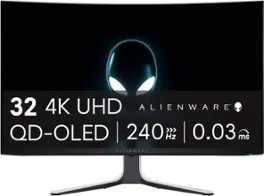
The world’s first 4K QD-OLED gaming monitor has arrived. The AW3225QF delivers ultimate visual fidelity with 4K resolution, Dolby Vision, a 240Hz refresh rate, and 0.03 ms minimum response time, plus superb color performance.

Alienware 34 240Hz QD-OLED Gaming Monitor - AW3425DW. Meet unmatched immersion with an ultrawide 34" QD-OLED, delivering greater speed and a striking new design.

Take command of every battle with a 32" 4K UHD (3840 x 2160) glossy OLED display engineered for gamers who demand more. Experience the ultimate balance of clarity and speed with Dual-Mode refresh rates—crisp 4K UHD at 165Hz for immersive story-driven play, or Full HD at an electrifying 330Hz¹ when every millisecond counts. With an ultra-fast 0.03ms response time, you’ll react instantly, keeping gameplay sharp and responsive. VESA DisplayHDR True Black 400 and up to 98.5% DCI-P3 color coverage reveal stunning contrast, deep blacks, and vivid detail that bring worlds to life. NVIDIA G-SYNC compatablity and AMD FreeSync Premium Pro keeps frames smooth and tear-free. Complete with a tilt, swivel, height, and pivot adjustable stand, this UltraGear OLED monitor adapts to your perfect setup. Built for performance, precision, and comfort—it’s everything you need to stay ahead of the competition.

Experience lightning-quick speed with up to a 240Hz refresh rate¹ and 0.03ms response time on a huge 34 Inch WQHD curved OLED monitor. The steep 800R curve surrounds you in the action. And with the 240Hz refresh rate, and 0.03ms response time, the action is fast, the play seamless and precise. Dive into UltraGear OLED’s immaculate visuals with up to 98.5% of DCI-P3 color coverage and a 1,500,000:1 contrast ratio for stunning blacks and vibrant colors. Adaptive sync technologies FreeSync Premium Pro and NVIDIA G-SYNC compatibility ensure tear-free, stutter-free performance, whether you're on PC or next-gen consoles. Plus, the UltraGear's 2-year OLED limited warranty and OLED Care features give you peace of mind, keeping your UltraGear monitor in top shape. Designed for gamers, the virtually borderless design complements any gaming setup, with height, tilt, and swivel adjustments for optimal comfort. The RBG backlighting creates the mood that’ll upgrade any battlestation.
| Pros for Alienware - AW3225QF 31.6" QD-OLED Curved 4K UHD 240Hz .03-ms G-SYNC Compatible Gaming Monitor with HDR (HDMI, USB-C) - Lunar Light | |||
|---|---|---|---|
| Picture Quality, Refresh Rate, OLED Quality, Color, HDR | Refresh Rate, Connectivity, Color Quality, Contrast, HDR Performance | Picture Quality, OLED Quality, Refresh Rate, Black Levels, Performance | OLED Quality, Refresh Rate, Connectivity, Overall Performance, Design |
| Cons for Alienware - AW3225QF 31.6" QD-OLED Curved 4K UHD 240Hz .03-ms G-SYNC Compatible Gaming Monitor with HDR (HDMI, USB-C) - Lunar Light | |||
| Audio, Price, Connectivity, Ghosting | Speakers | Flickering | Screen Type |
Specs
Reviews
Customers are saying
Customers are satisfied with the AW3225QF monitor's picture quality, smooth refresh rates, and vibrant colors. The OLED quality and HDR performance also receive positive feedback. Some customers feel that built-in audio should be included, while others express concerns about the price. A few customers have noted the lack of an aux port.
Customer Images
The vast majority of our reviews come from verified purchases. Reviews from customers may include My Best Buy members, employees, and Tech Insider Network members (as tagged). Select reviewers may receive discounted products, promotional considerations or entries into drawings for honest, helpful reviews.
- Rated 5 out of 5 stars
A monster of a monitor. Worth every dollar.
Here’s the thing: this screen changes how games feel. The clarity, the motion, the HDR… everything hits at a different level. I’ve used plenty of high-end displays before, but the AW3225QF stands out the moment you turn it on. The colors are rich without looking fake, the blacks are actually black, and 240 Hz on an OLED this size feels unreal. I use it for fast shooters, story games, and movies in my dorm, and it handles all of it without breaking a sweat. No weird setup stress either, plug it in, tweak a few settings, and you’re good. The curve feels natural, not extreme, and the build quality is exactly what you expect from Alienware. If you’re looking for something that genuinely upgrades your whole setup instead of being just another piece of gear, this is the one.
KZMH Posted
- Rated 5 out of 5 stars
Alienware - AW3225QF
I will start off by saying this monitor is good out of the box. It definitely needs tweaking, as all monitors do. My first 4k monitor so there was a learning curve. Once tweaked, this monitor is outstanding! Not a fan of OLED TV's due to lack of brightness, but that is not an issue with this monitor. I actually have the brightness turned down. Dolby vision actually works but can be finicky with windows 11. I leave it off unless watching a movie. Games are where this monitor really shines, but everything looks great. I came from a 27" 240 hz 1440p monitor and already can never go back. I mainly play open world titles and found out getting so immersed in the scenery can get you killed, LOL. Colors pop, brightness can go higher than you will want and no refresh flickering. No ghosting. I initially put this on an articulating arm mount, but switched to the included stand. It looks so good on it and is 100% stable with no wobble. Height, swivel and tilt adjustments with excellent cable management. I have not really used the USB hub functions. I just have the USB data cable connected for Alienware command center functionality, but this also enables hub function. Dont install Dell monitor control software. It doesnt play well with the Alienware. You dont need it anyway, just the Dell monitor driver. Update to the latest firmware as it adds HDR Peak 1000 Bright in addition to the already present HDR Peak 1000. You can get much better colors using HDR custom color though. Got it on sale and could not be happier. The curve is perfect for field of view. I have never had curved before and now wonder why. Take your time with adjustments and research while doing so. Once done, you will have the perfect monitor.
Vizio Posted
- Rated 5 out of 5 stars
2 years post release and still one of the best
For well over a year the Alienware AW3225QF was a certain review website's top pick for a gaming OLED. It's still a top choice, but newer fancier models from a couple of other manufacturers have supplanted it as top dog. Mainly because those newer monitors are capable of 480Hz refresh rate. I'm of the opinion that short of a few features, this monitor still outperforms those newer models in the 240Hz and below refresh category. There are very few negatives to speak of, so I may as well get them out of the way first. - No DisplayPort 2.1 support TBF I don't think there were ANY DP2.1 monitors when this first released. Even now there are only a handful of monitors with such outputs, but DSC-less 4k@240Hz would be a nice feature to have. - Noticeable flicker when G-Sync/VRR is enabled I don't think this is specific to this monitor, but happens with most if not all of them. Still, it's a negative and as such needs to be mentioned. If you disable VRR it goes away, but if you want to use VRR you can minimize the occurrence of flickering by keeping your FPS as stable as possible. Large swings in FPS make the flickering more pronounced. - Blacks look purplish in a bright room Most OLED TVs/monitors suffer some sort of loss in depth of blacks if the ambient light in the room is too high. Usually appears as either washed out blacks or, as is the case here, this sort of purple hue in the black shades. Fortunately the room I game in has only one window and I have a blackout curtain, so this doesn't effect me. - Screen finish is extremely fragile Be careful when cleaning this screen! I cannot stress this enough Stick with a microfiber cloth and distilled water. Do not get fingerprints or anything other than dust on the screen or the chances of scratching it go up dramatically. The first monitor I purchased came with what appeared to be a spec of glue on the display that I didn't even notice until the return date had passed. When I went to clean it off it made a rather large area (3-4" x 2-3") in the top left of the screen that had micro scratches all over it and really dull appearance. With my OCD it has ruined the monitor for me and Alienware refused to help in any way. It wasn't as noticeable when the screen was on so I found someone who wasn't as bothered by the defect and I sold it for not even 1/4 what I paid for it, turned around and bought another brand new one. The positives are more than enough to offset those limited drawbacks listed above. I probably don't really need to list them as they are all in the product description. - 32" display 3840x2160 @ 240Hz - Perfect, deep blacks with near flawless uniformity with no discernable banding - Rich vibrant colors with 99% coverage of DCI-P3 color gamut - Response time of 0.03ms (OLEDs are practically instantaneous) - Low input lag - DisplayPort 1.4a and HDMI 2.1 inputs (PC and new consoles can hookup to and fully utilize its features) - Asthetically pleasing and very clean looking
Justin Posted