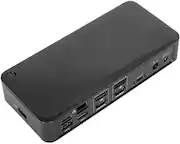
Belkin - Thunderbolt 3 Dock with Thunderbolt 3 Cable, 60W Upstream Charging, Dual 4K @60Hz
Belkin - Thunderbolt 3 Dock with Thunderbolt 3 Cable, 60W Upstream Charging, Dual 4K @60Hz
Related Item

About This Item
- Key Specs
- Maximum Number of Displays Supported: 2
- Maximum Supported Resolution: Full HD (1080p)
- Number of DisplayPort Outputs (Total): 2
- Number of Thunderbolt Ports (Total): 1
- Passthrough Power: true (Indicates whether the device allows power to passthrough, possibly with some loss, to another device, typically to charge that other device.)
- General
- Brand: Belkin
- Model Number: F4U109TT
- Product Name: Thunderbolt 3 Dock with Thunderbolt 3 Cable, 60W Upstream Charging, Dual 4K @60Hz
- Display
- Maximum Number of Displays Supported: 2
- Maximum Supported Resolution: Full HD (1080p)
- Maximum Supported Refresh Rate: 30Hz (The number of frames per second the device can support, expressed as a frequency. Higher rates help produce smooth, seamless pictures.)
- Ports
- Display Connector(s): 2 x DisplayPort, 1 x HDMI, 1 x Thunderbolt, 1 x VGA (The number and type of connectors used to connect to an external display.)
- Number of DisplayPort Outputs (Total): 2
- Number of HDMI Ports (Total): 1
- Number of Thunderbolt Ports (Total): 1
- Number of VGA Ports: 1 (VGA (Video Graphics Adapter or Video Graphics Array) is a display standard that transmits via analog signals. This type of interface is typically used to connect a computer to a display device such as a monitor, projector, or TV.)
- Number Of Ethernet Ports: 1
- Number of USB Ports (Total): 5
- USB Ports: 5 x USB-C 2.0, 5 x USB-A 3.1, 2 x USB-A 3.2, 2 x USB-C 3.2 (The number and type of USB ports the product has.)
- Headphone Jack: true (The device features an interface that allows for the connection of headphones.)
- Microphone Input: true (The device features an input for connecting an external microphone.)
- Memory Card Slot: false
- Power
- Powered: true
- Power Supply Included: true
- Cable Length: 3.06 feet
- Power Supply Input: USB Type C
- Maximum Input Power: 60 watts (The maximum amount of power allowed to come into the device.)
- Passthrough Power: true (Indicates whether the device allows power to passthrough, possibly with some loss, to another device, typically to charge that other device.)
- Power Supply Output: USB Type C (The connector type(s) used by the device to send electrical power to another device.)
- Maximum Output Power: 60 watts (The maximum amount of power produced or allowed to flow through the device.)
- Compatibility
- Brand Compatibility: Universal
- Model Compatibility: Universal
- Features
- Cable Lock Slot: Kensington Security Slot (K-Slot)
- Dimensions
- Product Height: 1.22 inches (The out of box height of the item. Height is measured as the vertical distance from the bottom of the item to the top as it would be primarily used or placed.)
- Product Length: 3.06 inches (The out of box length of the item. Length is measured as the longest dimension of the item.)
- Product Width: 6.52 inches (The out of box width of the item. Width is measured as the horizontal distance from one side of the item to the other as it would be primarily used or placed.)
- Product Weight: 9.42 ounces (The out of box weight of the item.)
- Other
- UPC: 745883785698
Connect secondary displays smoothly with this Belkin Thunderbolt 3 Dock Plus station. The audio and USB Type-A ports allow for simultaneous connections, while the Thunderbolt 3 Type-C port quickly transfers large files at speeds of up to 40 Gbps. This Belkin Thunderbolt 3 Dock Plus station supports Windows and macOS systems for versatile use, and the 60W upstream charging capability powers your electronics.
- Designed for both Windows and Mac laptops: Brings benefits of Thunderbolt 3 technology and lets you connect all your peripheral devices.
- Two DisplayPorts 1.4: Connect up to two displays without a hassle.
- Thunderbolt 3 Gen 2 cable included: Allows you to charge the laptop with a power up to 60W without a separate power cable.
- USB-C compatible: Designed to work without a Thunderbolt port too.
- Five USB ports: Features one USB Type-A 3.1 Gen 2 port on front besides two USB Type-A 3.1 Gen 1 and two USB Type-C 3.1 Gen 2 ports at the back.
- High-definition dual-monitor support: 4K at 60Hz with dual monitors and 8K at 30Hz with a single monitor setup through Thunderbolt 3 port.
- Gigabit Ethernet connection: Provides up to 40 Gbps transfer rates.
Whats Included
- Belkin Thunderbolt 3 Dock Plus Docking Station
- Thunderbolt 3 cable
- Owner's manual
Q: Will this device provide power to Windows computers, as well as MacBooks?
A: Hello. The Belkin F4U109 can charge a laptop up to 60W using the front Thunderbolt 3 port marked with a computer icon.
A: Hi, Tammy. The Belkin F4U109 dock supports dual DisplayPort 1.4 monitors using the two DisplayPort connectors on the rear of the dock. However, it is not yet tested to work on this kind of set up.
Q: I just bought two Dell 32 curved 165Hz monitors. Will this allow for both screens to be at 165hz?
A: Hi! Here are the supported maximum resolutions of the Belkin F4U109: Single monitor: 8K at 30 Hz Dual monitors: 4K at 60 Hz
Q: Will this help photoshop run on my Hp spectre? It just crashes everytime I try to use it.
A: Hi! This Belkin F4U109 is just plug-and-play. It has been tested for compatibility with Windows 10 or later and macOS 10.12 Sierra or later operating systems. Anyhow, please ring our hotline number instead, so we can assist you better around this. Our hotlines are listed here: https://www.belkin.com/support-article?articleNum=55022
A: Hi, TonyTT. This Belkin F4U109 has been tested for compatibility with the Windows 10 and macOS 10.12 Sierra. Yes, it supports dual monitors (4K at 60 Hz) since this Belkin Dock supports 2 x DisplayPort 1.4 connect to high-resolution monitors/displays
A: Hi Keith. No, the Belkin F4U109 is plug-and-play. All required drivers are built into the operating system of your computer.
Q: The specifications page states there is 1 VGA port. This dock does not have a VGA port!
A: Hi there. Please know that the Belkin F4U109 does not have a VGA port. To know more about the product features and specifications, you can click this link for reference:https://www.belkin.com/thunderbolt-3-dock-plus/F4U109tt.html.
A: Hello, MJ. The Belkin F4U109 offers universal compatibility to bring the benefits of Thunderbolt 3 technology to both Mac® and Windows® computers. For further diagnosis on the challenges that you have, please call our phone support team through the hotline numbers listed in this link: https://www.belkin.com/us/support-article?articleNum=55022.
Reviews
Customer Images
The vast majority of our reviews come from verified purchases. Reviews from customers may include My Best Buy members, employees, and Tech Insider Network members (as tagged). Select reviewers may receive discounted products, promotional considerations or entries into drawings for honest, helpful reviews.
Compare similar products
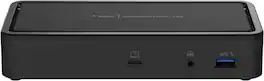
Connect secondary displays smoothly with this Belkin Thunderbolt 3 Dock Plus station. The audio and USB Type-A ports allow for simultaneous connections, while the Thunderbolt 3 Type-C port quickly transfers large files at speeds of up to 40 Gbps. This Belkin Thunderbolt 3 Dock Plus station supports Windows and macOS systems for versatile use, and the 60W upstream charging capability powers your electronics.
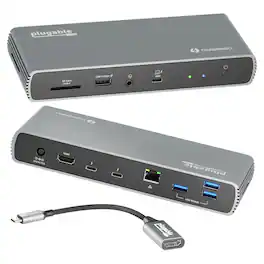
Connect with a TAA-compliant docking station Thunderbolt 4 designed for modern laptops. The Plugable Thunderbolt 4 and USB4 Docking Station (TBT4-UDX1) with up to 100W (96W certified) charging offers something a lot of Thunderbolt docking stations lack, Thunderbolt ports (which are fully USB4 compatible, by the way). In addition to the 40Gbps Thunderbolt connection to the host, get 2x downstream ports (40Gbps) for your most powerful peripherals. This TAA compliant Thunderbolt docking station dual monitor lets you spread out on two screens at up to 4K 60Hz. If you’re presenting to clients or streaming some shows, the 4K HDMI port connects an extra display at up to 60Hz. An included Thunderbolt to HDMI adapter lets you connect a second 4K 60Hz monitor. But if you really want to pack in the pixels, go straight to the Thunderbolt port to connect an 8K monitor up to 30Hz. Diving deeper into its features, the 11-port expansion on this docking station for laptop is perfect for ultra-thin devices like the Surface Pro 8 and Surface Pro 9 with an Intel processor, making it a great Surface Thunderbolt 4 dock. Get instant access to 1x HDMI port, 4x USB 3.0 ports, a 2.5 Gigabit Ethernet port, an SD Card reader, and even a combination audio jack. And the convenience continues with an included 3’ (1m) Thunderbolt cable. Just a heads up, on Mac, dual display is only available on M1 / M2 / M3 systems with a Pro or Max chip, like the Macbook M1 Pro/Max, M2 Pro/Max, M3 Pro/Max

Anker 10-in-1 USB C Docking Station, Displaylink Docking Station with Dual HDMI and DisplayPort for Windows Laptops, MacBook Air/Pro 13/16 inch and More
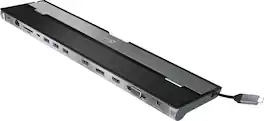
This triple display docking station turns your Mac or Windows laptop into a full workstation with a DisplayPort output, two HDMI outputs, and a VGA output, with resolution support up to 4K (3840 x 2160) on two displays and 1080p on the other one. You can also use your laptop screen for four displays in total, making it easy to access multiple applications at once. With 100W Power Delivery, three USB 3.0 ports, and a USB-C port, this docking station is perfect for your MacBook, Dell XPS, or other USB-C laptop requiring additional ports. This USB 3.0 docking station is also equipped with a RJ45 Gigabit Ethernet port, memory card reader/writer, and combo audio jack for maximum productivity. The elevated design assists with heat dissipation and, with its double-sided cable storage compartment, ensures an easy connection regardless of your USB-C port’s location. All 13 ports are combined into one slim docking station, so you’ll have all the connections you need to stay productive!
| Pros for Belkin - Thunderbolt 3 Dock with Thunderbolt 3 Cable, 60W Upstream Charging, Dual 4K @60Hz | |||
|---|---|---|---|
| There were no pros for this product— | There were no pros for this product— | There were no pros for this product— | Ease of use, USB-C, Overall Performance, Ports, Connectivity |
| Cons for Belkin - Thunderbolt 3 Dock with Thunderbolt 3 Cable, 60W Upstream Charging, Dual 4K @60Hz | |||
| There were no cons for this product— | There were no cons for this product— | There were no cons for this product— | Compatibility, Power Supply |