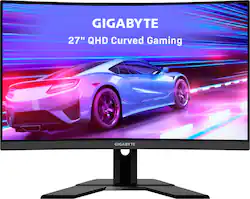
GIGABYTE - 27" LED Curved QHD FreeSync Monitor with HDR (HDMI, DisplayPort, USB) - Black
- Key Specs
- Refresh Rate: 165Hz (The number of frames per second the device can produce natively without enhancement. Higher rates help produce smooth, seamless pictures.)
- Maximum Resolution: 2560 x 1440 (Maximum resolution refers to the highest number of pixels that a screen can process and display. Higher resolution signals produce more detailed images.)
- Response Time: 1 milliseconds (The speed at which pixels can change colors is called response time. It is measured in milliseconds (ms).)
- Panel Type: VA (Technology that affects response time and image quality.)
- Synchronization Technology: FreeSync Premium (AMD Adaptive Sync) (Generally, these technologies allow syncing between a computer/console game's frame rate and the device's refresh rate for a smoother display without tearing.)
- Screen Size: 27 inches (Size of the screen, measured diagonally from corner to corner.)
- Display Connector(s): 1 x DisplayPort 1.4, 2 x HDMI (The number and type of connectors used to connect to an external display.)
- General
- Product Name: 27" LED Curved QHD FreeSync Monitor with HDR (HDMI, DisplayPort, USB)
- Brand: GIGABYTE
- Operating System Compatibility: Apple iOS, Windows, Not Applicable, Mac
- Model Number: G27QC
- Color: Black
- Display
- Refresh Rate: 165Hz (The number of frames per second the device can produce natively without enhancement. Higher rates help produce smooth, seamless pictures.)
- Maximum Resolution: 2560 x 1440 (Maximum resolution refers to the highest number of pixels that a screen can process and display. Higher resolution signals produce more detailed images.)
- Contrast Ratio: 3000:1 (Measured difference between a displayed image's brightest whites and darkest blacks. The larger the first number, the more detail and color that can be displayed.)
- Response Time: 1 milliseconds (The speed at which pixels can change colors is called response time. It is measured in milliseconds (ms).)
- Display Type: LED
- Panel Type: VA (Technology that affects response time and image quality.)
- Synchronization Technology: FreeSync Premium (AMD Adaptive Sync) (Generally, these technologies allow syncing between a computer/console game's frame rate and the device's refresh rate for a smoother display without tearing.)
- Aspect Ratio: 16:9 (The measurement of the width of a screen compared to the height of a screen, expressed as a ratio.)
- Curved Screen: true
- Brightness: 250 candela per square meter (A measure of the total light output.)
- Screen Size: 27 inches (Size of the screen, measured diagonally from corner to corner.)
- High Dynamic Range (HDR): true (An HDR-compatible 4K TV or other HDR-compatible product displays HDR video content when it's available from sources like 4K Ultra HD Blu-ray Discs and 4K streaming services.)
- Connectivity
- Number of DisplayPort Inputs (Total): 1
- Number of HDMI Inputs (Total): 2
- Display Connector(s): 1 x DisplayPort 1.4, 2 x HDMI (The number and type of connectors used to connect to an external display.)
- Number of USB Ports (Total): 3
- USB Ports: 2 x USB-A 3.0 (The number and type of USB ports the product has.)
- Headphone Jack: true (The device features an interface that allows for the connection of headphones.)
- Compatibility
- Wall Mountable: true (The product is able to be secured to a wall. Some products are designed ready to mount, while others may require additional hardware/accessories for installation.)
- VESA Wall Mount Standard: 100mm x 100mm (VESA wall mount standards refer to the spacing of screw holes built into a TV in order to fit with standard TV wall mounts. These standards are implemented into most TVs and monitors.)
- Features
- Tiltable: true
- Adjustable Stand Height: true
- Eye Relief Features: Low blue light, Flicker free
- Anti-Glare: true (Product has features, such as a matte finish, that reduce the likelihood for screen glare.)
- Built-In Webcam: false
- Integrated Speaker(s): true
- Dimensions
- Product Width: 24 inches (The out of box width of the item. Width is measured as the horizontal distance from one side of the item to the other as it would be primarily used or placed.)
- Product Weight: 14 pounds (The out of box weight of the item.)
- Stand Included: true
- Certifications Listings & Approvals
- ENERGY STAR Certified: false (Devices carrying the ENERGY STAR service mark, such as computer products and peripherals, kitchen appliances, and other products, generally use 20% to 30% less energy than required by federal standards.)
- EPEAT Qualified: false (The Electronic Product Environmental Assessment Tool (EPEAT) was designed to provide an environmental assessment tool for purchasers. In order to qualify for EPEAT, a product must meet all 23 required criteria.)
- Other
- UPC: 889523020838
GIGABYTE gaming monitors pack upscale performance into a streamlined package. The G27QC provides an immersive experience through fluid gameplay with 1ms response time, 165Hz refresh rate, and AORUS utility software.
- Display Size: 27 Inch VA Panel
- Display Resolution: 2K 2560x1440 VA Display
- Refresh Rate: 165Hz Refresh Rate
- Response Time: 1ms (MPRT) Response Time
- HDR Ready: Studio Grade HDR Ready and 92% DCI-P3 (120% sRGB) Color Gamut
- AMD FreeSync Premium: Smooth Gameplay with AMD FreeSync Premium
- Game Above The Curve: Native 1500R Curvature
- Gaming Feature: GIGABYTE Classic Tactical Features with OSD Sidekick
- Stand Adjustments: Head & Tilt adjustable stand
- Display Input: 1x Display Port 1.4, 2x HDMI 2.0, 2x USB 3.0
- VESA Mountable: VESA Wall Mount Compatible 100x100mm
- Blue Light Filter: Low Blue Light & Flicker-Free
- Warranty: 3 Years Warranty, Parts and Labor
A: Yes, I'm using a Gigabyte Aorus 3070 and it works just fine. While it's not on the list of tested and certified monitors from NVIDIA many still work with a little tweaking to settings. Look online for articles for how to set them up. Super easy and takes about 5 min.
A: You can, but if what you mean is stuttering and low framerates, this monitor won't fix anything. The PS4 Pro can't run games at anything higher than 1080p at 60fps regardless, so a 60hz display is all you need. You're at the mercy of your console, not the display you are using. On the other hand, the PS5 has the extra horsepower to take advantage of a high refresh rate monitor, but doesn't currently support variable refresh rate, so even higher framerate gaming on a display that supports it would still have stutter, though less intrusive than on the PS4. Long story short, unless you plan on upgrading to a next gen console/gaming pc in the future, stick to your larger display :)
Q: Does it have UHD and what hdmi version is the input?
A: Typically UHD is for 4k and QHD is for 2k, just as FHD (Full-HD) is for 1080 resolution. I double checked at the Gigabyte website to be sure too. If you wanna take a look. https://www.gigabyte.com/Monitor/G27QC/sp#sp Oh and, HDMI 2.0 x2, Display port 1.4 x1 Pretty sure that answers for ya.
Q: Does this monitor have sound
A: Yes it has speakers, and an audio jack.
A: You will need an adapter to connect either to the HDMI or Display port of this monitor. If you have the cable already than get the adapter. Check exactly what type of DVI cable you have. That is, is your current cable DVI-A (analog), DVI-D (digital) and DVI-I (integrated; analog and digital). It is easy to figure out what cable you have by google and check images to see which ones matches your cable. Than get the adapter that will help convert your DVI cable to either display port or HDMI. Another option can also be to get a cable that has display port or HDMI on one end and DVI (your cable type) on the other end. Sometimes a complete cable can be cheaper than the adapter. Also a benefit of the cable is that you can get ends that have gold plating as it can help a little with signal. There are also adapters with gold plating on their ends as well. Sorry I threw too much information in there. But hopefully this helps.
Q: can you plug in a speaker in the back of the monitor or does it even have an audio jack.
A: Yes it has an audio jack. The speakers on the monitor, though, arent that good for bass.
A: It is not wireless