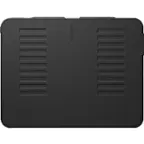
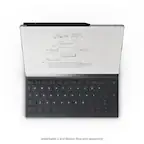
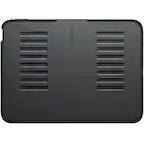
Logitech - Combo Touch Keyboard Folio for Apple iPad Air 10.9" (5th & 4th Gen) with Detachable Backlit Keyboard - Oxford Gray
Logitech - Combo Touch Keyboard Folio for Apple iPad Air 10.9" (5th & 4th Gen) with Detachable Backlit Keyboard - Oxford Gray
Related Item

About This Item
- Key Specs
- Model Compatibility: Apple iPad Air (4th Generation) 10.9" 2020, Apple iPad Air (5th Generation) 10.9" 2022
- Operating System Compatibility: Apple iPadOS
- Interface(s): Smart Connector (Refers to the types of connections that devices use to interact and communicate with each other.)
- Illuminated: true
- General
- Brand: Logitech
- Model Number: 920-010260
- Product Name: Combo Touch Keyboard Folio for Apple iPad Air 10.9" (5th & 4th Gen) with Detachable Backlit Keyboard
- Color: Oxford Gray
- Material: Textile PU, TPE, glass, plastic, mylar, silicon
- Compatibility
- Brand Compatibility: Apple
- Model Compatibility: Apple iPad Air (4th Generation) 10.9" 2020, Apple iPad Air (5th Generation) 10.9" 2022
- Operating System Compatibility: Apple iPadOS
- Maximum Compatible Display Size: 10.9 inches
- Connectivity
- Wireless: true
- Interface(s): Smart Connector (Refers to the types of connections that devices use to interact and communicate with each other.)
- Features
- Touchpad: true
- Illuminated: true
- Included
- Number Of Keys: 78
- Palm Rest Included: false (null)
- Dimensions
- Product Height: 7.45 inches (The out of box height of the item. Height is measured as the vertical distance from the bottom of the item to the top as it would be primarily used or placed.)
- Product Width: 9.92 inches (The out of box width of the item. Width is measured as the horizontal distance from one side of the item to the other as it would be primarily used or placed.)
- Product Depth: 0.67 inches (The out of box depth of the item. Depth is measured as the distance from the front of the item to the back as it would be primarily used or placed.)
- Product Weight: 20.16 ounces (The out of box weight of the item.)
- Warranty
- Warranty - Parts: 1 year
- Warranty - Labor: None
- Other
- UPC: 097855166470
This is not a laptop. It’s so much more. Meet Combo Touch, the keyboard case with trackpad that enables new levels of versatility with iPad Air. Navigate and work in apps like never before with a new click-anywhere trackpad — our largest ever* — that gives you more space and allows for Multi-Touch trackpad gestures. SMART CONNECTOR technology helps to deliver an incredibly responsive trackpad experience and also makes powering and pairing the keyboard instant. Type comfortably for hours with laptop-like backlit keys that automatically adjust to your environment. You can always see what you're typing thanks to 16 levels of brightness. Enjoy convenient access to volume controls and more with a full row of iPadOS shortcut keys. The iPad Air meets its aesthetic match with a slim, sleek design — the thinnest keyboard case we've ever designed with a trackpad. * The elegant woven outer fabric feels as great as it looks and the case is molded to fit your iPad Air, protecting the front, back, and corners from scrapes and bumps. Your iPad Air is held securely in place so you can have peace of mind that it won’t slip out and focus on what matters most — getting things done. *Compared to Logitech keyboard cases with trackpad released in 2020.
- Works with Apple iPad: Compatible with iPad Air 5th and 4th Generation
- Smart Connector technology: Enjoy instant power and pairing with Combo Touch keyboard case and never worry about charging as power is sourced directly from your iPad Air
- Do it all with Combo Touch: Four versatile use modes allow you to type, sketch, view and read without ever having to remove your iPad Air from the keyboard case
- Detachable keyboard and adjustable kickstand: Remove the keyboard when you're done typing for more flexibility and enjoy 50 degrees of adjustable viewing angles
- Large, click-anywhere trackpad: This iPad keyboard case features a responsive and reliable trackpad that allows you to use the entire surface to work and perform Multi-Touch trackpad gestures
- Backlit, laptop-like keyboard: Backlit keys auto-adjust to your environment with 16 levels of brightness and a full row of iPadOS shortcut keys provide one-tap access to volume controls and more
- Front, back and corner protection: A durable form-fit cover protects the front, back, and corners of your iPad Air, securely holding it in place no matter what you’re doing
- Home for Apple Pencil: Easily charge your Apple Pencil while keeping the case on thanks to a convenient opening in the side of the iPad Air case. *Apple Pencil Sold Separately
- More sustainable: Certified carbon neutral: the carbon impact of the product and packaging has been reduced to zero.
- Works with Apple iPad: Compatible with iPad Air 5th and 4th Generation
- Smart Connector technology: Enjoy instant power and pairing with Combo Touch keyboard case and never worry about charging as power is sourced directly from your iPad Air
- Do it all with Combo Touch: Four versatile use modes allow you to type, sketch, view and read without ever having to remove your iPad Air from the keyboard case
- Detachable keyboard and adjustable kickstand: Remove the keyboard when you're done typing for more flexibility and enjoy 50 degrees of adjustable viewing angles
- Large, click-anywhere trackpad: This iPad keyboard case features a responsive and reliable trackpad that allows you to use the entire surface to work and perform Multi-Touch trackpad gestures
- Backlit, laptop-like keyboard: Backlit keys auto-adjust to your environment with 16 levels of brightness and a full row of iPadOS shortcut keys provide one-tap access to volume controls and more
- Front, back and corner protection: A durable form-fit cover protects the front, back, and corners of your iPad Air, securely holding it in place no matter what you’re doing
- Home for Apple Pencil: Easily charge your Apple Pencil while keeping the case on thanks to a convenient opening in the side of the iPad Air case. *Apple Pencil Sold Separately
- More sustainable: Certified carbon neutral: the carbon impact of the product and packaging has been reduced to zero.
Whats Included
- Keyboard case
- User documentation
- Keyboard case
- User documentation
A: Yes it is protected on all sides. The keyboard acts as a cover for the front of the iPad. You can also disconnect the keyboard and switch it around and snap it to the back..see last photo to see what I mean.
A: No. This is not a Bluetooth keyboard. It is powered through the 3 point Apple connector only.
A: Hello, Annina! For this specific Combo Touch, it will fit both the 4th and 5th generation iPad Airs. Unfortunately, the pencil is a separate purchase. - Maggie from Logitech
Q: Does the keyboard cause the battery to drain faster?
A: It uses the iPad battery for power and backlighting which should draw some power when in use bit I haven’t noticed a significant change in battery life from it. While closed or asleep there is no drain whatsoever my iPad stays the same percentage overnight with keyboard attached.
Q: Are the typing keys back lit
A: Yes they are.
Q: Is the keyboard also available in over language layout? Querty ?
A: Hello Bap, Unfortunately, it doesn't come in other language layouts. - Richard from Logitech
Q: Does the iPad power the keyboard or does the keyboard need to be charged periodically?
A: the ipad charges the key board, no extra cable to charge
A: Hello, Kat! Unfortunately, the Combo Touch for iPad Air (4th Gen) will only fit the 4th Generation iPad Air since they are different sizes and shapes. - Maggie from Logitech
Reviews
Customer Images
The vast majority of our reviews come from verified purchases. Reviews from customers may include My Best Buy members, employees, and Tech Insider Network members (as tagged). Select reviewers may receive discounted products, promotional considerations or entries into drawings for honest, helpful reviews.
Compare similar products

This is not a laptop. It’s so much more. Meet Combo Touch, the keyboard case with trackpad that enables new levels of versatility with iPad Air. Navigate and work in apps like never before with a new click-anywhere trackpad — our largest ever* — that gives you more space and allows for Multi-Touch trackpad gestures. SMART CONNECTOR technology helps to deliver an incredibly responsive trackpad experience and also makes powering and pairing the keyboard instant. Type comfortably for hours with laptop-like backlit keys that automatically adjust to your environment. You can always see what you're typing thanks to 16 levels of brightness. Enjoy convenient access to volume controls and more with a full row of iPadOS shortcut keys. The iPad Air meets its aesthetic match with a slim, sleek design — the thinnest keyboard case we've ever designed with a trackpad. * The elegant woven outer fabric feels as great as it looks and the case is molded to fit your iPad Air, protecting the front, back, and corners from scrapes and bumps. Your iPad Air is held securely in place so you can have peace of mind that it won’t slip out and focus on what matters most — getting things done. *Compared to Logitech keyboard cases with trackpad released in 2020.

Increase your productivity with this Logitech Folio Touch iPad keyboard case. The large, comfortable keys provide an improved typing experience, while the adjustable key brightness levels let you work in low-light environments. Shortcut keys offer easy access to popular functions, and a sturdy case protects your device from damage. This Logitech Folio Touch iPad keyboard case is foldable for versatility.

Flip into joy with Flip Folio, the iPad case featuring a stowable keyboard and front and back protection. You can type anywhere, any way you like—or stash the keyboard away and just relax. Find the right angle with adjustable viewing angles, plus portrait and landscape modes for iPad. Dock your iPhone, or connect to your TV for even more options. Now available for iPad Pro and iPad Air.

Type, sketch, view and read with the Combo Touch keyboard case. A flexible kickstand and a full-size, detachable keyboard give you multiple use modes for any task. Take iPad further with a bigger trackpad that gives you superior, intuitive tracking experience with familiar Multi-Touch gesture controls.
| Pros for Logitech - Combo Touch Keyboard Folio for Apple iPad Air 10.9" (5th & 4th Gen) with Detachable Backlit Keyboard - Oxford Gray | |||
|---|---|---|---|
| There were no pros for this product— | Keyboard Quality, Ease of use, Protection, Price, Fit | Typing Comfort, Build Quality, Portability, Connectivity, Attachment Strength | Keyboard Quality, Protection, Ease of use, Design, Weight |
| Cons for Logitech - Combo Touch Keyboard Folio for Apple iPad Air 10.9" (5th & 4th Gen) with Detachable Backlit Keyboard - Oxford Gray | |||
| There were no cons for this product— | Weight, Bulk | Weight, Protection | Price, Size |