reMarkable - Paper Pro - Mosaic weave Type Folio keyboard for your 11.8'' Paper Tablet - Basalt

Key Accessories:
- reMarkable - Marker Tips refill (6pcs) for your reMarkable Paper Pro Marker and Marker Plus - Black$19.00

Related Item

About This Item
- Key Specs
- Model Compatibility: reMarkable Paper Pro
- General
- Brand: reMarkable
- Model Number: RM08B-1002NW
- Product Name: reMarkable Paper Pro - Mosaic weave Type Folio keyboard for your 11.8'' Paper Tablet - Basalt
- Color: Basalt
- Compatibility
- Brand Compatibility: reMarkable
- Model Compatibility: reMarkable Paper Pro
- Connectivity
- Wireless: true
- Features
- Touchpad: false
- Adjustable Tilt: false
- Power
- On/Off Switch: false
- Included
- Number Of Keys: 64
- Palm Rest Included: true (null)
- Dimensions
- Product Height: 0.65 inches (The out of box height of the item. Height is measured as the vertical distance from the bottom of the item to the top as it would be primarily used or placed.)
- Product Width: 8.93 inches (The out of box width of the item. Width is measured as the horizontal distance from one side of the item to the other as it would be primarily used or placed.)
- Product Depth: 12.09 inches (The out of box depth of the item. Depth is measured as the distance from the front of the item to the back as it would be primarily used or placed.)
- Product Weight: 1.49 ounces (The out of box weight of the item.)
- Warranty
- Warranty - Parts: 1 year limited
- Warranty - Labor: 1 year limited
- Other
- UPC: 7090045250150
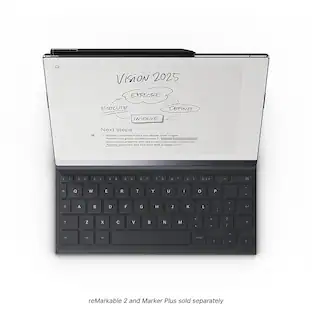
Experience comfortable, focused typing on reMarkable Paper Pro with Type Folio. Seamlessly combine or switch between handwriting and typing on the same page. No pairing, charging, or cables, just distraction-free writing.
- Thin profile, neatly hidden keyboard: Add comfortable, focused typing to your paper tablet with a slim, tactile keyboard. When the keyboard isn’t in use, it neatly folds away, leaving a stylish cover to protect your paper tablet.
- Type with focus: With a simple design, minimalistic formatting, and flexible page lengths and column widths, nothing gets in the way of you and your thoughts. It's a typewriter with digital powers.
- Combine typing and freehand: Add extra thoughts and comments in the margins, sketch between paragraphs, or highlight passages with your Marker as you type. Handwriting, typing, sketching — all seamlessly integrated.
- Find the right angle: Type Folio for reMarkable Paper Pro offers two typing modes: an upright position and a near-flat position perfect for combining handwriting and typed text. Reading documents or writing by hand? Fold away the keyboard and open your folio up like a book.
- Take notes anywhere: Type and edit notes across your smart devices* with our mobile and desktop apps. Add new thoughts on the go, or pick up where you left off. All your work is available and ready to build on, wherever you are.
- A smarter accessory: When you open the keybord, your paper tablet automatically rotates its display for typing. Handwritten annotations or sketches anchor intelligently to your typed text, even as it moves around the page. And with no charging, pairing, or cables, writing’s always hassle-free.
- Tactile, comfortable typing: Type Folio’s keyboard boasts a generous 1.3 mm of key travel and full-size letter keys for a smooth typing experience. Combined with the paper-like display on reMarkable Paper Pro, you can type for hours without glare or eye strain.
- Keep your paper tablet safe: Smart and functional protection for your paper tablet. Type Folio for reMarkable Paper Pro is available in Mosaic weave and designed exclusively to fit reMarkable Paper Pro.
Disclaimers
- *Note-taking in the apps require a Connect subscription. New reMarkable users get a 100-day free trial, then $2.99/mo. Cancel anytime.
Q: Can you adjust the tilt of the keyboard?
A: This keyboard does not have adjustable tilt.
Q: What is the warranty on the keyboard?
A: The manufacturer's warranty for both parts and labor on the keyboard is one year limited.
A: This keyboard is backlit for easier typing in a variety of environments.
Q: What is the keyboard's weight?
A: The product has a weight of 1.49 ounces.
Q: Does the keyboard have a touchpad?
A: This keyboard does not have a touchpad.
Q: How does the keyboard connect to the Paper Pro?
A: The Type Folio keyboard connects magnetically to the reMarkable Paper Pro.
Q: Can I use this to type in both portrait and landscape mode?
A: Hi there! Our Type Folio for the reMarkable Paper Pro is designed to provide a focused, laptop-like typing experience, optimized for landscape mode. However, the device itself remains fully versatile and can be used in both horizontal and vertical orientations.
A: Hello there! I understand you prefer not to carry the keyboard. Since you have a Type Folio, please note that the keyboard cannot be removed from the case. If you prefer to use the device without the keyboard, the Book Folio, which is a case with no keyboard, is the best option to ensure your paper tablet is still protected. You can, of course, also use the device without any Folio at all.
Reviews
Rating 4.6 out of 5 stars with 35 reviews
- Typing Performance (9)
- Overall Performance (7)
- Design (5)
- Backlight (3)
- Weight (3)
Customer Images
The vast majority of our reviews come from verified purchases. Reviews from customers may include My Best Buy members, employees, and Tech Insider Network members (as tagged). Select reviewers may receive discounted products, promotional considerations or entries into drawings for honest, helpful reviews.
Compare similar products

Experience comfortable, focused typing on reMarkable Paper Pro with Type Folio. Seamlessly combine or switch between handwriting and typing on the same page. No pairing, charging, or cables, just distraction-free writing.

Smart and functional protection for reMarkable Paper Pro Move. Made from minimalist polymer weave and designed to fit your 7.3” paper tablet perfectly. Built-in magnets automatically lock and wake your paper tablet, and the strap keeps your Marker securely attached.
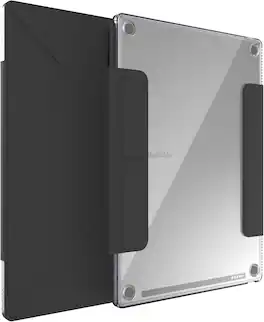
The TUDIA M-FLIP Clear Magnetic Case for the reMarkable Paper Pro delivers premium protection in a sleek, modern design. Built with a crystal-clear, anti-yellowing back panel, this case showcases the original style of your Paper Pro while safeguarding it from daily wear. The front magnetic cover provides a secure closure and supports auto wake/sleep for effortless power management. With a lightweight trifold design, you can instantly convert the cover into a stable stand—perfect for note-taking, sketching, or reading hands-free. Engineered for durability and comfort, the case features a hard polycarbonate back, reinforced corners, and a smooth PU leather cover that feels great in hand. Slim, portable, and functional, the TUDIA M-FLIP Clear Case is the ideal companion for your Paper Pro, offering dependable protection without compromising style or usability.

Safeguard your reMarkable Paper Pro tablet with the SaharaCase Venture Series bi-fold folio case in black. Crafted from triple-hardened fabric and TPU, it offers robust protection against daily wear and tear. The precise cutouts ensure easy access to ports and buttons, while the raised edges protect the screen from scratches. With a convenient stylus holder and a foldable kickstand for hands-free viewing, this lightweight and elegant case is the perfect blend of style and functionality.
| Pros for reMarkable - Paper Pro - Mosaic weave Type Folio keyboard for your 11.8'' Paper Tablet - Basalt | |||
|---|---|---|---|
| Typing Performance, Overall Performance, Design | There were no pros for this product— | There were no pros for this product— | There were no pros for this product— |
| Cons for reMarkable - Paper Pro - Mosaic weave Type Folio keyboard for your 11.8'' Paper Tablet - Basalt | |||
| Backlight, Weight | There were no cons for this product— | There were no cons for this product— | There were no cons for this product— |
Specs
Customers often buy these together
 Clearance$169.99The price was $199.00
 Top Deal$599.99The price was $999.99
 $31.99The price was $44.99


Explore related products Sponsored
 Top Deal$199.99The price was $229.99
 Top Deal$169.99The price was $199.99
 Top Deal$139.99The price was $159.99
- Clearance$169.99The price was $199.00
Discover related products
 $13.99The price was $19.99
 $30.99The price was $32.99