reMarkable - 2 - Type Folio keyboard for your 10.3'' paper tablet - Ink Black - Black Ink


About This Item
- General
- Brand: reMarkable
- Model Number: RM810
- Product Name: reMarkable 2 - Type Folio keyboard for your 10.3'' paper tablet - Ink Black
- Color: Black Ink
- Accessory Type: Case
- Number of Units Per Package: 1
- Dimensions
- Product Height: 0.75 inches (The out of box height of the item. Height is measured as the vertical distance from the bottom of the item to the top as it would be primarily used or placed.)
- Product Length: 8.58 inches (The out of box length of the item. Length is measured as the longest dimension of the item.)
- Product Width: 10.12 inches (The out of box width of the item. Width is measured as the horizontal distance from one side of the item to the other as it would be primarily used or placed.)
- Product Weight: 15.84 ounces (The out of box weight of the item.)
- Warranty
- Warranty - Parts: 1 year limited
- Warranty - Labor: 1 year limited
- Other
- UPC: 7090045258101
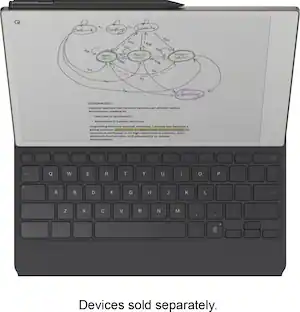
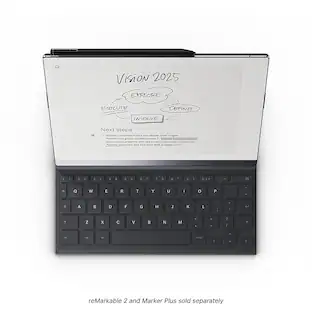
Experience comfortable, focused typing on reMarkable 2 with Type Folio. Seamlessly combine or switch between handwriting and typing. Get the convenience of a slim, tactile keyboard with the protection of a stylish cover that connects to your paper tablet magnetically. No pairing, charging, or cables, just distraction-free writing.
- Thin profile, neatly hidden keyboard: Add comfortable, focused typing to your paper tablet with a slim, tactile keyboard. When not in use, the keyboard neatly folds away, leaving a stylish cover to protect your paper tablet.
- Type with focus: With a simple design, minimalistic formatting options, and flexible page lengths, nothing gets in the way of you and your thoughts. It's a typewriter with digital powers.
- Combine typing and freehand: Add extra thoughts and comments in the margins, sketch between paragraphs, or highlight passages with your Marker as you type. Handwriting, typing, sketching - all seamlessly integrated.
- Find the right angle: Type Folio for reMarkable 2 offers two typing modes: an upright position and a near-flat position perfect for combining handwriting and typed text. Reading documents or writing by hand? Fold away the keyboard and open your folio up like a book.
- Take notes anywhere: Type and edit notes across your smart devices with our mobile and desktop apps. Add new thoughts on the go, or pick up where you left off. All your work’s available and ready to build on, wherever you are.
- A smarter accessory: When you open the Type Folio, your reMarkable 2 automatically rotates its display to landscape mode for typing. Handwritten notes anchor intelligently to your typed text, even as it moves around the page. And with no charging, pairing, or cables, writing’s always hassle-free.
- Tactile, comfortable typing: Type Folio’s keyboard boasts a generous 1.3 mm of key travel (similar to many laptops) and full-size letter keys. reMarkable's Canvas digital paper display, which mimics the matte look and immediate response of paper, means you can type for hours without glare or eye strain.
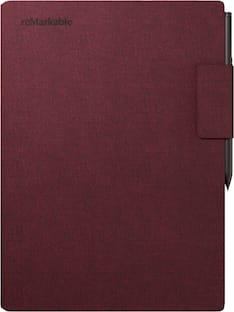
- Keep your reMarkable safe: Smart and functional protection for your paper tablet. Type Folio for reMarkable 2 is available in Ink Black and Sepia Brown and designed exclusively to fit your reMarkable 2.
Disclaimers
- *A Connect subscription gives you access to seamless note-taking across devices, with unlimited cloud storage and sync. Activate Connect at my.remarkable.com and start your 100-day free trial. Cancel anytime.
Q: Does the keyboard offer different typing positions?
A: Yes, the keyboard offers two typing modes: an upright position and a near-flat position.
Q: Can I use this keyboard with other devices?
A: No, this keyboard is exclusively designed to fit the paper tablet.
Q: Does this keyboard offer different typing positions?
A: Yes, this keyboard offers two typing modes: an upright position and a near-flat position.
Q: What is the key travel distance on this keyboard?
A: The keyboard boasts a generous 1.3 mm of key travel.
Q: Is there a warranty for this keyboard?
A: Yes, there is a one year limited warranty for parts and labor.
Q: Can I use this keyboard to type and edit notes on other devices?
A: Yes, you can type and edit notes across your smart devices with mobile and desktop apps.
Q: Does this keyboard need to be charged?
A: No, this keyboard does not require any charging.
Q: Does this keyboard require pairing with the tablet?
A: No, this keyboard does not require pairing.
Reviews
Rating 4.6 out of 5 stars with 59 reviews
- Keyboard (21)
- Overall Performance (8)
- Connectivity (4)
- Case Quality (3)
- Portability (3)
- Weight (4)
Customer Images
The vast majority of our reviews come from verified purchases. Reviews from customers may include My Best Buy members, employees, and Tech Insider Network members (as tagged). Select reviewers may receive discounted products, promotional considerations or entries into drawings for honest, helpful reviews.

- Lenovo - Tab One - 8.7" HD Tablet - 4GB RAM - 64GB eMMC - Luna GreyTech Fest Deal$99.99
- Lenovo - Idea Tab Plus - 12.1" 2.5K Tablet - 8GB RAM - 128GB UFS - Luna GreyTech Fest Deal$209.99
Compare similar products

Experience comfortable, focused typing on reMarkable 2 with Type Folio. Seamlessly combine or switch between handwriting and typing. Get the convenience of a slim, tactile keyboard with the protection of a stylish cover that connects to your paper tablet magnetically. No pairing, charging, or cables, just distraction-free writing.

Experience comfortable, focused typing on reMarkable Paper Pro with Type Folio. Seamlessly combine or switch between handwriting and typing on the same page. No pairing, charging, or cables, just distraction-free writing.
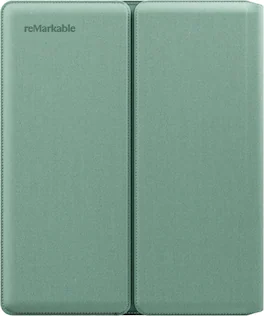
Sleeve Folio for reMarkable Paper Pure offers smart, tailored protection for your paper tablet. The wraparound design keeps reMarkable Paper Pure and the attached Marker or Marker Plus protected when you’re on the go. Built-in magnets automatically lock and wake your paper tablet.

Protect your device and look good doing it. The Folio Case of the Lenovo Idea Tab Pro is perfect for college students. It protects your tablet from everyday bumps and scratches and has a handy pen holder on the back. You can easily watch lectures or movies hands-free and take notes effortlessly. This case keeps your tablet safe and ready for whatever your day brings.
| Pros for reMarkable - 2 - Type Folio keyboard for your 10.3'' paper tablet - Ink Black - Black Ink | |||
|---|---|---|---|
| Overall Performance, Keyboard, Connectivity, Case Quality, Portability | Overall Performance, Design, Typing Performance | There were no pros for this product— | Design, Durability, Fit |
| Cons for reMarkable - 2 - Type Folio keyboard for your 10.3'' paper tablet - Ink Black - Black Ink | |||
| Weight | Weight, Backlight | There were no cons for this product— | There were no cons for this product— |
Specs
Customers often buy these together
 Tech Fest Deal$399.95The price was $449.95





Customers ultimately bought

Explore tech essentials Sponsored
 Clearance$159.99The price was $199.00
Discover related products
 Tech Fest Deal$36.99The price was $49.99
 $13.99The price was $19.99
 $28.99The price was $32.99
 Tech Fest Deal$11.99The price was $14.99






Keep exploring
 $35.49The price was $63.01