Questions & Answers
- Model:
- CXI24GKM
- |
- SKU:
- 4445931
Highly rated by customers for: Performance
Page Showing 1-12 of 12 questions
Q: QuestionAlready have old acre computer, will my monitor that came with it hook up in back to it??
Asked by Cricket4327.
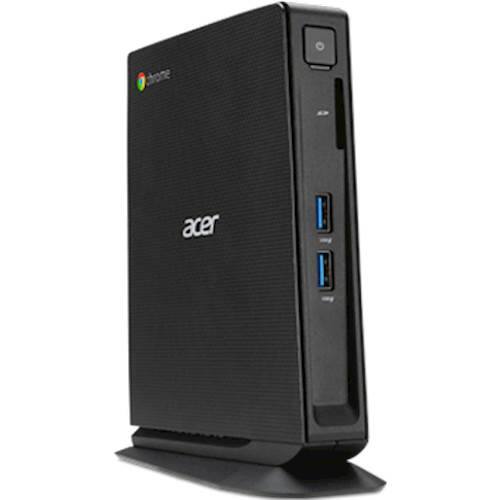
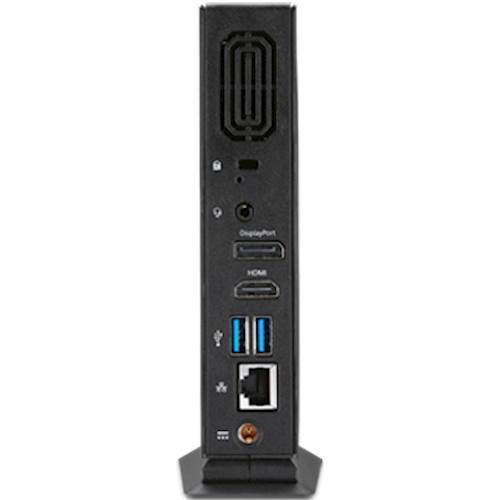
- A:Answer It has an HDMI port and a Display port. I had an old monitor with a VGA hookup so I had to buy an VGA/HDMI adapter. The adapter is very cheap though 15$-20$ dollars.
Answered by Felipe
Q: QuestionCan you tell me what the warranty is on this unit?
Asked by Doey.
- A:Answer Acer provides a 1-year manufacturer's warranty against hardware defects. Warranty details are posted here for your convenience: https://www.acer.com/ac/en/US/content/standard-warranty
Answered by TeamAcer

Q: QuestionWhat software comes with this?
Asked by J.
- A:Answer No software comes with this Chromebox. It is already loaded with the ChromeOS operating system. The ChromeOS operating system does not recognize or run executable (exe) files. This is what makes Chromebooks and Chromeboxes so much more secure and simpler to use than a computer running windows. It is basically an internet access device. They are not for everyone though. If you have a specific piece of software that you must run locally, that is, load and run off the computer hard drive, then it is not for you. If you can access all of the programs you need on the web, then it is a good choice. I've been using ChromeOS devices for the last five years and think they are amazing. If you are in doubt about whether or not they are for you then do a search for "Are Chromebooks Right For Me". You'll find plenty of detail to help you answer the question. With all that said, you should know that many of the newer chrome devices will now run android apps from the Google Play Store. My understanding is that, this device may receive the software update to do that at some point in the future. Not sure when that will happen and I would not purchase the device if you are counting on that update happening soon. Hope this answer helps.
Answered by HVBjr
Q: Questioncan I install android apps from the google play store on this device like some of the newer chromebooks can?
Asked by douglasbn.
- A:Answer According to Google here: https://www.chromium.org/chromium-os/chrome-os-systems-supporting-android-apps this model is in the Planned stage for PlayStore and Android app support.
Answered by TeamAcer

Q: QuestionDOES THIS CHROMEBOOK PLAY DVDS?
Asked by CHUCK.
- A:Answer No, a DVD player is not include.
Answered by CommunityAnswer
Q: QuestionIs Keyboard included? Or does it need to be purchased separately?
Asked by Anonymous.
- A:Answer Yes, a keyboard is included.
Answered by CommunityAnswer
Q: QuestionI am interested in buying the Acer Chrombox. I have three questions: 1. Can I use an ethernet cable to attach my HP printer? 2. Can I use my simple plug-in speakers for sound? 3. If a WIFI signal is generated by the computer, can I turn it off?
Asked by Rich.
- A:Answer I do not know about the printer, I have a I am told I can use google cloud to print documents with it, however I have not yet gotten it to work, 2, yes plug and play speakers work with the headphone hack in the back of the unit 3. Yes you have the option to have WIFI on or off
Answered by huberdave
Q: QuestionCan two computer monitors be connected to a Chromebox?
Asked by Elmer.
- A:Answer yes, with the addition of a docking station. Not out of the box.
Answered by chromeguy
Q: QuestionWhat kind of printer is compatible with this computer//
Asked by Anonymous.
- A:Answer You will need either a classic printer or Cloud-Ready printer. Here is a link on how to do this that may be helpful: https://productforums.google.com/forum/#!topic/chromebook-central/kJAZJKgaMGQ
Answered by TeamAcer

Q: Questioncan you watch 4k videos on it?
Asked by dallas.
- A:Answer No, this unit is not compatible with 4K resolution video.
Answered by CommunityAnswer
Page 1, Showing 1-12 of 12 questions