“Is this easily upgradable? I like the thermals on this machine and its within my budget. However, I need 64 GB of RAM because I use my computer for AI applications. How difficult would it be to upgrade the ram on this machine once I buy it?”
Answer This Question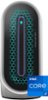
1-2 of 2 Answers
It has to be Kingston Ram. And you may have to have it still match the basic MHZ rating as the stock ram. I misunderstood that in the owners manual the first time thinking that I could put 5600MHz in there because it was referenced as an acceptable configuration. I got a pair of corsair vengeance 32gb and after replacing couldn’t get it to boot up and got the error light. Read online and found other recommendations about Kingston, it also has in fine print in the owners manual “only certified kingston ram supported”. Gave it one more shot with a pair of 32gb Kingston Fury rated at 4800MHz just as the stock ram. I’ve seen that the Fury ram has caused issues with people too. Booted up just fine for me and gave the message acknowledging that the ram had changed, let me access the bios and boot the computer as usual. Has worked fine so far. As far as access to changing the ram, it is wonderful! They built a latch that just allows you to pop the side panel out, access the whole interior, then the side panel just pops back into place. Makes it very easy!
Sorry, there was a problem. Please try again later.This desktop can be upgraded to 64 GB RAM in one of the following configurations: 64 GB, 2 x 32 GB, DDR5, 4800 MHz, dual-channel or 64 GB, 2 x 32 GB, DDR5, 5600 MHz, dual-channel, XMP. NOTE: The maximum speed of XMP needs to be enabled in BIOS or AWCC. Only Dell Certified Kingston XMP memory is supported. For assistance in upgrading parts on this desktop, please reach out to the Dell technical support team after the purchase. They are available on Facebook and Twitter(@Dellcares).
Sorry, there was a problem. Please try again later.


