“Where are the channel controls on this model of firestick? Thank you!!”
Answer This Question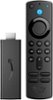
1-1 of 1 Answer
Hello Auntsis61, Thank you for your question. The Fire TV Stick has a navigation button in the shape of a circle underneath the blue Alexa button on the remote, you can use it by pressing up, down, right or left. You can also use the blue Alexa button with your voice to find a channel or selection. Simply press and ask Alexa to find, launch, and control content, or even switch to cable. Hope this helps, have a nice day!
Sorry, there was a problem. Please try again later.