“I have wifi but the fire sitck's settings show the connection as unavailable or fair. Movies will not start or freeze midway through. What can I do to get a better connection?”
Answer This Question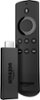
1-10 of 10 Answers
FIND OUT WHAT SPEED YOUR INTERNET IS (BASIC, AND STANDARD SPEEDS HAVE THOSE PROBLEMS)!!! THE HIGHER THE SPEED, THE BETTER YOUR MOVIE WATCHING, AND STREAMING WILL BE!!!
Sorry, there was a problem. Please try again later.to get a better connection you can detach other items that are also using the same wifi source
Sorry, there was a problem. Please try again later.Don't use the hdmi adaptor connect the fire stick without the hdmi extender directly to your tv hdmi and reset your router and should be golden
Sorry, there was a problem. Please try again later.Run a speed test standing near your fire stick. Go to speedtest.net to use that speed test it is the most reliable. If you have a weak single you may need to move your modem closer to the room that your tv is in.. Do you have a large home?
Sorry, there was a problem. Please try again later.Get a Wi-Fi booster or plug the internet directly into the tv.
Sorry, there was a problem. Please try again later.Up your internet speed. I had Frontier and had the same problems switched to comcast (75mb) and it works excellent. The faster your internet the better off you are.
Sorry, there was a problem. Please try again later.Move your router or buy a wifi extender. Make sure you now have a good wifi connection. If that doesn't work, test the speed of your internet downloads. You may need to increase your bandwidth that you are buying from your Internet provider.
Sorry, there was a problem. Please try again later.Purchase a WiFi range extender. They're somewhat cheap and extend the WiFi so it can be closer to your firestick. If the stick is already close to the Router (or source of the wifi) then I would suggest calling either your ISP (Internet service provider) or calling Amazon and asking for a new Stick (this would be last resort). Most likely it's just that your router is not near your stick.
Sorry, there was a problem. Please try again later.Make sure that you have an up to date router.
Sorry, there was a problem. Please try again later.More than likely the cause would be a poor wifi device, poor location of the wifi device or slow internet. You internet provider should be able to assist you in testing the connection to pin point the problem.
Sorry, there was a problem. Please try again later.