“Where is the button located to change the color of the tower can't find it anywhere”
Answer This Question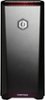
1-5 of 5 Answers
The button is button located under the ledge in the top front of the case. It is directly beneath the "☼" symbol. If you need further assistance on this, please feel free to call our technical support department 1.888.937.5582 Monday through Friday from 7am to 7pm PST.
Sorry, there was a problem. Please try again later.right under the hood ish lip where the power button is. You'll see signs meaning reset and colors.
Sorry, there was a problem. Please try again later.On top of the computer at the ledge and above the CyberPowerPC Logo, there is the little sun and under it is the button. You can change it to the color you like by pressing it, or if you hold it down for 5 seconds or so, it will become RGB.
Sorry, there was a problem. Please try again later.I'm gonna try to explain it lol. to change the tower color its near the power button on the top, but its underneath the part that sticks out in the front. just feel for it, it should be there. There's two buttons under there, I'm not sure what the other one does.. The button for the tower color is the left one. Hope this helps.
Sorry, there was a problem. Please try again later.the color swap button is underneath the top rim. the top of the case has 2 icons one is a color symbol and the other is the restart symbol, directly under those icons are buttons (the color button is the closest to the middle)
Sorry, there was a problem. Please try again later.