A:Answer4 screws and a couple of cables, but I'd advise against it. Buy a compute with the power supply you need (plus about 10%-25% extra to allow for expansion).
A:AnswerWhile the motherboard does support the video card, the video card is not fully compatible with the CPU equipped in this system. Also you will need to upgrade the power supply as well in order to properly power the new video card. If you have any further questions you are always welcome to get in touch with our support team; we're always happy to help.
Tech support:
(888)937-5582
- Cyber_Tech2
A:AnswerYou will only need to upgrade the power supply to support a GTX 970 graphics card. Please feel free to call us if you have any other questions at 1.888.937.5582 Monday through Friday from 7am to 7pm PST.
A:AnswerThe PC's motherboard does not support a GTX 1080. You will have to upgrade the motherboard before you can use that graphics card. Probably the processor as well.
A:AnswerWhile a GTX 1070 does fit in the case, the CPU does not fully support the video card and the power supply will need to be upgraded in order to properly power the new video card. If you have any further questions or concerns you are always welcome to get in touch with our support team; we're always happy to help.
Tech support:
(888)937-5582
- Cyber_Tech2
A:AnswerThe CPU is not fully compatible with the motherboard that is equipped in this system. The FX 8350 is a 125w CPU while the motherboard best supports 95w CPUs. Also in order to install the 1070 you will need to also upgrade the power supply to properly provide enough power. if you have any further questions please do not hesitate to get in touch with our support team for assistance; we're happy to help.
Tech support:
(888)937-5582
- Cyber_Tech2
A:AnswerWhile the motherboard does support the video card the PSU and CPU do not. the power supply will need to be upgraded to handle the power consumption and the CPU will need to be upgraded as it will affect the video cards performance. If you have any questions you are always welcome to get in touch with our support team; we're happy to help.
Tech support:
(888)937-5582
- Cyber_Tech2
A:AnswerYou can buy a new everything.. Just install your old hard drive to the new or old motherboard and make it your bootable device in your bios settings..
A:Answeryou simply need the appropriate video cable to connect the computer to the TV. Only requirements is ensure the TV has an HDMI connection. If you have any further questions please do not hesitate to get in touch with our tech support team; we're happy to help.
Tech support:
(888)937-5582
- Cyber_Tech2
A:AnswerYou are welcome to swap out systems components with ones of your own. I would like to mentioned our warranty will only cover the components which were provided by CyberPowerPC.
If you have any further questions please feel free to get in touch with our support team; we're always happy to help.
Tech support:
(888)937-5582
- Cyber_Tech2
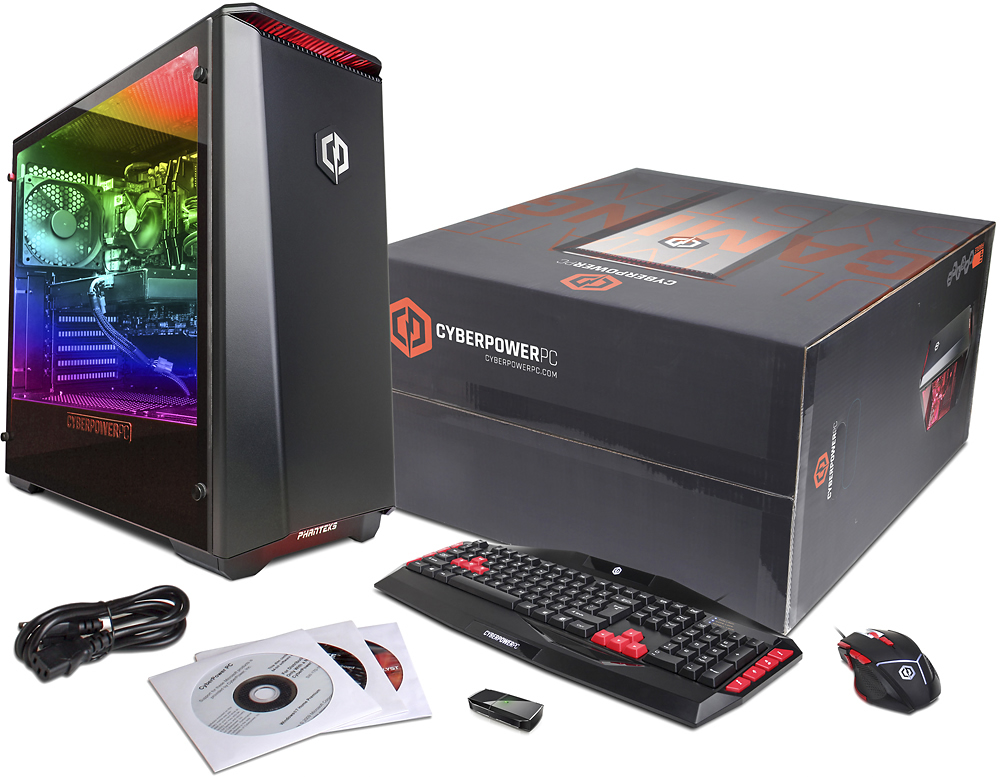
A:AnswerThe computer should arrive already configured and the software installed. The system will come with CDs however as they are included with the components. The need for a disk drive will be solely up to you if you ever feel the reason to need one. If you have any further questions or concerns you are welcome to get in touch with our support team; we're happy to help anyway we can.
Tech support:
(888)937-5582
- Cyber_Tech2
A:AnswerThe game will not be able to run ARMA 3 on high however will be able to run around a medium setting. We always recommend comparing a game's requirement to a computer's specifications to get an idea of how it will run. If you need assistance in comparing them or have any further questions please do not hesitate to get in touch with our support team; we're happy to help.
Tech support:
(888)937-5582
- Cyber_Tech2
A:AnswerYes, it will run those games with no problem. Also been running two of these about 12 hours a day for last 12 days with no crashes or errors. Just be aware that it does not have an external disk drive and keyboard and mouse are wired.
A:AnswerIn order to support a GTX 970 graphics card, you will need to upgrade the power supply. Please check or contact the graphics card manufacturer's requirements to determine this information. We also recommend to keep the original hardware for warranty purposes and that the warranty only covers the original hardware that was included in the PC. Please feel free to call us if you have any other questions at 1.888.937.5582 Monday through Friday from 7am to 7pm PST.
A:AnswerThis pc is a gamer! I was on the fence but was leaning heavily towards this machine based on the reviews, and I can tell anybody looking at this but not sure whether to get it that they won't be disappointed. Very fast and awesome graphics if paired with a good gaming monitor.
A:AnswerYou need to either use a power supply that can be switched from 110v tp 220Volt or use an external converter to connect between the PC and the 220Volt outlet. Please contact our technical support department if you need additional assistance at 1.888.937.5582 Monday through Friday from 7am to 7pm PST.