“Hi... I was told over the phone that it could swivel 180 degrees. How? I can't seem to find out how to so it. ALSO It only blows out air from the front...how do I get it to blow out purified air from front and back? THANKS”
Answer This Question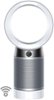
1-3 of 3 Answers
Hi Charles, this is Kelly with Dyson. You will see an oscillation button on your machine's remote control, which you'll use to put the machine into the oscillation mode. Pressing the button repeatedly will allow you to scroll through the different degrees of oscillation. This video will show you how to perform this function: https://www.youtube.com/watch?v=SNmQ_bLM2Vk This video here is a great "Getting Started" video for your model: https://www.youtube.com/watch?v=ssDmZ_dwzH4 Please feel free to contact us with any other questions. You can reach us at [email protected]. Best wishes, Kelly Dyson Customer Support
Sorry, there was a problem. Please try again later.Use the remote control to both activate the swivel feature and also to change the airflow from front flow to back flow. The remote controls all of the features of this great air purifier/fan.
Sorry, there was a problem. Please try again later.on the remote press the button it will say 45 90 180 and 350 once you it days 180 on the screen stop you can also do it on the app
Sorry, there was a problem. Please try again later.