1-1 of 1 Answer
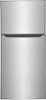
Good day, Betty Boop! To replace the air filter in your Frigidaire Gallery 20 Cu. Ft. Garage Ready Top Freezer Refrigerator (model FGHT2055VF), follow these steps: 1. Locate the Air Filter Compartment: Open the refrigerator compartment. The air filter is typically housed near the top center of the fresh food section, close to the control panel. 2. Access the Air Filter: If the filter is behind a cover, gently open or remove the cover to expose the filter. 3. Remove the Old Filter: Twist the old air filter counterclockwise to detach it from its compartment. 4. Insert the New Filter: Take the new Frigidaire PureAir AF-1 Air Filter and twist it clockwise into the compartment until it is securely in place. 5. Reset the Air Filter Indicator: After installing the new filter, reset the air filter status light on the control panel. Press and hold the "Air Filter" button for 3 seconds until the indicator resets. - Maico
Sorry, there was a problem. Please try again later.