A:AnswerOut of the box the Garmin Smartphone link using your smartphone’s data connection is required to receive traffic. If you don’t have a smartphone, a Garmin GTM 36™ or GTM 60™ will be needed to access the traffic feature.
A:AnswerIt does a good job at providing the information you need and it will look for the fastest route. When you have to detour for the faster route it will ask you before it will do it. The one problem I have notices is that the time it tells you can be off by a bit.
A:AnswerFrom: Garmin website
Garmin DriveSmart™ 60LMT
PART NUMBER 010-01540-01
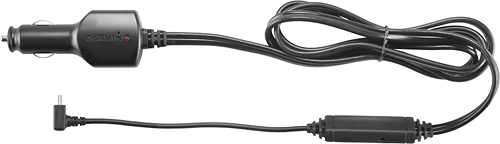
Lifetime traffic antenna/vehicle power cable that came in the Garmin DriveSmart™ 60LMT box.
Under ACCESSORIES:
for replacements
CABLES & CHARGERS column lists:
Vehicle Power Cable
PART NUMBER 010-11838-00
FYI if you look at the back of you Garmin where you install bracket mount to secure DriveSmart™ 60LMT to a suction cup mount, portable friction mount or adhesive dashboard mount. You need a flashlight to see the fine print DriveSmart™ 60LMT. LMT is built into the DriveSmart™ 60LMT. If you see LM you get a Traffic Receiver (GTM™ 36 - PART NUMBER 010-01009-02) enclosed in Garmin DriveSmart™ 60LMT box.
Under ACCESSORIES column:
Traffic Receivers lists
GTM 60™ HD Digital Traffic Receiver
PART NUMBER 010-01031-00
&
Under COMPATIBLE DEVICES column list your GPS.
Garmin DriveSmart™ 60LMT
A:AnswerAloha, Once you start your route, go to settings and make sure you've checked the traffic box, than it'll work fine. Cannot enable traffic updates unless you actually start your route first. Hope this helps.
Sincerely, Mike.