“How easy is it to playback on TV I am almost totally tech brain dead but want to buy a 3 or 4 to self film bowhunting. What all do you have to do for playback on TV or get on my laptop?”


1-6 of 6 Answers
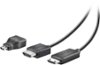
Couple answers: 1- Copy files to computer. you can remove the SD card if you have a card reader on your laptop you can install and drag it off there. 2-Copy files to computer. You can plug the camera into the laptop and it acts like another drive that you can drag and drop. 3-Use the GoPro free software which will recognized your connected GoPro and ask if you want to import into the editing tools (which allow you to watch). Very simple. 4- If you want to just watch your video on the TV direct from the camera, you will need to buy a micro HDMI to standard HDMI cable which they sell at Best Buy. #4 will require that your TV has an open HDMI port to use. Older TV's often dont have them and will require more adapters to make work.
I would recommend:
Sorry, there was a problem. Please try again later.I was able to playback on my TV by attaching the camera via the USB cable. Then I simply chose the input on my TV menu. You may also want to download the GOPRO app to your phone. You can then use your smart phone as a remote for viewing or recording.
Sorry, there was a problem. Please try again later.Easy. Simply remove sd card from camera. Plug into computer and play, save or file. Easy peasy.
Sorry, there was a problem. Please try again later.Connect it with the USB cables straight to your tv. Most tv's have USB connections now.
Sorry, there was a problem. Please try again later.You just need either an HDMI mini-HDMI cable for the TV. Switch on the camera and scroll to the playback screen using the power and shutter buttons, select the correct output on the TV and the selected video will playback. Similar process for the laptop, only using the USB cable and selecting the camera under "my computer"
Sorry, there was a problem. Please try again later.There is a plug in for a mini or micro HDMI interface cable on the camera. This can be plugged directly into most modern TV screens that have the plug in receptacle. There is also the possibility of using an interface device that can hold the SD Card directly (like a computer adapter or a USB device that can be used to display on a TV in some ways). The answer is YES there are several ways to play on a TV.
Sorry, there was a problem. Please try again later.