“I am old so I want to connect a 40 inch TV as a monitor. What adapter will work best with this computer?”
Answer This Question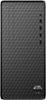
1-1 of 1 Answer
Thank you for the question. That depends on the connectors you have on the TV. If it's HDMI, you simply need to connect one end of an HDMI cable to the TV and the other to the desktop, then set up the display in "settings". We recommend that that you take a picture of the TV inputs with your smartphone and present the picture at your local Best Buy. An associate will be able to determine what you need to connect the TV to your computer.
Sorry, there was a problem. Please try again later.