A:AnswerIf you are referring to the GW3DHDKIT or one of the other wireless kits with HDMI connections , it should work however this has not been tested. thank you for choosing IOGEAR.
A:AnswerThank you for choosing IOGEAR and we apologize for the inconvenience. Most wireless kits will meet these requirements as long as the source has a direct HDMI connection as will as the TV or projector connected to the receiver . To better service you and understand your set up, please feel to contact our customer support at 1-866-946-4327 or email us: support@iogear.com. Once again, thank you for choosing IOGEAR.
A:AnswerThank you for choosing IOGEAR and we apologize for the inconvenience. We need more information to help answer your question. To better service you and understand your set up, please feel to contact our customer support at 1-866-946-4327 or email us: support@iogear.com. Once again, thank you for choosing IOGEAR.
A:AnswerThank you for choosing IOGEAR. As long as the XBOX has a direct HCDMI yes the GW3DHDKIT should transmit to your TV.
To better service you and understand your set up, please feel to contact our customer support at 1-866-946-4327 or email us: support@iogear.com. Once again, thank you for choosing IOGEAR.
A:AnswerIOGEAR says: We would need to know the model number to Answer your question. Most of the wireless kits that do not utilize software and have HDMI connections will work with security cameras as long as the system has direct HDMI connections. To better service you and understand your set up, please feel to contact our customer support at 1-866-946-4327 or email us: support@iogear.com. Once again, thank you for choosing IOGEAR.
A:AnswerThe GW3DHDKIT has a loop through on the transmitter for a hardwired TV at the transmitter and a receiver for a remote location TV . The transmitter has two inputs for sources like a blueray, DVD or cable Box. This kit will not work from TV to TV . Once again, thank you for choosing IOGEAR.
A:AnswerThank you for choosing IOGEAR . Please contact us at 1-866-946-4327, email us at support@iogear.com, or come to our KeyMander user forum for additional support, help topics and game profiles.Once again, thank you for choosing IOGEAR.
A:AnswerThank you for choosing IOGEAR. I am sorry but we do not have a kit that can be used with 20 receivers . If you are looking at the GW3DHDKIT this is a one to one solution only. Again, thank you for choosing IOGEAR.
A:AnswerThank you for choosing IOGEAR. If you are referring to the GW3DHDKIT the answer is no . This kit is made for a direct HDMI to HDMI connection. You can look at the GWHDMS52. This kit has a connector of the older connection with RCA jacks. https://www.iogear.com/product/GWHDMS52 . Again, thank you for choosing IOGEAR.
A:AnswerThank you for choosing IOGEAR. If you are referring to the GW3DHDKIT yes it will transfer the music from a laptop to your TV monitor as long as both have a direct HDMI connection. Once again, thank you for choosing IOGEAR.
A:AnswerIt works with Windows 7, but you have to install the driver for the dongle (on the supplied CD or download from their website). Miracast is available on
Windows 8 and 10. Easier to just install the software for Windows 7 rather than upgrading your operating system.
A:AnswerThere's only one device box to connect to hdmi for smart view connection. I believe only one phone or laptop to each TV since it's using one screen to mirror from. It would definitely be a surprise to me if a single hdmi cord can connect to several TVs at a time.
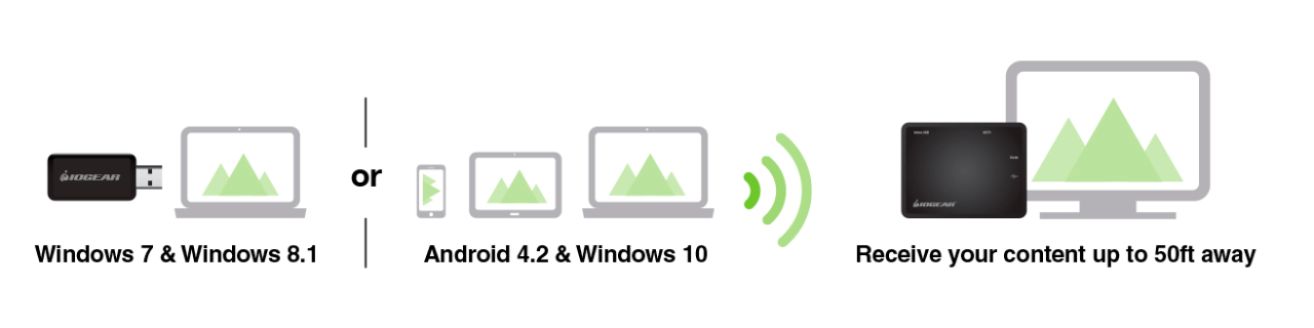
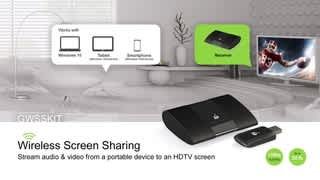
A:AnswerIt includes both. Android devices do not need a transmitter since their built in "Miracast/Screen Sharing" feature is native in the operating system. For windows 7, 8 &, 8.1 systems the included USB transmitter is required to connect.
A:AnswerIOGEAR says: You can connect the Galaxy S8 using smart view to the Receiver connected to your TV . To better service you and understand your set up, please feel to contact our customer support at 1-866-946-4327 or email us: support@iogear.com. Once again, thank you for choosing IOGEAR.
A:AnswerThe GWSSKIT does not need a wireless network to connect to. The connection is dedicated between the transmitter and the receiver. I could assist you more if I know what your source device is and what OS you're using.
A:AnswerThe application for the GWSSKIT is to cast what is on your Android or your Windows 7, or Windows 10 PC/Laptop only. IOGEAR does have a GW3DHDKIT that will do what you need quite well.
A:AnswerThis device is basically a casting device and needs a USB port for the transmitter to connect to. So the answer in this case would be no as the only 2 USB ports are just for the controllers.