“When I'm connected to my partybox 100 with my phone, another person is able to connect with his phone while I'm still connected and automatically disconnects mine, how can I prevent that?”
Answer This Question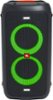
1-2 of 2 Answers
To prevent the other person from connecting to Partybox100 via Bluetooth. Have that person go to settings on his smartphone, select Bluetooth and turn it on, select the device you want to remove, and click Forget or Unpair Device and confirm your action. If you have other questions about any of our products, contact our customer service at. https://bit.ly/3r5oWYM
Sorry, there was a problem. Please try again later.How unfortunate. Basically the answer is saying you cannot prevent someone from hijacking your speaker. I use this speaker with a USB thumbdrive for school field trips. Students unplug the drive and send their own phone audio through the speaker. If I use the bluetooth from my phone, they can STILL override it. The only workaround I can think of is finding 8 bluetooth phones and pairing them all to the speaker. Because the speaker remembers a maximum of 8 signals, this would prevent students from hijacking the speaker with their own phone. But I don't have 8 bluetooth phones, so this solution is not very practical. JBL really needs to consider this problem for future products.
Sorry, there was a problem. Please try again later.