“Can I connect two monitors to this tower? One monitor is hdmi , The other monitor only connects by VGI or DGA. I am looking for dual image not mirror image.”
Answer This Question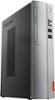
1-2 of 2 Answers
Yes it can ad two monitors of any connection to this tower. I think you mean a VGA port though. And this computer has both so no adapters needed. Just connect the HDMI to the HDMI and the VGA to the VGA. Do this however with the computer OFF. That way when it reboots it recognizes both. Then right click on the desktop and a screen comes up and you select display settings (on windows 10 - others are similar) like in pic 1. It shows two videos 1 & 2 in the green box. There may also be two separate boxes with a number in each. Either way scroll down to Multiple Displays as in pic 2 and see the box listed as multiple displays. Choose "Duplicate these displays" as shown. That's all there is to it really. It sounds complicated, but you'll find it easy. There are other things you can look at in that box as well before closing. There is a button called Identify that will show which is which on each monitor. But it you're setting them as same, then they both just show a 1|2.
Sorry, there was a problem. Please try again later.The Lenovo IdeaCentre 310s Desktop ships with two video out ports, a VGA port and a HDMI port for video out.
Sorry, there was a problem. Please try again later.

