A:AnswerYes, you can control some functions of this unit by your TV remote control even by other company’s product. Controllable functions are volume up/down and mute. ^Daphane
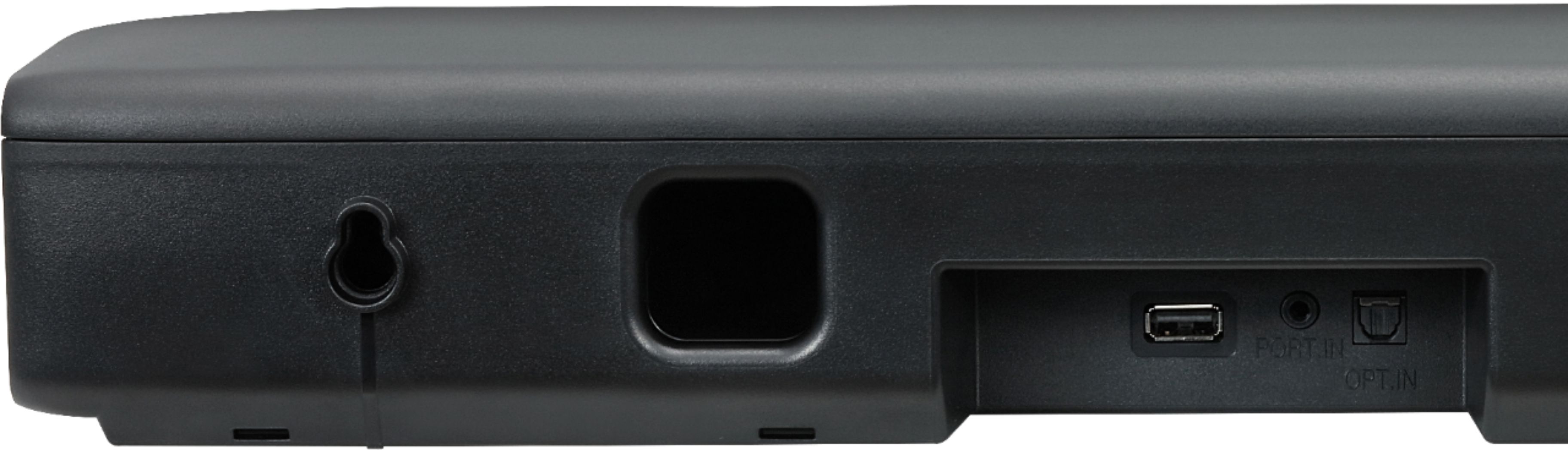
A:AnswerHi Biggs. What "special cord" are you referring to? The LG 2.0-Channel Soundbar with 40-Watt Digital Amplifier and Bluetooth® Connectivity, Model # SK1 has an Optical Digital Audio Input that requires an Optical (Toslink) cable to connect to other devices. Bluetooth on this unit works the same way it does with any other Bluetooth device. You need to pair the Soundbar with another Bluetooth device so you can stream audio wirelessly via Bluetooth from the device you pair with the Soundbar. Before you pair the units, make sure that the Bluetooth feature on your device is turned on, then set the input source on the Soundbar to Bluetooth by pressing the button with the Bluetooth icon on the Soundbar. The Bluetooth LED will blink and you can select the Soundbar from a list of available devices that show up on your Bluetooth device. The Soundbar should show as “LG-SK1 (XX)”. XX means the last two digits of Bluetooth address...^IFV
A:AnswerIf your LG TV supports Bluetooth, the LG SK1 2.0 Channel Compact Sound Bar with Bluetooth® Connectivity can be paired with the TV via Bluetooth or you connect its Optical Digital Audio Input to the TV's Optical Digital Audio Output. Pressing the DRC ON button on the remote control for about 2 seconds will allow you to set the TV remote to control the Volume and Mute functions on the Soundbar (also works for TV remotes from Panasonic, Philips, Samsung, Sharp, Sony, Toshiba, and Vizio). You will need to contact Verizon Fios Customer Support about which remote they provided you with their service. If it is a programmable or learning remote or a universal remote, you might be able to control some functions on the Soundbar but that will depend on what remote control they provided you with. They will also be able to let you know what functions it will control on the Soundbar if it is capable of that...^IFV

A:AnswerThe LG - 2.0-Channel Soundbar with 40-Watt Digital Amplifier - Black, Model # SK1 supports Bluetooth® Connectivity so if your TV supports Bluetooth®, you can pair it with the Soundbar to stream audio wirelessly. The Soundbar also has an Optical Digital Audio Input on it so if your TV does not support Bluetooth® but has an Optical Digital Audio Output on it, then you can connect the ports with an optical (Toslink) cable. If the TV only has the older Analog RCA Stereo Audio Outputs (Red/White barrel ports) on it, you can connect those to the AUX IN (3.5 mm) port on the Soundbar with a stereo to mini stereo RCA cable. ^CP
A:AnswerThe LG - 2.0-Channel Soundbar with 40-Watt Digital Amplifier - Black, Model # SK1 supports Bluetooth® Connectivity so if your computer supports Bluetooth®, you can pair it with the Soundbar to stream audio wirelessly. The Soundbar also has an Optical Digital Audio Input on it so if your computer does not support Bluetooth® but has an Optical Digital Audio Output on it, then you can connect the ports with an optical (Toslink) cable. If the computer only has the older Analog RCA Stereo Audio Outputs (Red/White barrel ports) on it, you can connect those to the AUX IN (3.5 mm) port on the Soundbar with a stereo to mini stereo RCA cable. ^CP