Black Friday is hereShop new DoorbustersShop now

Skip to content
Gift Ideas
26 Cypress St
Williston, VT 05495
Opens tomorrow at 6 am
Find Another Store
Main Content

Questions & Answers

Your price for this item is $61.99
The comparable value price is $74.99
Page Showing 21-40 of 457 questions
  • QuestionWill this work with Windows 11?

    Asked by Lisa.

    • Answer Hello, yes it will.^Venette

      Answered by LG Digital Customer Care

  • QuestionWill this work with Windows 11?

    Asked by Lillor.

    • Answer Yes it works fine with windows 11

      Answered by Carnell

  • QuestionIs this unit compatible with Windows 11? Can you use regular DVD’s/CD’s instead of the dual super multi blade?

    Asked by Browneyes.

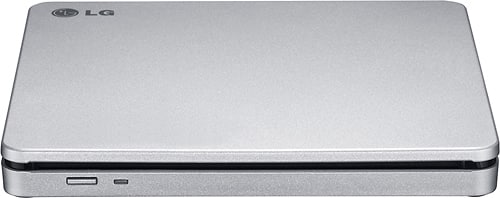
    • Answer Drive AP70NS50 is compatible with Windows 11. Supported disc for this drive include DVD-ROM(Single/Dual), DVD-RW, DVD-R, DVD+RW, DVD+R, DVD+R Double layer, DVD-R Dual layer, DVD- RAM, M-Disc (DVD+R SL), CD Digital Audio & CD-Extra, CD-Plus, CD-ROM, CDROM XA-Ready, CD-I FMV, CD-TEXT, CD-Bridge, CD-R, CD-RW, Photo-CD (Single & Multi-Session), Video CD, DVD-VIDEO. ^Daphane
      Answered by LG Digital Customer Care

  • QuestionI have old movies and TV series on DVDs. Can I watch DVD movies and TV shows on this?

    Asked by Paul.

    • Answer YES YOU CAN WATCH REGULAR DVDs. IT DOES NOT PLAY BLUE RAY DVDS or TV SHOWS. IF YOU HAVE MICROSOFT...BE AWARE IT NO LONGER HAS MEDIA PLAYER. YOU WILL HAVE TO PURCHASE OR DOWNLOAD A FREE APP THAT WILL ALLOW YOU TO PLAY YOUR DVDs. Also Best Buy does have a Lg writer that will play Blue Ray DVDs. I don't know if it will play regular DVDs. I'm sure someone will be able to assist you.

      Answered by Samsonite

  • QuestionIs this compatible with a 2020 MacBook Pro?

    Asked by Anonymous.

    • Answer Software Required OS include Windows 8/Windows 7/Windows Vista (32 bit, 64 bit)/Windows XP SP3, Mac OS X v.10.5.4 or Higher, Direct X 9.0 or Higher. ^Daphane

      Answered by LG Digital Customer Care

  • QuestionWill this work with an iPad

    Asked by Rachel.

    • Answer The LG 8x External Double-Layer DVD±RW/CD-RW SuperMulti Blade Drive, Model # AP70NS50 is compatible with Mac OS X v.10.5.4 or Higher, Direct X 9.0 or Higher Operating Systems and connects via USB. The drive is PC USB powered so the USB port needs to be able to provide enough power for the drive. Under the Mac 10.8.x operating system, built-in DVD Player may not support the USB Drive. The drive only comes with a software installation disc for Windows only. If you iPad does not detect the drive, it may not be supported. You can check with Apple to see what drives are supported...^IFV

      Answered by LG Digital Customer Care

  • QuestionThis device will not play my CD's with music on them. Am I doing something wrong?

    Asked by harley.

    • Answer Do they load and not play, or they won't even load? I had the latter problem with a few commercial disks, so I returned it. Except for that issue, it played both commercial and home-made audio disks just fine.

      Answered by JerrySNB

  • QuestionIs this compatible with Apple computers that have the Mac M1 chip?

    Asked by Cicadaloca.

    • Answer The LG - 8x External Double-Layer DVD±RW/CD-RW SuperMulti Blade Drive - Silver, Model # AP70NS50 is as being compatible with the Mac OS® X v.10.5.4 or Higher, and Direct X 9.0 or Higher Operating Systems. Regrettably, I am not sure of its compatibility with the new the Mac M1 chip. The drive does not come with a software installation disc for macOS devices. It should be automatically recognized by the operating system. You can check with Apple to see if the drive is listed as being compatible with the Mac M1 chip. ^Daphane

      Answered by LG Digital Customer Care

  • QuestionI tried a similar less expensive eternal dvd player but it is compatible with OS X Yosemite for mac. I'm on Catalina which is newer than Yosemite so that may be why it's not working. What is this compatible with for mac? Might it work for me? thanks

    Asked by mike.

    • Answer Hi Mike. The LG - 8x External Double-Layer DVD±RW/CD-RW SuperMulti Blade Drive - Silver, Model # AP&0NS50 is a unit that was released well before the release of macOS Catalina and is listed as being compatible with the Mac OS® X v.10.5.4 or Higher, and Direct X 9.0 or Higher Operating Systems. Regrettably, macOS Catalina is not listed. The drive does not come with a software installation disc for macOS devices. It should be automatically recognized by the operating system. You can check with Apple to see if the drive is listed as being compatible with macOS Catalina...^IFV

      Answered by LG Digital Customer Care

  • QuestionI bought a MSI 750 Raider 10th Gen intel. Obviously this gaming laptop does not come with a DVD/CD drive. Can this LG DVD drive play games as well not just DVDs or CDs. Can it plug into my laptop?

    Asked by Twisters369.

    • Answer The LG - 8x External Double-Layer DVD±RW/CD-RW SuperMulti Blade Drive - Silver, Model # AP70NS50 is an optical disk drive (ODD) that allows you to use CDs, DVDs, and Blu-ray discs to listen to music or watch a movie. and also allows you to burn to compatible DVD or CD discs so you can create your own music CDs, video DVDs or even create of back-up copy of your important data files. If your games are on the compatible DVD or CD discs, it will play them too. This optical disk drive is compatible with Windows 10, Windows 7, Windows 8, Windows Vista™, and Windows XP Operating Systems and connects via a USB port...^IFV

      Answered by LG Digital Customer Care

  • QuestionWill this work with MacBook Air

    Asked by CPoe.

    • Answer Hi CPoe. The LG - 8x External Double-Layer DVD±RW/CD-RW SuperMulti Blade Drive, Model # AP70NS50 is compatible with Mac OS X v.10.5.4 or Higher, Direct X 9.0 or Higher Operating Systems...^IFV

      Answered by LG Digital Customer Care

  • QuestionDoes this drive play movies?

    Asked by Meanjean.

    • Answer Yes, this drive will play movies.

      Answered by CommunityAnswer

  • QuestionWanted to check if this drive plays DVD's of all regions? Since they got rid of DVD/CD drives on new laptops, and on a laptop you had to set it up on which region you want the DVD to play, I wonder how is it with external DVD drives? Thanks!

    Asked by Lucka.

    • Answer Short answer, yes. Long answer, the disc will give you the option to change the region once it’s loaded so that it can be read, but you can only do so a finite number of times (3 I think). At least this is what happened to me with a region 2 copy of Shaun of the Dead

      Answered by 3Diddy

  • QuestionI just purchased a Google Pixelbook for school. If a class has a textbook that comes with a program, will I be able to use this external drive to install the program either onto the Pixelbook itself or an external hard drive that will also be hooked up

    Asked by Ashley.

    • Answer Yes, you can install software onto you pixelbook or an external hard drive with this product.

      Answered by CommunityAnswer

  • QuestionCan I plug this into a USB 3.0 port?

    Asked by hypno.

    • Answer Yes, the DVD/CD drive is compatible with USB 3.0 ports.

      Answered by CommunityAnswer

  • QuestionDoes it come with a USB cable?

    Asked by 0u812.

    • Answer yes, it comes with a USB cable.

      Answered by BobLexus

  • Questioncan i use an adapter if my computer does not have a USB port

    Asked by Anonymous.

    • Answer Hi there! We understand your inquiry about using your LG AP70NS50 external DVD±RW drive if your computer doesn’t have a standard USB-A port. Your drive uses a USB 2.0 interface, so you can indeed use a compatible adapter—such as a USB‑A to USB‑C or USB‑A to Thunderbolt adapter—that supports data transfer (not just charging). Ensure the adapter you choose explicitly lists USB 2.0 (or higher) data support, then plug the mini‑USB cable from your AP70NS50 into the adapter and into your computer’s port. As a troubleshooting step, if your computer doesn’t recognize the drive after connecting, try these quick checks: 1. Verify the adapter is fully seated in both the drive’s cable and your computer’s port. 2. Connect through a different USB‑C or Thunderbolt port, if available. 3. Reboot your system with the drive attached, then check in Device Manager (Windows) or System Information (Mac) for a connected “USB Optical Drive.” 4. Install or update LG’s Power DVD‑BD software to ensure proper driver support. https://www.bestbuy.com/site/lg-8x-external-double-layer-dvdrw-cd-rw-supermulti-blade-drive-silver/1802033.p?skuId=1802033 Please send us a private message on social media @LGUSSupport and our team will be more than happy to explore any additional solutions. We appreciate your patience and look forward to helping you enjoy your LG AP70NS50 to its fullest. —Renzo

      Answered by LG Digital Customer Care

  • QuestionWill this work to play music cd’s through my car speakers ?

    Asked by Sue.

    • Answer Hi there, Sue! Thank you for your question about the AP70NS50. This model is an external DVD writer and is designed to read and write CDs, DVDs, and Blu-ray discs. However, it does not have built-in capabilities to directly connect to car speakers for playback. To play music CDs through your car speakers, you would need to connect it to a compatible device, such as a computer or a CD player that supports audio output. You may access this link related to your concern and check "All Specs" :https://www.lg.com/us/burners-drives/lg-ap70ns50-external-dvd-drive.If you have any further questions or need assistance, please send us a private message on Social Media @LGUSSupport, and we’ll be happy to help. We appreciate your feedback! —Avril

      Answered by LG Digital Customer Care

  • QuestionCan I use a USB-C to connect this LG External drive to my 2023 MacBook 16" MacBook Pro?

    Asked by JSJSusan.

    • Answer Hello there, Susan. Thank you for your inquiry about the LG External DVD Drive, Model AP70NS50. We understand you’re looking to connect this drive to your 2023 16" MacBook Pro. This model connects using a USB 2.0 cable, but it does not support USB-C directly. To use it with your MacBook, you would need a USB-C to USB-A adapter to connect it via the USB 2.0 port. https://www.lg.com/us/burners-drives/lg-ap70ns50-external-dvd-drive#pdp_specs If you have further questions, feel free to send us a private message on social media @LGUSSupport, and we’ll be happy to assist! —Renzo

      Answered by LG Digital Customer Care