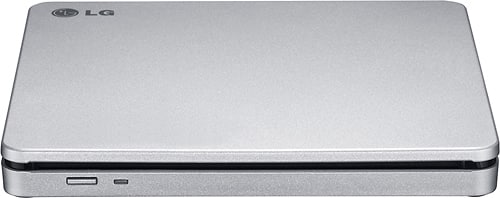
A:AnswerHello Rohn! We'd be happy to help you out. Excellent question. Yes, The LG Super Multi Blade DVD, Model AP70NS50, is Mac compatible. For more questions, reach out to us on social media @LGUSSupport. We're eager to assist! ^Joslyn
A:AnswerHi there. Thank you for reaching out with your question about the LG model AP70NS50. We understand how important it is to ensure compatibility with your MacBook.
The LG AP70NS50 is a DVD writer (or optical drive) that is generally compatible with both Windows and macOS systems. To use it with your MacBook, you’ll need to connect it via USB. Ensure that you have the appropriate software or drivers installed if required, and macOS should recognize the drive automatically.
If you encounter any issues or have further questions, please send us a private message on Social Media @LGUSSupport. We’re here to help!
We appreciate your inquiry and look forward to assisting you.
—Renzo
A:AnswerThank you for reaching us regarding LG Portable DVD. The LG AP70NS50 is an external DVD writer and is not directly compatible with a 2023 Chevy Tahoe. You can download its owner's manual through this link for more information: https://www.lg.com/us/support/product/lg-AP70NS50.AUSR10B. For additional assistance, please reach out to us on social media @LGUSSupport so we can help you further. ^Cris
A:AnswerThank you for reaching us regarding LG Portable DVD. No, the LG AP70NS50 external DVD drive cannot be directly used with a USB port in a car that has no CD player. You can download its owner's manual through this link for more information: https://www.lg.com/us/support/product/lg-AP70NS50.AUSR10B. For additional assistance, please reach out to us on social media @LGUSSupport so we can help you further. ^Cris
A:AnswerThank you for reaching us regarding LG Portable DVD. Yes, the LG AP70NS50 external DVD drive is compatible with Windows 11 Pro. You can download its owner's manual through this link for more information: https://www.lg.com/us/support/product/lg-AP70NS50.AUSR10B. For additional assistance, please reach out to us on social media @LGUSSupport so we can help you further. ^Cris
A:AnswerHello there. Thank you for your question about the LG AP70NS50 DVD writer.
The LG AP70NS50 is an external DVD writer that is generally compatible with most operating systems via a USB connection. Chromebooks, however, can have limited support for external devices like DVD writers due to their operating system's capabilities.
For full functionality, you might need to use specific applications or extensions available on the Chrome Web Store that support optical drives. Additionally, ensure that your Chromebook recognizes the drive and that any required drivers are installed.
If you have any further questions or need additional assistance, please send us a private message on Social Media @LGUSSupport. We’re here to help!
—Renzo
A:AnswerHello there, thank you for your inquiry about the AP70NS50. This model is not applicable for use in a car via USB to play CDs, as it requires a dedicated car CD player to function. If you have any further questions or need assistance, please send us a private message on Social Media @LGUSSupport. We’re here to help!
—Avril
A:AnswerHi there! Thank you for your question about the LG AP70NS50 external drive. Yes, this external drive is a great solution for adding programs to your HP Pavilion Desktop. It connects via USB, allowing you to read and write CDs and DVDs, which can be useful for installing software, backing up data, or playing media.
If you need further assistance, please send us a private message on Social Media @LGUSSupport. We’re happy to help!
—Avril
A:AnswerThank you for reaching us regarding LG Portable DVD. Yes, the LG AP70NS50 is an external DVD drive that can be used to read CD programs on your desktop computer. You can download its owner's manual through this link for more information: https://www.lg.com/us/support/product/lg-AP70NS50.AUSR10B. For additional assistance, please reach out to us on social media @LGUSSupport so we can help you further. ^Cris
A:AnswerThank you for your interest in the LG Portable DVD. The LG AP70NS50 is a portable DVD rewriter that supports burning DVDs. It has an 8x DVD-Max writing speed, allowing you to burn discs quickly. You can download its owner's manual through this link for more information: https://www.lg.com/us/support/product/lg-AP70NS50.AUSR10B. ^Cris
A:AnswerHi there! Thank you for your inquiry about the AP70NS50. This unit is compatible with most devices, including Lenovo all-in-one computers, as long as the necessary connections are available. It’s important to check that the ports on your computer match the required inputs for the unit. As for installation, the AP70NS50 typically comes with everything needed, including cables and installation instructions. However, it's always a good idea to verify the included components in the packaging. If you have any further questions or need assistance, please feel free to send us a private message on Social Media @LGUSSupport. Our team is here to help!
—Avril
A:AnswerHi there! Thank you for your question regarding the AP70NS50 and the issue with your Philips multi-input TV. The "Unsupported Device Connected" message can sometimes indicate compatibility issues between the device and the TV. It’s possible that certain settings or configurations need to be adjusted on your TV to recognize the device properly.
Here are a few steps you can try: ensure that the input source is correctly selected on the TV, check all cable connections, and try using a different HDMI port if available. Additionally, make sure that the AP70NS50 is powered on and functioning properly.
If the issue persists, it may be worth checking with Philips customer support to confirm compatibility with your specific TV model. For further assistance, feel free to send us a private message on Social Media @LGUSSupport. Our team is here to help!
Thank you for reaching out!
—Avril
A:AnswerThank you for your interest in the LG Portable DVD Rewriter (AP70NS50) model. The LG AP70NS50 device is a portable DVD writer that can be connected to a computer or other device to read and write DVDs. It is not designed to work directly with Android tablets. You can download its owner's manual through this link for more information: https://www.lg.com/us/support/product/lg-AP70NS50.AUSR10B. ^Cris
A:AnswerHi there! We understand you're having playback issues with this external drive. Please try these steps for possible resolution options:
1. Check the connection: Ensure that the drive is securely connected to your computer's USB port. If you are using a USB hub, try connecting the drive directly to a USB port on your computer.
2. Check device manager: Right-click on the Start button and select "Device Manager." Look for any yellow exclamation marks or error symbols next to the DVD/CD-ROM drives category. If you see any, right-click on the device and select "Update driver" to install the latest driver for the drive.
3. Check autoplay settings: For Windows users, open File Explorer (Windows + E), right-click on the disc drive, and select "Properties." Go to the "AutoPlay" tab and ensure that the desired action (e.g., play music, open folder) is selected for different types of media.
4. Try different discs: Test the drive with different DVDs or CDs to see if the issue is specific to certain discs. Make sure the discs are clean and not scratched or damaged.
5. Install alternative media player: If the drive still doesn't play discs, try installing alternative media player software like VLC or Leawo. These programs can sometimes resolve compatibility issues.
If you need further assistance, please send us a private message on social media (@LGUSSupport) with your phone, model, & serial numbers. We'd be happy to help! ^Chris
A:AnswerThank you for your interest in the LG Portable DVD. Yes, you can use the LG AP70NS50 external DVD writer with your iPad Pro 6th generation. You can download its owner's manual through this link for more information: https://www.lg.com/us/support/product/lg-AP70NS50.AUSR10B. For additional assistance, please reach out to us on social media @LGUSSupport so we can help you further. ^Cris
A:AnswerThank you for your interest in the LG DVD Rewriter (AP70NS50) model. Yes, the LG AP70NS50, an 8x Portable DVD Rewriter with M-DISC™ support, can burn music CDs. This device is designed to play and record both CDs and DVDs, allowing you to create your own music CDs among other functionalities. You can download its owner's manual through this link for more information: https://www.lg.com/us/support/product/lg-AP70NS50.AUSR10B. ^Cris
A:AnswerThank you for your interest in the LG Portable DVD (AP70NS50) model. Yes, the LG AP70NS50 is an external DVD rewriter that can be used to read and write discs on a computer that does not have an internal disc drive. It supports various disc formats, including DVD-ROM, DVD-RW, DVD-R, DVD+RW, and DVD+R. You can download its owner's manual through this link for more information: https://www.lg.com/us/support/product/lg-AP70NS50.AUSR10B. ^Cris