“how can I turn back on the volume on my new tracphone LG Rebel”
Answer This Question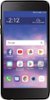
1-2 of 2 Answers
open phone to home page on phone and if you look on the left side of phone near top are 2 buttons .........push lower button to drop volume ,,,,,,,if that doesn't work then try from home page swiping down from top you will see a thing that looks like a gear in the upper right side ..........tap that and it will take you to a settings page ......go to sound and tap then it will open another settings page that says volume.............tap volume and it will open to all volume controls where you can see how high the volumes are set. hope that helps!
Sorry, there was a problem. Please try again later.There are volume buttons on the left side of the LG Rebel 4. The bottom volume button can be used to lower the volume on the device. You can also adjust the volume in the sound settings. If you need additional assistance, you can contact our Customer Support by any of the below options: Phone: 1-800-243-0000 LiveChat: https://www.lg.com/us/support/chatbot Email: https://www.lg.com/us/support/email-appointment Facebook Messenger: https://www.facebook.com/LGUSA/ Twitter DM: @LGUS The LG Community Forum is also a great resource for getting help from other LG customers: https://lgcommunity.us.com/ ^CP
Sorry, there was a problem. Please try again later.