“Does the remote turn off and on with just one button? I am seeing that I need to press each individual button and the on/off button together. Is there anyway around that ?Thank you.”
Answer This Question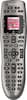
1-3 of 3 Answers
Just one button. You can set it up to do a series of functions. I've got mine easily setup, with the press of one button to turn on my TV, DVR, and receiver. I recently bought another remote because i wore my other one out, which lasted 7 years. I love this remote... you will too.
Sorry, there was a problem. Please try again later.When you press the button for a "scene" it turns on whatever gear needs to be turned on for that "scene." when you set this remote up on their web site first you put in all the gear you have, then you set up scenes such as "watch TIVO box." when you hit the watch TIVO box button it turns on the TV and sets the proper input, then turns on the TIVO box, and then the audio system (if you use one). The power button is really only there for turning everything off. You can use this in device mode as well. In device mode you choose which device you want to control then the power button only works for that device.
Sorry, there was a problem. Please try again later.There is a button that turns off all devices at once, named "All Off" but this is not the same button used to power devices ON. You would be selecting a command, such as "Watch a Movie" or "Listen to Music" to power on ALL the devices that that "activity" uses.
Sorry, there was a problem. Please try again later.