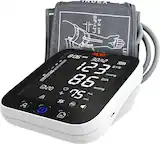
A:Answer A: To delete a single measurement
1. Enter the memory recall mode as described in section [Recall the Records]. Press “Record” or “Bluetooth” button to get the measurement you would like to erase.
2. Press and hold “Record” button for 3 seconds, and the display will show a blinking “dEL yES” along with the memory number of the reading.
3. Use the “Record” or “Bluetooth” button to toggle between “dEL yES” and “dEL no”, Press “START/STOP” to confirm the selection.
If “dEL yES” is selected, the unit will delete the record and display “dEL do nE” along with the memory number of the reading. After then it will return to last memory record and All the records are pushed forward one digit
(e.g., 03 becomes 02, and so on)
If “dEL no” is selected, it will stop the deletion.
B: To delete all measurements:
1. Enter the memory recall mode as described in section [Recall the Records].
2. Press and hold “BLUETOOTH” and “RECORD” button for 5 seconds, and the display will show a blinking “dEL ALL” along with the user ID.
3. Use the “BLUETOOTH” or “RECORD” button to toggle between “dEL ALL” and “dEL no”, Press “START/STOP” to confirm the selection. If “dEL ALL” is selected, the unit will display “dEL ALL do
nE” + User ID and delete all the record of the current user. Several seconds later, it will display “---”. If “dEL no” is selected, it will stop the deletion