“does it need? does this adapter need to be wired. i live in the basement of a house and have bad strength.”
Answer This Question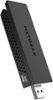
1-10 of 11 Answers
No wire needed. I too installed on a desktop computer in my basement 3 floors below my router. works absolutely fine.
Sorry, there was a problem. Please try again later.No wiring, except into a usb port on your PC. It draws it power from that. You may want to look into a signal booster that you could place between your router and the PC. Talk to a Geek at Best Buy. They should be able to help you out with an affordable solution. Good Luck!
Sorry, there was a problem. Please try again later.This plugs directly into USB Port. No wires. Connects wirelessly to your router/modem. I set this up in 10 minutes.
Sorry, there was a problem. Please try again later.Depends, for max gain you need to extend adapter to its fullest. To extent it to the fullest, I suggest connecting it to the supplied USB cable
Sorry, there was a problem. Please try again later.Only "wire" is a USB plug which attaches to a USB slot on your computer. No wires going to electrical outlets.
Sorry, there was a problem. Please try again later.No, it does not need to be wired. It does, however, come with a USB wired dock that you can use to position the device to improve signal strength.
Sorry, there was a problem. Please try again later.it can be wired or just connected to the USB input on PC or laptop i recommend wired on desktop it looks neat, but just for reference you dont need a power input to clarify the question
Sorry, there was a problem. Please try again later.No. Just plug into your computer's USB port.
Sorry, there was a problem. Please try again later.Adapter has about a 36" cable and plugs into your USB port.
Sorry, there was a problem. Please try again later.It connects right into an open USB port.
Sorry, there was a problem. Please try again later.