“Does this unit have to be plugged in to the same electric circuit as the router is in? My router is down stairs in the living room and I have a really weak signal in all the upstairs bedrooms so I got a powerline but in the guidelines I noticed it said the Powerline type of extenders they have to be plugged in on the same electric circuit, that didn't work for the way my house is set up so I'm hoping that's not the case with this one as well.”
Answer This Question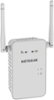
1-10 of 11 Answers
This unit does not use the power line for a signal path. It receives the wireless signal from your router and amplifies it, thereby extending the range (place where there is still a good signal from the router and it will cover your dead spots) or in wireless access mode connects to your network with an ethernet cable and then works as a wireless hotspot.
Sorry, there was a problem. Please try again later.My instructions said it had to be plugged in by original router/modem for set up but once set up complete could be moved. I did that and afterward moved it to separate building behind the house with its own electrical service so no, did not have to be on same powerline to work after initial set up.
Sorry, there was a problem. Please try again later.This one connects wirelessly and not through electric grid. (I had one of those and it didn't work well.) You should set it up initially close to wireless through with the WPS to make sure signal connects. Once set up it will boost your signal no matter where ever you plug it in if it can connect wirelessly with original source/router. Name shows as ext so you know what signal your devises are connected to. It also has a wired connection on the unit to connect to a wired device via wireless signal to extender.
Sorry, there was a problem. Please try again later.It just has to be plugged into an electrical circuit in the same room for the set-up. You then can take it upstairs and extend your range.
Sorry, there was a problem. Please try again later.Just for initial setup, it has to be close to your router. After that, no wires or "same circuit" is necessary. Works great and easy to install.
Sorry, there was a problem. Please try again later.No. Separated by two rooms and centered in the house.
Sorry, there was a problem. Please try again later.The netgear-AC750 Wi Fi Range Extender Wall Plug can be plugged in near the place you need it to work.
Sorry, there was a problem. Please try again later.No it does not. You do not even need to put it in the same room as the router. I would suggest midway from router room & where you are with your computer, bdrm., den, etc.
Sorry, there was a problem. Please try again later.It does not need to be in the same outlet. You just need to put it at the midpoint of your wireless signal.
Sorry, there was a problem. Please try again later.This unit does not have to be plugged in to the same electric circuit as the router is in.
Sorry, there was a problem. Please try again later.