“Hi Im planning to buy this desktop and this only has 1tb hdd. Can you put ssd without removing hdd? If so what kind ssd do I need”
Answer This Question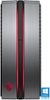
1-2 of 2 Answers
Not to be rude, but this question shows a completely lack of understanding of computer architecture. You'd be better off reaching out to the Geek Squad or an actual technician who can help you and install the drive. Yes, there are plenty of spots to add an SSD without having to remove the HDD. You will need both an SSD - what kind you get will be up to you and how much you want to spend, the interface with the computer will be the same, that's kind of the point of SATA - and a SATA data cable as well.
Sorry, there was a problem. Please try again later.Yes, this desktop features additional slots on the board to connect SATA SSD from any brand.
Sorry, there was a problem. Please try again later.