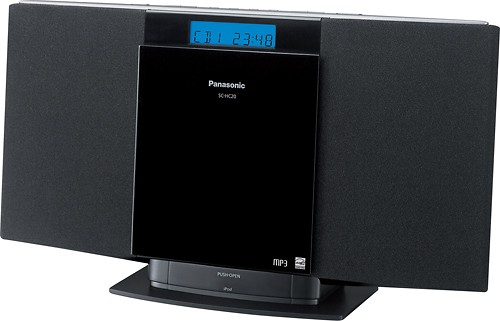
A:AnswerAbsolutely. The Panasonic SC-HC20 shelf system operating instructions indicate on page 4 that this unit comes with a detachable AC power cord. Good Luck.
A:AnswerYes. The Panasonic SC-HC20 shelf system operating instructions indicate on page 8 that this unit’s built-in iPod dock will charge your compatible iPod. The operating instructions indicate that when this unit is charging the iPod in standby mode, “IPOD CHARGING is shown on the main unit’s display.” Good Luck.
A:AnswerAbsolutely. The Panasonic SC-HC20 shelf system operating instructions indicate on page 4 that this unit features a 3.5mm headphone jack. Good Luck.
A:AnswerAbsolutely. The Panasonic SC-HC20 shelf system operating instructions indicate on page 6 that this unit can play CD’s and MP3 CD’s as well. The Panasonic stereo is a single disc CD player. Good Luck.
A:AnswerYes. The Panasonic SC-HC20 shelf system operating instructions indicate on page 8 that this unit’s built-in iPod dock is compatible with iPod nano 5th generation. Good Luck.
A:AnswerAbsolutely. The Panasonic SC-HC20 shelf system operating instructions indicate on page 6 that this unit offers several repeat CD playback options. Those repeat CD playback options include: Repeat 1 track, Repeat Album, and Repeat Random Play Mode Selections. The repeat function also works in program play mode. Good Luck.
A:AnswerYes. The Best Buy website indicates that the Panasonic SC-HC20 refurbished shelf system comes with the following warranty:
Warranty Terms-Parts |90 Days
Warranty Terms-Labor |90 Days
Good Luck.
A:AnswerHello Cindy. Welcome to the Best Buy community. Thank you for your question. No. The operating instructions and marketing specifications for the Panasonic SC-HC20 |SKU:2550182 shelf system do not indicate that a third party speaker system such as “outside speakers” can be added to the system. You are correct that you will have to find a system that has speakers separated from the tuner such as a component stereo receiver. Your needs will be met with the purchase of any A/V receiver from Best Buy. There is no information contained in the operating instructions, marketing specifications, or Best Buy website for the Panasonic SC-HC20 shelf system that indicates that additional third party speakers can be added to the stereo system. Panasonic can’t provide support or assure the performance, quality, audio quality, power handling capacity, compatibility, and functionality of third party speaker systems with its shelf stereo systems unless otherwise indicated. Traditionally, with respect to the compact stereo shelf system product category, it is not recommended that additional third party speakers be connected to a shelf system unless indicated otherwise in the unit’s operating instructions. A shelf system manufacturer can’t possibly test every pair of speakers sold by every vendor in the U.S. market to assure compatibility with its shelf system. Shelf systems that are sold by Best Buy are closed proprietary systems as it pertains to the speaker system that the stereo systems come with. A shelf system speaker system has been carefully designed, constructed, and tested by the manufacturer to ensure that it can handle the amplifier output power of the system. In addition, a shelf system manufacturer has carefully designed speakers that can achieve the sonic characteristics that the manufacturer has intended the customer to hear once the system has been properly set-up at home. A shelf system is the wrong product category to consider adding a third party speaker system to. The correct product category to add suitable speakers of your choice including outdoor speakers is a component stereo receiver. There is much more flexibility in speaker selection for the component receiver. There are very few limitations other than your budget when making this receiver speaker selection decision. Good Luck.
A:AnswerAbsolutely. The Panasonic SC-HC20 shelf system operating instructions indicate on page 4 that this unit features a 3.5mm AUX input jack for connection to your TV. You will need to purchase a stereo cable to make this connection. You can use a Dynex DX-AD104 |SKU:9222352 audio cable to make this connection. Plug one end of the cable with red and white rca connectors into the audio out jack on the TV. Plug the other end of the cable featuring a stereo mini connector into the AUX input on the Panasonic stereo. Make sure to select the AUX input on the Panasonic stereo to hear audio from the TV through this unit’s speakers. Good Luck.
A:AnswerNo. The Panasonic SC-HC20 shelf system’s built-in iPod dock is not compatible with iPod touch 4th generation. Sorry. However, you are correct that the Panasonic SC-HC25 shelf system operating instructions indicate on page 7, that its built-in iPod dock is compatible with your iPod touch 4th generation. Good Luck.
A:AnswerYes. The Panasonic SC-HC20 shelf system does include a remote control. The operating instructions indicate on page 8 that this unit’s remote control can control iPod menu and playback functions. Good Luck.
A:AnswerHi, the Panasonic SC-HC20 Compact Stereo System is compatible with the Apple iPhone 4. Compatibility may also depend on the software version of your iPhone. For Android phones, since they are not compatible with this unit's dock, you may connect them to the AUX port on the back of this unit using a 3.5mm stereo audio cable to the headphones jack of the phone for music and audio playback.
A:AnswerThe Best Buy website indicates that the Panasonic SC-HC20 shelf system has the following dimensions:
Product Height: 8-7/16”
Product Width: 15-1/8”
Product Depth: 4-7/16”
Product Weight: 4.6 lbs
Good Luck.