Main Content

Questions & Answers

$199.99
Page Showing 61-80 of 179 questions
  • Questioncan i use a dvd player with this tv?

    Asked by lar.

    • Answer Hi Lar, The F6000F can connect to a DVD Player via HDMI. ~Samsung Advisor

      Answered by Samsung

  • QuestionWill samsung Smartview work on this TV

    Asked by Skipper.

    • Answer Hi Skipper, Yes, SmartView is available on the F6000F TV. ~Samsung Advisor

      Answered by Samsung

  • QuestionIs this tv Bluetooth capable

    Asked by Chuck.

    • Answer Hi Chuck, Yes, the F6000F is Bluetooth-enabled. ~Samsung Advisor

      Answered by Samsung

  • QuestionCan I connect multiple Bluetooth headphones?

    Asked by FincoachDc.

    • Answer Hi FincoachDc, You sure can connect your AirPods or wireless headset via Bluetooth. You can also use the Multi-output Audio feature to use both TV speakers and Bluetooth headsets simultaneously if you have viewers who want two different volume levels. ~Samsung Advisor

      Answered by Samsung

  • QuestionCan I use a universal pedestal stand with this TV??

    Asked by McRae.

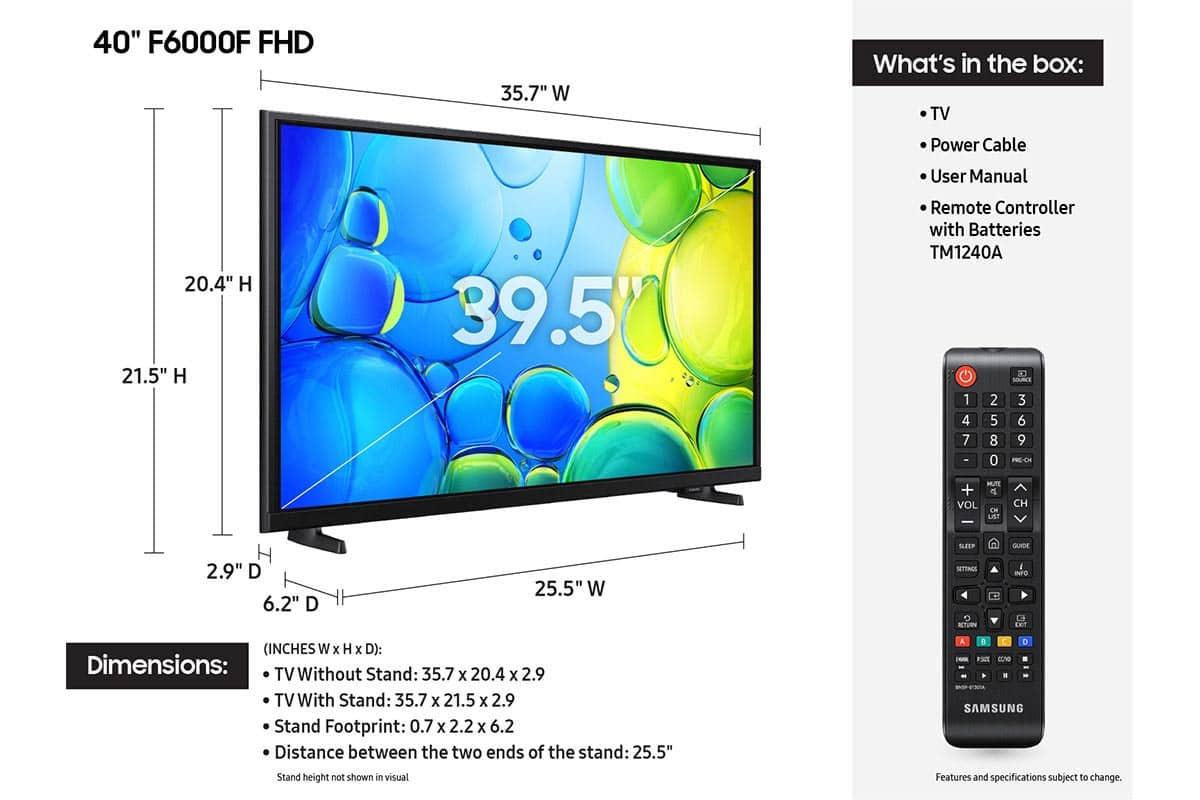
    • Answer Hi McRae, The 40" F6000F TV can connect to mounts that are compatible with a VESA Map of 200x200mm. ~Samsung Advisor

      Answered by Samsung

  • QuestionWhat do I need to record and play back programs with this TV?

    Asked by JBODIE1.

    • Answer Hi JBODIE1, You will need a DVR device to record and play back programs. ~Samsung Advisor

      Answered by Samsung

  • QuestionThere have been several negative responses about the remote. Why is it different from most of your remotes ? and what is the problem ?

    Asked by Mike.

    • Answer Unresponsive or sluggish to respond to imput

      Answered by TVMAN

  • Questioncan i use this in a cold garage

    Asked by mill.

    • Answer Hi Mill, The F6000F TV is not intended for outdoor use, as it does not carry an outdoor-use rating. If you’re looking for a TV built specifically for outdoor environments, we recommend The Terrace TV Series. ~ Samsung Advisor

      Answered by Samsung

  • QuestionWhat are the actual dimensions of the 40 inch TV?

    Asked by Richard.

    • Answer Hi Richard, The 40" F6000F TV dimensions are 35.7" x 20.4" x 2.9" (WxHxD) without the stand and 35.7" x 21.5" x 6.2" with the stand attached. ~Samsung Advisor

      Answered by Samsung

  • QuestionDoes the TV come with the stand and the screws to attach it?

    Asked by Rita.

    • Answer Hi Rita, Yes, the F6000F comes with removable feet. ~Samsung Advisor

      Answered by Samsung

  • QuestionDoes this tv have a sleep timer?

    Asked by Dan.

    • Answer Hi Dan, The F6000F TV includes Auto Power Off, Sleep Timer, and Off Timer – each designed to reduce power use or automate shutoff. Sleep Timer and Off Timer let you schedule when the TV shuts off. Auto Power Off turns off the screen if the TV hasn’t been used for a while. To adjust these settings: Home > Settings > All Settings > General & Privacy > Power and Energy Saving. ~ Samsung Advisor

      Answered by Samsung

  • QuestionSend me a PDF file for the remote that came with my F6000F tv

    Asked by Bob.

    • Answer Hi Bob, Here is the user manual for the F6000F TV: https://downloadcenter.samsung.com/content/UM/202507/20250711045610001/BN81-25561A-820_EUG_ROPATSCD_NA_ENG-US_250429.0.pdf ~Samsung Advisor
      Answered by Samsung

  • Questionwhere can I find a manual that fully describes all the buttons on the remote that came with this tv?

    Asked by remote.

    • Answer Hi Remote, The e-Manual and Remote Control Guide are also conveniently built into your TV: Settings > Support > Tips and User Guides ~Samsung Advisor

      Answered by Samsung

  • Questioninstruction for the remote

    Asked by remote.

    • Answer Hi Remote, You can download the full e-Manual and more by visiting Samsung’s website then navigating to: Support > Manual & Software > TVs & Home Theater. From there, you can search for and select your F6000F TV model to view or download the available guides. The e-Manual and Remote Control Guide are also conveniently built into your TV: Settings > Support > Tips and User Guides. ~Samsung Advisor

      Answered by Samsung

  • QuestionAre there RCA Connectors on the back of this tv?

    Asked by Mattie.

    • Answer Hi Mattier, The F6000F does not have RCA connectors. ~Samsung Advisor
      Answered by Samsung

  • QuestionDoes this tv have a backlit remote

    Asked by Gus.

    • Answer Hi Gus, No, the remote is not backlit. ~Samsung Advisor

      Answered by Samsung

  • Questionis this tv Bluetooth headphone audio capable?

    Asked by Rrs.

    • Answer Hi Rrs, Yes, the F6000F is Bluetooth-enabled. ~Samsung Advisor

      Answered by Samsung

  • QuestionHow do you connect Roku to this TV?

    Asked by Anonymous.

    • Answer Even though I did not use this Samsung 40" inch model F6000F TV (2025) as yet because Samsung did not include the proper screws to fit the holes of the 2 feet stands, I made research online prior to buying it because i want to use ROKU to watch Cirque di Soleil which is not yet available on Samsung Tizen; Googling and on Samsung website FAQ it states one can download ROKU app from Samsung Store on the TV and watch ROKU free channels. Also it should be noted that Googling will come up that Samsung F6000F model TV was released originally in 2013 and since Samsung has been updating its software and internal parts etc which may explain why the back cover of 40" F6000F model (2025) is so thin not sold that does to provide solid back cover protection as all prior TVs I bought, the thin back cover of this TV pops in and out on the touch.

      Answered by RoadWarrior

  • QuestionDo I need an HDML cable for this TV model?

    Asked by Anonymous.

    • Answer Hi, To connect external devices such as your cable box or soundbar, you will need an HDMI cable. ~Samsung Advisor

      Answered by Samsung

  • QuestionCan you hook up a sound bar to this tv

    Asked by Anonymous.

    • Answer Hi, Yes, you can connect a soundbar via HDMI. ~Samsung Advisor

      Answered by Samsung