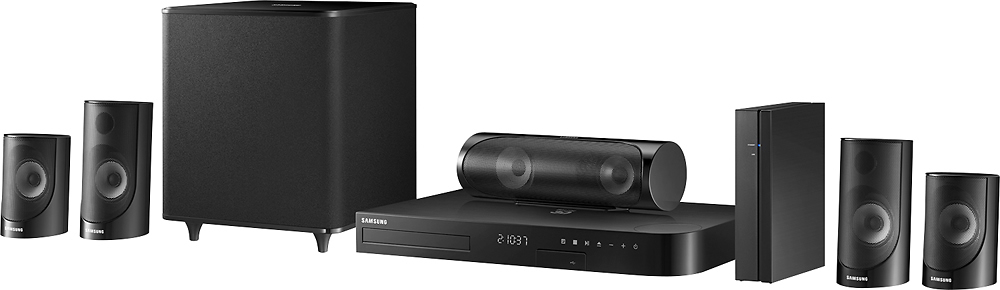
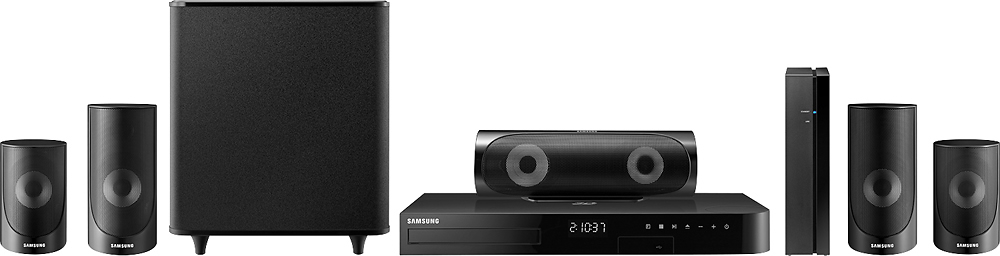
A:AnswerSamsung uses proprietary connectors to make it easy to connect the speakers to the correct output on the amplifier, so you can't connect your home's "bare ended twisted wire" directly to the Samsung system. BUT, the other end of the speaker cables (the one that connects to the speaker) is bare twisted wire. You could use the proprietary cables to connect to the amp, and then just get some wire nuts from the hardware store and connect the other ends to your in-house wiring. Just verify that your house wiring isn't too heavy gauge (too thick) to fit in the speaker's spring connectors.
Note: The "wireless" surround module is REQUIRED for surround sound because Samsung removed the surround channels from the main system's amplifier. Using the house wiring may not be worth all the effort, depending on where you plan to place/mount your speakers.
A:AnswerIt will display video yes, ARC compatibility is audio. This unit is the same as the last one you bought. You will only get stereo audio unless you have an optical output on your television with 5.1 capability that you can then connect to the Samsung.
A:AnswerNo, there is no connection to the internet for operation of the back speakers. The rear speakers attach to the powered wireless receiver, which must be plugged in to a power outlet. This unit pairs with the main receiver. The internet signal is required however to stream video from internet sources like Netflix, Hulu, and You Tube.
A:AnswerYes and No. There is a box that is wireless to the main unit but there are wires that connect to the 2 rear speakers from that box. So I have the box behind my couch and you can minimally see the wires going to the speakers....
A:Answer3 ohms for each speaker small print next to the wire in back of speaker. The color coding helps you find problems later on. Make sure the connection to the woofer should only go to the woofer, make sure. If not correct damage may occur.
Clean and not fuzzy wires at the connectors will be a long lasting benefit. The Speaker plugs not only have different colors but different shapes some of the notches are different from plug to plug take time do it right. Over the years (women let men do the work so if an error is made the "NOT ME" kicks in. Men always know many things about how to fix but when things fail always RTFM (READ THE FREAKING MANUAL). Over my more than fifty years of fixing stuff, ten minutes with manual saved a lot of blue smoke, blue screens and loud discussions!
It is a great system I use mine everyday!
A:AnswerYes! I am using two klipsch tower speakers, a klipsch 8" subwoofer, and two klipsch satellite surround speakers. Pushes them with no problem. Hope this helps. Good luck!
A:AnswerIf its plugged into a surge protector it will do this. risk you have to take to plug straight in to wall. I have disucced this with Samsung and that is their only fix. It worked
A:AnswerThere is no input for your cable box. I wish it had one. However when you want to listen to music from your phone or tablet, no you do not have to turn the tv on.
A:AnswerNo. There is a rear surround "module" (amplifier) that connects to wall power and wirelessly communicates with the main unit. The surround speakers connect to it with wires. There is no 30-75ft wire run around your room, but there are still plenty of wires.
A:AnswerYes this system can be hooked using most methods. I have discovered though that an optical connection is by far the easiest. Everything else has been a confusing pain.