Questions & Answers
- Model:
- HW-S50B/ZA
- |
- SKU:
- 10187652
$247.99
Save $32
Comp. Value: $279.99
Page Showing 121-137 of 137 questions
Q: QuestionI would like to connect my sat box directly to soundbar, but if this doesn't have hdmi in how would I do this?
Asked by Jimm.
- A:Answer Hi Jim, You are correct that the HW-S50B does not have an HDMI In port, natively this is not possible with this soundbar. Our Q-Series Soundbars do have 1 HDMI IN port and 1 HDMI OUT port. Consider looking at one of those models if this is something that you are really wanting to do. ~Samsung Solutions
Answered by Samsung

Q: QuestionDoes this have earc?
Asked by Jimm.
- A:Answer Hi Jim, The new HW-S50B Soundbar does not have eARC, it has 1 HDMI TV ARC port. ~Samsung Solutions
Answered by Samsung

Q: QuestionCan this hw s50b work with samsung hw- 9100s rear speakers system?
Asked by Gongchiri.
- A:Answer Hi there, The HW-S50B Soundbar works with either the SWA-9100S and the SWA-9200S Wireless Rear Speaker Kits. ~Samsung Solutions
Answered by Samsung

Q: QuestionHow long is the s50b/za sound bar
Asked by Bud.
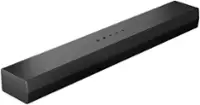
- A:Answer The specs say the sound bar measures 26.4" L x 4.1" D x 2.4" H and these are accurate compared with the actual device.
Answered by diynese
Q: QuestionIs it wireless and will it work with a QN800B. OLED 8K SAMSUNG TV
Asked by Jeri.
- A:Answer Hi Jeri, The HW-S50B is unable to support Wi-Fi but will be able to connect wirelessly using a Bluetooth connection. You would be able to connect the soundbar to your QN800B through Bluetooth, Digital Optical or an HDMI cable. ~Samsung Solutions
Answered by Samsung

Q: QuestionCan you mount it on the wall
Asked by Jake.
- A:Answer Comes with wall mounts
Answered by SueD
Q: QuestionCan you add a sub woofer or additional speakers to this system?
Asked by AVCreative.
- A:Answer Yes, you can add a subwoofer and rear or surround speakers. But it varies with models.
Answered by Barnes24
Q: QuestionDoes this have an ARC input?
Asked by KeithK.
- A:Answer Hi KeithK, Yes the HW-S50B does have a HDMI ARC connection. ^Andrew
Answered by Samsung

Q: QuestionCan this sound bar attach to the Samsung 85 inch TV that will be hung on the wall?
Asked by Bill.
- A:Answer Hi Bill! The HW-S50B features three ways to connect to an external device: HDMI (ARC), digital optical audio, and Bluetooth wireless audio technology. If your TV is compatible with one of these three audio connections, you should have no issue connecting the soundbar to your TV. ~Samsung Solutions
Answered by Samsung

Q: QuestionHow do I set up or initiate the soundbar's Q symphony feature? MY soundbar is connected to my Samsung TV with a HDMI cord. Thanks.
Asked by Jack.
- A:Answer Hello Jack, For Q-Symphony, the Soundbar syncs with a Samsung TV to output sound through two devices for optimum surround effect. When the Soundbar is connected, the menu, “TV+Soundbar” appears under the Sound Output menu of the TV. Select the corresponding menu. ~ Samsung Solutions
Answered by Samsung

Q: QuestionHow much distance should there be between the sound bar and the tv, assuming I mount the sound bar under the Tv?
Asked by AM.
- A:Answer Hello AM, As long as there are no obstructions to the soundbar's speakers you can place it directly under your TV. ~ Samsung Solutions
Answered by Samsung

Q: QuestionIs the Samsung Hw-s50 b compatible with qn700 b 8k tv ?
Asked by Jess.
- A:Answer Hi Jess, The HW-S50B Soundbar would indeed be compatible with the QN700B Samsung TV. You can connect it using Bluetooth, Digital Optical or HDMI. ~Samsung Solutions
Answered by Samsung

Q: Questionhello, this sound bar works with 220v voltage?
Asked by quinto.
- A:Answer Hi quinto, Samsung Soundbar's sold within the US are meant to be used exclusively here, it is not compatible with 220v outlets. ~Samsung Solutions
Answered by Samsung

Q: QuestionHow can I control the menu volume? It is at 11.
Asked by Brianavguy.
- A:Answer Hi Brianavguy, Please contact Customer Service so we can offer step-by-step troubleshooting. Call us at 1-800-SAMSUNG (ask for Soundbars), available 8 AM – 12 AM EST, 7 days a week. LiveChat with an agent by clicking the ‘Support’ link on the Samsung website. ~Samsung Solutions
Answered by Samsung

Q: QuestionWhat subwoofers can be hooked to this soundbar? And can I add a subwoofer and rear surround speakers kit?
Asked by Barnes24.
- A:Answer Hello Barnes24, The SWA-9200S Wireless Rear Speaker Kit and the SWA-W510 Wireless Subwoofer can both be connected to this Soundbar. ~Samsung Solutions
Answered by Samsung

Q: QuestionIs it worth it to spend the extra money for the S60b over the S50b?
Asked by Nickname.
- A:Answer Hello Nickname, The major differences between the HW-S60B Soundbar and the HW-S50B Soundbar are: HW-S60B is a 5.0 Channel Soundbar with 200W of total power, the ability to connect using Wi-Fi and connect to the SmartThings App. The HW-S60B also has Alexa built-in, the ability to play Dolby Atmos content and Samsung's Active Voice Amplifier feature The HW-S50B is a 3.0 Channel Soundbar with 140W of total power, it cannot be connected using Wi-Fi or SmartThings. The HW-S50B Soundbar cannot use Alexa, is not Dolby Atmos compatible and doesn't feature Samsung's Active Voice Amplifier feature. ~Samsung Solutions

Answered by Samsung
Q: Questioni just installed this soundbar on my new outdoor patio (covered), connected to a new 75" TV (Samsung). with volume up to 100 it is not really that loud. anyway to increase the output?
Asked by Campy.
- A:Answer Hi there, For the HW-S50B Soundbar there are a few ways you can optimize your overall sound. By pressing the CH LEVEL button on your provided soundbar remote you can adjust the levels of each speaker between -6 to +6. If you pair the compatible SWA-9200S Wireless Rear Speaker Kit you can adjust the volume for these the same way. Press and hold the SOUND CONTROL button for roughly 5 seconds to have access to the 7 band equalizer. Press the LEFT/RIGHT buttons to switch between each band and then the UP/DOWN buttons to adjust the levels between -6 to +6. When you press the SOUND MODE button you can switch between the pre-equalized sound modes. When you press the button it will switch between them in this order, DTS Virtual:X - Standard - Music - Game - Adaptive Sound Increase your overall bass levels between -12 or -6 to +6 using the WOOFER button pushing forwards or backwards on the button. If you PRESS IN this will reset the subwoofer levels to 0. ~Samsung Solutions

Answered by Samsung