“PC and Mac? The guy at Best Buy said the "Seagate Backup Plus for Mac" would work for Windows computers also, I have worked on this for hours trying to get this to work. He said it has the windows logo on the side and it would work, I bought (2) one for me and one for my Wife's computer. We live about 75 miles from Best buy. cant get it to read either computer. Does anyone know what the problem is?”
Answer This Question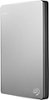
1-6 of 6 Answers
The Mac drive comes formatted for Mac only. You need to re-format the drive for use on your PCs. Hopefully Windows has a utility for formatting drives.
Sorry, there was a problem. Please try again later.You have to reformat the harddrive to whatever your file system is on the Windows PC. NTFS Is what most windows harddrives use as their format. Most of the time if you plug it in to a windows based PC and attempt to enter the harddrive or save data to it you'll be prompted to ask if you'd like to reformat. Hope that points you in the right direction
Sorry, there was a problem. Please try again later.If it connected via a wired Ethernet connection Operating system does not matter
Sorry, there was a problem. Please try again later.Not from your description.You need to be more specific, does windows show any messages, do the lights flash on the drive when you plug it in ?
Sorry, there was a problem. Please try again later.I would contact Seagate's customer service/tech support and they should be able to help you out.
Sorry, there was a problem. Please try again later.Hello Craig. The "guy" at Best Buy is correct BUT he failed to let you know that this drive is formatted for Mac computers. Mac computers use "Mac OS X Extended Journaled" format while Windows computers use "NTFS" format. You can make the drives work but you need to reformat them in Windows. I would need to know what Windows version you have (e.g. XP, Vista, 7, 8, or 10) to let you know how to do this or you can simply exchange the drives for Windows formatted hard drives.
Sorry, there was a problem. Please try again later.