“Anybody know why the hd light goes on and off when the xbox is turned off. It even does it in the morning when the last time I played would be the night before.”
Answer This Question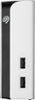
1-5 of 5 Answers
Your Xbox power settings are set so your Xbox can download game/system updates when you ‘turn it off’. If you change the power settings, you will ‘disable’ the hard drive light when powered off, however your console won’t auto update if you do this
Sorry, there was a problem. Please try again later.The light on front is also the power button. I noticed the similar blinking and clicked the light/button and it powered down. Only downside I see is you have to power it back on when turning on the Xbox...
Sorry, there was a problem. Please try again later.It does this when Xbox is updating if Xbox is set to instant on (stand by mode).
Sorry, there was a problem. Please try again later.Sleep mode, since Xbox is not turned on. Turn on your Xbox and it will respond by itself and have a solid light. There’s nothing you can do about the light setting blinking on and off therefore it’s just letting you know it’s still receiving power from your electrical outlet. Hope that helps.
Sorry, there was a problem. Please try again later.I have the same drive and it exhibits the same behavior. I'm not shure why but I suspect the the Xbox is hybernating and not completely powered down. Do not unplug the power while the light is on if it's doing maintenance you could loose data. My drive stays on for about 5-10 minutes after I power off my xboxX
Sorry, there was a problem. Please try again later.