“What connection will it work with, bluetooth and what else”
Answer This Question
1-1 of 1 Answer
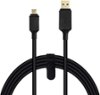
The SteelSeries Stratus Duo connects on PC with 2.4GHz RF, similar to gaming mice and keyboards to provide low latency compared to bluetooth devices, and includes a 2.4GHz wireless dongle that is paired with the included controller from the factory. A 6ft / ~2m USB-Type-A to USB-Micro-B charging / data cable is also provided for controller charging and wired controller use. See my attached photo of all packaged contents, excluding user manual. The buttons shown on the rear of the controller are from left to right: 1) Wireless Mode Switch - 2.4GHz Wireless PC (green), Bluetooth Android (blue) 2) Wireless Pairing Button, 3) Battery Level Button (4 LEDs on controller top light up 1-4 showing charge level low to high), 4) Power Switch (toggle on to use, off to save battery, if left ON controller will time out after some period of time to save battery). Note, the controller does not have rumble (no force feedback). Also, Steel Series do not provide any software for calibration but the controller can be calibrated using Steam Big Picture Mode. The analog sticks have a fairly large dead zone from the factory compared to my usual PS4 controllers and so camera movement in some games with the right analog stick will seem really twitchy fast, like Doom Eternal with a mouse set to 2,000+ DPI fast, from the factory. This is easily fixed to match a PS4 controller feel by turning on XBOX Configuration Support in Steam > Big Picture Mode > Settings > Controller Settings, selecting the controller under Detected Controllers in the same window and then selecting Calibrate > Start Full Auto Calibration. I have only 2 days use with the controller but am finding it very comfortable with no sharp edges digging into the hands and the combination of PlayStation layout analog sticks mixed with XBOX layout buttons and thus XBOX configuration support in Steam and XBOX Game Pass for PC to make this my new favorite controller. I've included a 9ft cable as a recommended product add on for when the controller is out of battery and you don't want to stop gaming.
Sorry, there was a problem. Please try again later.