“Hi, Can I pair TP Link RE 505 X with my router while in my home and walk it out to my garage and plug it in? I need wifi extension for my outdoor cameras. I need the simplest solution possible. Thank you”
Answer This Question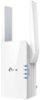
1-3 of 3 Answers
Yes, the whole purpose is to set this up as a mesh network so you can move freely thought-out your living space and have a great signal all the time (automatically switching to best signal). Keep in mind you need it placed in the house such that it receives a good signal from your main router so it can replicate and transmit a "good" signal further. It doesn't do much good if you are retransmitting a weak signal. Instructions should explain all this.
Sorry, there was a problem. Please try again later.1. If strength or reliability of signal is your concer: Think of it this way: you are taking a signal and re-transmitting it so that the signal will be stronger and usable further away. So the theoretical halfway point of placement is only a starter. I am using mine to boost a 5gHz signal from a T-Mobile hotspot. Since 5gHz has less distance of effectiveness for maximum speed, I placed my TP-Link just a few inches from the relatively weak hotspot, and it actually rebroadcasts the signal at a greater strength than the router (also TP-Link). 2. If you are worried about whether the extender will keep its settings between the time you unplug and relocate it, the simple answer is "yes."
Sorry, there was a problem. Please try again later.Depends on the distance. The display lights will tell you, once plugged into the destination outlet, whether the signal from the router is strong enough. You should try and find a spot half way between the router and your cameras. Doesn’t necessarily need to be closer to the cameras than to the router.
Sorry, there was a problem. Please try again later.