“Trying to connect VTech IS6200 purchased at Best Buy to a At&T TL86109 compatible according to VTech website Chart . have followed all VTech and AT&T Instructions . Problem seems be how to place IS6200 into discoverable mode when TL86109 menu asks?”
Answer This Question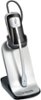
1-1 of 1 Answer
Hi - The VTech IS6200 has to be registered to the AT&T TL86109 via DECT 6.0 technology and not via Bluetooth. Here's the steps on how to go about it. Step 1: Remove the headset from the headset base or charger. Step 2: Press and hold HOLD on the telephone base for about four seconds until it shows Registering...Please wait. Then, release the button. Step 3: Place the headset back to the headset base or charger Step 4: It takes up to 60 seconds to complete the registration. When the registration completes, the telephone base displays HEADSET Registered and you hear a confirmation tone. Thank you, -VTech Support
Sorry, there was a problem. Please try again later.