Customer Ratings & Reviews
- Model:
- 910-005131
- SKU:
- 5870706
Rating by feature
- Value
Rating 4.5 out of 5 stars
- Quality
Rating 4.8 out of 5 stars
- Ease of Use
Rating 4.8 out of 5 stars
Customers are saying
Customers are positive about the MX Master 2S Wireless Laser Mouse's battery life, comfort, and scroll wheel, with many praising its exceptional performance in these areas. They also appreciate the mouse's size and surface compatibility, finding it well-suited for various hand sizes and surfaces. While some find the price a bit high, the overall feedback highlights the mouse's precision and responsiveness. A few users noted concerns about the weight and software, but these were less frequent than positive comments.
This summary was generated by AI based on customer reviews.
- Pros mentioned:Battery life

Powerful Mouse options app
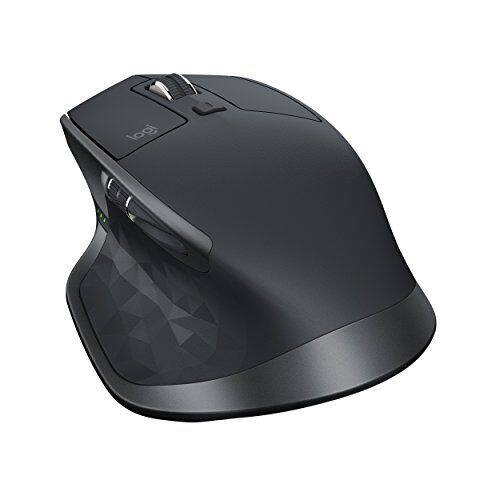
|Posted .This reviewer received promo considerations or sweepstakes entry for writing a review.The Logitech MX Master 2S is a wireless mouse that is a bit pricier but its features set makes it a joy to use for extended time. In addition to being a comfortable mouse with a sensor that works on all surfaces, its Logitech Flow feature lets you copy and paste documents, images, and text from one computer to another, speeding your workflow. The mouse features a stunning 4,000 dpi darkfield sensor that works on all surfaces even clear glass. I used the options control panel for the Logitech mouse to hone in on my perfet settings which produced a mouse that tracked quickly, precisely and smoothly over any surface. The mouse wakes from sleep instantly and gives you a visual battery level via 3 green LEDs on the left side. Speaking of battery life, supposedly you get 70 days but unable to test that but so far using continuously for about 7 days, 4-6 hours a day and all 3 LED still lit. There is a micro-USB port on the front of the mouse to plug in the included USB cable, which lets you recharge while using it. The mouse is connectable by Bluetooth or via USB nano receiver. I connected via the USB nano receiver. The mouse features seven buttons (left, right, center, back, forward, gesture, and scroll mode shift) and two scroll wheels, and they work the same way. Each of the buttons is adjustable for functions including left click, volume control, brightness control, and zoom, among others. You can click the gesture button under your thumb, hold it, and move the mouse up, down, left, or right for additional commands. You can switch the default via the Logitech Options app. I found using the mouse became second nature after tweaking the Logitech Options control panel to adjust the scrolling and mouse behavior to settings that suited me. A button on the bottom of the mouse lets you pair with and switch between a combination of up to three Bluetooth computers or Logitech USB receivers. But when it comes to using the mouse on multiple computers it is smart to install the free Logitech Options software. You install the software on each machine, then set up the Logitech Flow feature. Once installed, you'll be able to switch control between the computers just by moving the cursor between the screens, as long as all devices are on the same Wi-Fi network. Just like if you had two or more displays connected side by side to one PC, if you move the cursor through the right side of one screen to the other, the cursor control will pass to the PC or Mac to the right. Again, as long as all computers are connected on the same network, you can copy text or files from one machine, move the cursor over to another, and paste them. File transfer can take some time if the size is large but much quicker than using a USB drive, relaying over a network drive or emailing it to yourself. The Logitech MX Master 2S is the perfect mouse for anyone who uses multiple computers on the same desk. It is comfortable to use all day, is responsive, seems to have a long battery life with quick charge ability. Connectivity is a snap. The Logitech Flow is a killer app and enables you to become more productive as you copy and paste from one computer to another on the fly.
I would recommend this to a friend its nice mouse but better if wireless
||Posted .This reviewer received promo considerations or sweepstakes entry for writing a review.mouse has nice options for its settings but it would of been nice to be able to use it without the usb cord always plugged in and as wireless especially since it costs so much.
No, I would not recommend this to a friend- Pros mentioned:Battery life, Multi-device
Awesome Mouse for everyone!
|Posted .This reviewer received promo considerations or sweepstakes entry for writing a review.The mouse has a nice futuristic look that is very nice, ergonomically speaking it fits my hand very well. Much better than the standard mouse. My wrist and fore arm doesn’t bother me so much (carpel tunnel). I plugged in the adapter to my PC and within 20 seconds the mouse driver was loaded. Should you already have a Bluetooth PC/Mac the mouse has it built in so no need for the adapter. I had previously charged it with the included USB cord. It will hold up to a 70 Day charge. In a hurry and only need a day charge? It only takes 4 minutes. I used the mouse on Formica, glass, paper, wood, plastic and even napkins to test out their Darkfield High precision tracking feature and it worked flawlessly. I was a little intimidated by all the buttons at first but after a few minutes of using it. I learned quickly. The thumb area has a side to side scroll feature that is very nice, 2 buttons behind this wheel can be programmed for a Multitude of tasks. You can also change the scroll from a ratchet type scroll to smooth. The thumb button when pressed opens a window of all running apps. (You can change this to do whatever task you like.) The unit has the ability to do Gestures, Meaning you click with your thumb and move mouse for additional options. Truthfully there are so many different combinations and options that it boggles the mind is bound to fit any person. Even those that are finicky. If you can make these type of people happy then they are just too demanding! This can be accomplished by downloading the software. You can customize buttons and functions as well as setup cross computing function. (Ability to switch up to 3 different Mac/Win computers on the fly.) If you don’t download this utility you would be doing yourself a disservice. Especially if you are a gamer. (Battlefield and COD) Basically the software shows you a picture of your mouse when you click on a button a window opens with about 30 different choices to customize the button or wheel. I changed multiple buttons and all worked great.
I would recommend this to a friend Nicely designed, but software for it--not so much.
||Posted .This reviewer received promo considerations or sweepstakes entry for writing a review.This mouse feels great and performs well once it's programmed, The software that came with it buggy and less than satisfactory. Getting help online was a joke.
No, I would not recommend this to a friend- Pros mentioned:Comfortable, Customizable
Favorite Mouse
|Posted .This reviewer received promo considerations or sweepstakes entry for writing a review.I work as a Mechanical design engineer in my company and have to use mouse 99% of the time for 3D modeling in Creo and SolidWorks software. Earlier, I used to own a simple Lenovo N50 mouse and then upgraded to Logitech G602 gaming mouse. After extensive use for about 1.5 years, the mouse began giving problems. However, it had a 3 years warranty and I am in a process of getting a replacement from Logitech. I still thought of upgrading to this Logitech MX Master 2S Wireless Laser Mouse and boy, was that a great decision! One of the best features is it's rechargeability. I had to replace batteries after almost every 4 months in my old G602 but this one can be plugged into the computer to recharge. This is definitely a plus. I haven't used it enough to know how long the battery will last after one charge. The only thing that I miss from my G602 are the extra buttons that I had programmed with my design software. Other than that, this MX 2S mouse has all the features that I need, even more. MX 2S is lighter than previous MX mouse. The new design of the thumb rest makes it easier to access the scroll wheel. Another plus point is the customization with the Logitech software. Like G602, I can set custom actions for different applications. It is so far my favorite mouse.
I would recommend this to a friend - Pros mentioned:Comfortable, Customizable
Another Awesome Wireless Mouse from Logitech!
|Posted .This reviewer received promo considerations or sweepstakes entry for writing a review.Definitely one of the best wireless mouse devices I have ever used. I have been in the Information Technology industry for over 20 years and I love this mouse! My go to wireless mouse device for the past couple of years has been the Logitech Performance MX (I have four of them) and this mouse is even better. The size, weight, and ergonomic comfort is very similar to the Performance MX. The MX Master 2S is very comfortable in your hand. It works nicely on multiple surface types and colors. Button locations are placed in good spots on the device and are easy to use. I would prefer the buttons on the side to be a little farther forward on the device but it is not that big of a deal. The “forward” button should also be a little larger. Having the multiple scrolling buttons is very nice. The vertical scrolling option based on the speed you are scrolling at was surprising. When scrolling at a slower speed you get a click resistance feeling as you scroll (standard for just about any scrolling mouse button). When you scroll at a high speed the button automatically changes to a smooth and fast mode which allows you to quickly move up / down on a page. In order to take advantage of the full functionality of the mouse and really customize its features you need to install the Logitech software (easily downloadable from the Logitech web site). This is standard though for all of their peripheral devices. Setup is simple and the ability to easily pair it with multiple devices using multiple connectivity options is awesome. Battery life is excellent and it recharges fairly quickly. All in all I highly recommend this mouse!
I would recommend this to a friend Feels great, great price
||Posted . Owned for 1 month when reviewed.This reviewer received promo considerations or sweepstakes entry for writing a review.Needed a mouse for work and we went looking at Best Buy’s options, saw on shelf. Went home and tried it out. Great mouse
I would recommend this to a friend- Pros mentioned:Battery life
Good mouse.
||Posted .This reviewer received promo considerations or sweepstakes entry for writing a review.The mouse is very responsive. Great battery life.
I would recommend this to a friend great mouse for muti-system user
||Posted .This reviewer received promo considerations or sweepstakes entry for writing a review.this mouse is really good, but there are some point, it doesn’t connect to my pc
I would recommend this to a friendWorks well
||Posted .This reviewer received promo considerations or sweepstakes entry for writing a review.This works as expected. Designed for people with large palms.
I would recommend this to a friendNot happy with the programming the mouse
||Posted .This reviewer received promo considerations or sweepstakes entry for writing a review.It is difficult, if not impossible, to change the programming back to default. I wanted to change it back to default since it would not let me make a change. Also, Logitech Options re-installs each time I click on it instead of just opening up to set-up
No, I would not recommend this to a friend- Pros mentioned:Comfortable, Multi-device
The power user's mouse
|Posted .This reviewer received promo considerations or sweepstakes entry for writing a review.This is the ultimate poweruser mouse. It works on any surface, the battery lasts forever on a charge, it has 7 buttons to do just about anything (including a side-scroll wheel), and it's very comfortable to use. If these features were the only thing you got with this mouse, it would be pretty awesome. But where the mouse blows me away is with its ability to work simultaneously on up to 3 computers. Logitech calls the software Flow. As long as your computers are on the same network, you can move the pointer from screen to screen without missing a beat, almost like extended desktops in Windows, but with entirely different computers, including Windows and OSX. If you are a multitasker or work on multiple computers, this mouse is a must-have.
I would recommend this to a friend Questionable performance
||Posted .This reviewer received promo considerations or sweepstakes entry for writing a review.Worked good when first connected. But after downloading "options" the mouse was erratic and useless. I suspect it may be something that I am doing wrong. But, if that is true, then it is too complicated to set up!
No, I would not recommend this to a friend- Pros mentioned:Scroll wheel
A Fantastic Upgrade of the Original!
|Posted .This reviewer received promo considerations or sweepstakes entry for writing a review.A few months ago I got this mouse’s predecessor (the MX Master) and I can confirm that this is a worthy upgrade. As that is my daily driver, I’m going to try to make a ton of comparisons to show what has changed (not much in all honesty) and what hasn’t changed to help illustrate why I think this version is better. For starters, the first thing I noticed out of the box is that this mouse has a far more satisfying click action on the left mouse button. It loosely reminds me of a clicky keyboard and makes me feel like I’m being productive (who knew a mouse could do that? Full disclosure, I know my productivity hasn’t changed - mostly because video games are not all that productive). One of my favorite features of the original MX Master was the thumb vertical scroll mouse wheel. For this revision, they have actually changed the wheel such that the scroll has a little less resistance - a change that is more than welcome in my book. While we’re on the topic of the scroll wheel, I will admit that the software is what really makes this work well. Admittedly, this is not something I normally ever say about perherpial software, so it feels a bit weird. But in this case, their “Logitech Options” tool lets you configure everything ranging from which direction the page will go when you scroll one way, what the buttons will do (to include macros for the rest of us), and how the dynamic scroll wheel works. “What is the dynamic scroll wheel?” you might ask. Truth be told, it was the hardest thing for me to adapt to on this device. By default, the scroll wheel has two modes - a clicky step lock mode and a free-spin mode. The dynamic option lets you have the best of both worlds in that after you spin it X speed (or lines, can’t quite tell yet), it unlocks from the clicky mode and goes to free-spin mode. The instant upshot of which is that it allows you to scroll through long documents or webpages with two very quick finger movements. Before I got this mouse for my home PC, I was subconsciously trying to do it with my old mouse. Of course, the back and forward buttons are also a nice touch. What I wish I had more time to test before this review is the battery life. My original MX has problems surviving after about 40 hours, even when using the unifying receiver. According to the documentation for this device, it should last for (up to) 70 hours. I don’t use my home PC that often to keep a counter, but if it does indeed survive that long, it is a worthy addition. Logitech also pushes “Flow” with this product - a software that lets you bounce between computers with no effort whatsoever. I personally have almost all of the screen real estate that I could need and don’t have a need to dynamically move between computers, so I can’t really put good testing words towards it. On a minor note, one thing that bothers me about this product is that Logitech has now jumped 100% onto the “Unifying Receiver” dongle, which is awesome. The part that bothers me is that one receiver comes with every device - seems a bit wasteful to have one with each. Also, unlike my relatively cheap Logitech M510, this one does not have a storage location for the (now extra) receiver.
I would recommend this to a friend - Pros mentioned:Comfortable, Scroll wheel
Fantastic!
|Posted .This reviewer received promo considerations or sweepstakes entry for writing a review.Having used mostly gaming mice, this MX Master 2S is a highly functioning, customize-able mouse. You can switch the functions of any button to almost anything you can think of using the Logitech's software suite. This being primarily a wireless mouse, there is no noticeable lag when in use, and can even be use it while charging. It is very comfortable, and it felt just right in my large hand. The scroll wheel is nice, it can be unlocked to quickly scroll through large documents or web pages. I would not recommend this mouse for gaming, but it would work in a pinch. Other than that, this is a fantastic mouse that I would recommend.
I would recommend this to a friend - Pros mentioned:Customizable
Another great mouse by Logitech!
|Posted .This reviewer received promo considerations or sweepstakes entry for writing a review.I have always been a fan of Logitech mice, having used them since the early 1990's. For the past few years, I have been using the Performance MX mouse and have been very happy with them. I was excited to get the chance to try out the new MX Master 2S. One feature that really appealed to me was the ability to use either Bluetooth or the Unifying receiver. Since I have computers from several computer generations, I was eager to find out how well it really worked. My first try was on a Dell XPS 17" laptop from around 2012. As much as I tried, I was not able to get the Bluetooth to pair up. I spent some time trying and then went to the web to see what was up. I found a site that mentioned that it needed to be "Smart Bluetooth" in order to work. I suppose that in the years since my XPS was built, someone finally figured out how to make Bluetooth smart, so I guess it is OK that it doesn't work with that connection on a five year old laptop (although every other Bluetooth device I have tried has worked on it). Instead, I paired it with my existing Unifying receiver for my older MX mouse and it worked flawlessly. Next I tried a year old HP Spectre 13. I HAD to use Bluetooth since the Spectre only has USB-C ports and I haven't seen a Unifying receiver for USB-C yet. It paired instantly and I was able to be up and working in a matter of seconds. The buttons are very much like the older MX mouse, with the same fast scrolling I have come to expect from every mouse and absolutely hate when I have to use one that doesn't scroll fast enough! The side scroll wheel and the side buttons are a bit different for me, but I am already finding that they are very useful. I use the back button quite a bit on my MX mice and am happy to see it moved down a bit. The gesture function on the lower thumb button is very nice, although I haven't found myself using it much. All of the buttons are changeable using the Options software from the Logitech website, so you can remap any of them to do what you want. I see this as a direct upgrade to the older MX line and am happy that Logitech didn't drastically change it or drop the line altogether as they did with the old Trackman Marble FX and Cordless FX line, just when they got them perfected! Overall, I have no problem recommending this mouse to anyone who wants a high quality device that is completely configurable. As a tool for moving a cursor, I haven't found a better fit for my hand.
I would recommend this to a friend Not connected
||Posted . Owned for 6 months when reviewed.This reviewer received promo considerations or sweepstakes entry for writing a review.I keep losing Bluetooth connection with my computer have tried on multiple computers and its the same on all of them.
No, I would not recommend this to a friendNot comfortable
||Posted . Owned for 3 weeks when reviewed.This reviewer received promo considerations or sweepstakes entry for writing a review.Usually Logitech is good. This time the mouse just doesn't feel like it has the same quality.
No, I would not recommend this to a friend- Pros mentioned:Scroll wheel
Fits like a glove
|Posted .This reviewer received promo considerations or sweepstakes entry for writing a review.I have never gone with a "higher end" mouse until now. In the past as long as it had a left click, right click and a wheel in the middle I was good. Sometimes you don't know what you're missing. First off this mouse fits wonderfully in my hand. There is a resting pad for my thumb (more on that later) a center wheel with a button right above it and two very responsive left and right clickers. I used the mouse on a number of surfaces and it worked well with no hesitation. One of the features is that button just above the scroll wheel that allows you to switch from a smooth scrolling wheel to a tactile clicking wheel. I find myself switching between the two depending on the activity. The thumb rest is more than just a spot to rest your digit. If you push down it will show you a preview pane of all your open windows. This was on a Windows 10 Surface Pro so I can't say what it would do on others but I would expect the same. Above the thumb is a pair of buttons that will allow you to page forward or backward with the movement of your thumb. Definitely handy when on the web. There is also a scroll wheel that allows you to scroll horizontally all with the movement of a thumb. One of the features I have not tired is the ability to drag and drop between two computers! Yes that's right two different computers as long as they are on the same network. To do this you will have to install the Logitech Options software on both computers. The install was quick and painless. In the very near future I will be giving this a try but if it works like everything else it will be perfect.
I would recommend this to a friend - Pros mentioned:Comfortable, Multi-device
Excellent Mouse,
|Posted .This reviewer received promo considerations or sweepstakes entry for writing a review.Setup was a breeze, and although the mouse is large in size its the most comfortable mouse that I have ever used before. Great for gaming or everyday use. It can be used on multiple devices and charges very fast. The only issue that I have had so far is with the bluetooth connectivity. Randomly connects and disconnects. Scroll wheel is sketchy sometimes also. But overall this is the best mouse i have had to use yet
I would recommend this to a friend